
Contents
- 1. The 6 Core RoleManager Slots in Settings > Apps > Default Apps
- 2. Default Password Manager, Autofill & Passkeys on Android 14–15 (CredentialManager)
- 3. Why Links Open in the Browser Instead of the App (Android App Links & assetlinks.json)
- How Android 12–15 Changed Web Intent Resolution
- How android:autoVerify="true" and /.well-known/assetlinks.json Work
- Fix 1: Manually Approve Unverified Domains in Android Settings (No PC Required)
- Fix 2: Check Browser-Layer Outbound Link Settings (Firefox, Samsung Internet & Chrome)
- Fix 3: Inspect and Re-Verify App Links via ADB or Termux (pm get-app-links)
- 4. How to Change or Clear the Default PDF Viewer, File Handler & mailto: App
- Why PDF Viewers and mailto: Handlers Are Stored on the Winning App
- Step-by-Step: Clear a Stuck PDF or File Handler Without Affecting Other Apps
- Why You Should Avoid Reset App Preferences Unless the Handler Cannot Be Found
- Frequently Asked Questions
- Why is there no Default PDF Viewer option in Android Default apps?
- How do I clear default app settings on Android when a link or file opens in the wrong app?
- Why do Reddit, YouTube, or Amazon links keep opening in Chrome instead of the installed app?
- How do I set Bitwarden or 1Password as my default password and passkey manager on Android 14 and 15?
- How do I change the default NFC Tap and Pay wallet on a Pixel or Samsung Galaxy phone?
- What is the difference between clearing defaults for one app and selecting Reset app preferences?
- Sources & References
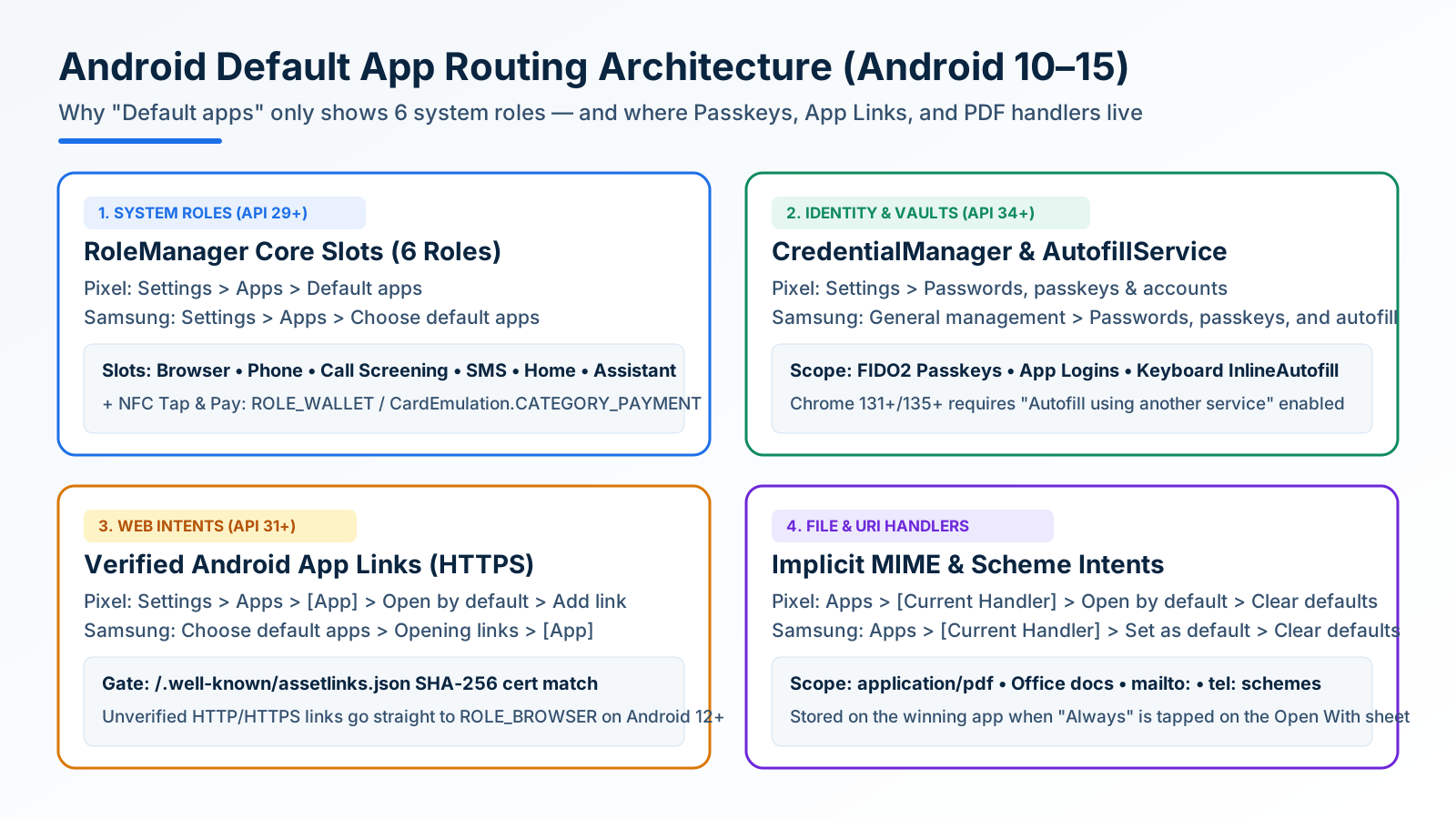
Opening Settings > Apps > Default apps on Android and looking for a PDF viewer, password manager, or Reddit link toggle fails for a structural reason: Android does not store default app bindings in a single registry. Starting with Android 10 (API level 29) and continuing through Android 15 (API level 35), the operating system splits default app ownership across four separate OS subsystems [1, 4, 7, 11].
To change or reset default apps on Android, match the symptom to the subsystem that owns it: use Settings > Apps > Default apps (Choose default apps on Samsung One UI) for the 6 core RoleManager slots (Browser, Phone, Caller ID & spam, SMS, Home, Assistant, and Wallet); use Settings > Passwords, passkeys & accounts for CredentialManager passkey vaults and keyboard autofill; use Settings > Apps > [Target App] > Open by default > Add link when verified Android App Links open in your browser instead of the native app; and use Settings > Apps > [Current Hijacking App] > Open by default > Clear default preferences to unstick PDF viewers, Office document editors, or mailto: handlers.
Once your core capture, sync, and automation tools are in place from our Android productivity and essential apps guide on the TasteOfAndroid blog, locking down these four routing layers prevents Samsung Notes, Google Drive, or Chrome from hijacking files and deep links.
Scroll horizontally to view all table columns.
| Default App Category | Pixel / AOSP Settings Path | Samsung One UI Settings Path | Underlying Android Subsystem | How to Reset or Override |
|---|---|---|---|---|
| Browser, Phone, SMS, Home, Digital Assistant | Settings > Apps > Default apps [2] |
Settings > Apps > Choose default apps [3] |
android.app.role.RoleManager (ROLE_BROWSER, ROLE_DIALER, ROLE_SMS, ROLE_HOME, ROLE_ASSISTANT) [1] |
Select a different qualifying app directly inside the role slot picker. |
| Caller ID & Spam Protection | Settings > Apps > Default apps > Caller ID & spam app [2] |
Settings > Apps > Choose default apps > Caller ID and spam app [3] |
RoleManager (ROLE_CALL_SCREENING) [1] |
Bind your primary dialer (Google Phone or Samsung Phone) to inspect incoming calls before ringing. |
| NFC Tap & Pay Wallet | Settings > Apps > Default apps > Wallet app (or Settings > Connected devices > Connection preferences > NFC > Contactless payments) [1, 10] |
Settings > Connections > NFC and contactless payments > Contactless payments [3, 10] |
ROLE_WALLET (API 34+) + CardEmulation.CATEGORY_PAYMENT HCE routing [1, 10] |
Pick the primary payment wallet and toggle whether an open foreground wallet overrides the default. |
| Passkeys & Password Autofill | Settings > Passwords, passkeys & accounts > Preferred service [7, 8] |
Settings > General management > Passwords, passkeys, and autofill [7] |
android.credentials.CredentialManager + AutofillService + InlineAutofill [7, 8] |
Change the Preferred service, enable Inline Autofill, and set Chrome to "Autofill using another service" [9]. |
Website-to-App Deep Links (http / https) |
Settings > Apps > See all apps > [Target App] > Open by default [2, 4] |
Settings > Apps > Choose default apps > Opening links > [Target App] [3] |
Android App Links (android:autoVerify="true" + /.well-known/assetlinks.json) [5, 6] |
Toggle Open supported links on, tap Add link, and check the unchecked domain boxes [4, 5]. |
PDFs, Office Docs, Images & mailto: URIs |
Settings > Apps > See all apps > [Current Handler] > Open by default [2, 11] |
Settings > Apps > [Current Handler] > Set as default [3, 11] |
Implicit Intent.ACTION_VIEW MIME-type & scheme preferred activities [11] |
Open the app currently hijacking the file and tap Clear default preferences (Clear defaults on One UI) [2, 3]. |
1. The 6 Core RoleManager Slots in Settings > Apps > Default Apps
Prior to Android 10, default apps were scattered across legacy broadcast receivers and shared preferences. In Android 10 (API level 29), Google introduced android.app.role.RoleManager, which ties exclusive OS privileges and implicit intent routing to named system roles [1]. On Pixel, Motorola, Nothing, and Sony devices, these roles sit at Settings > Apps > Default apps [2]; on Samsung Galaxy phones and tablets running One UI, the menu is named Settings > Apps > Choose default apps [3].
Scroll horizontally to read the labels in this diagram.
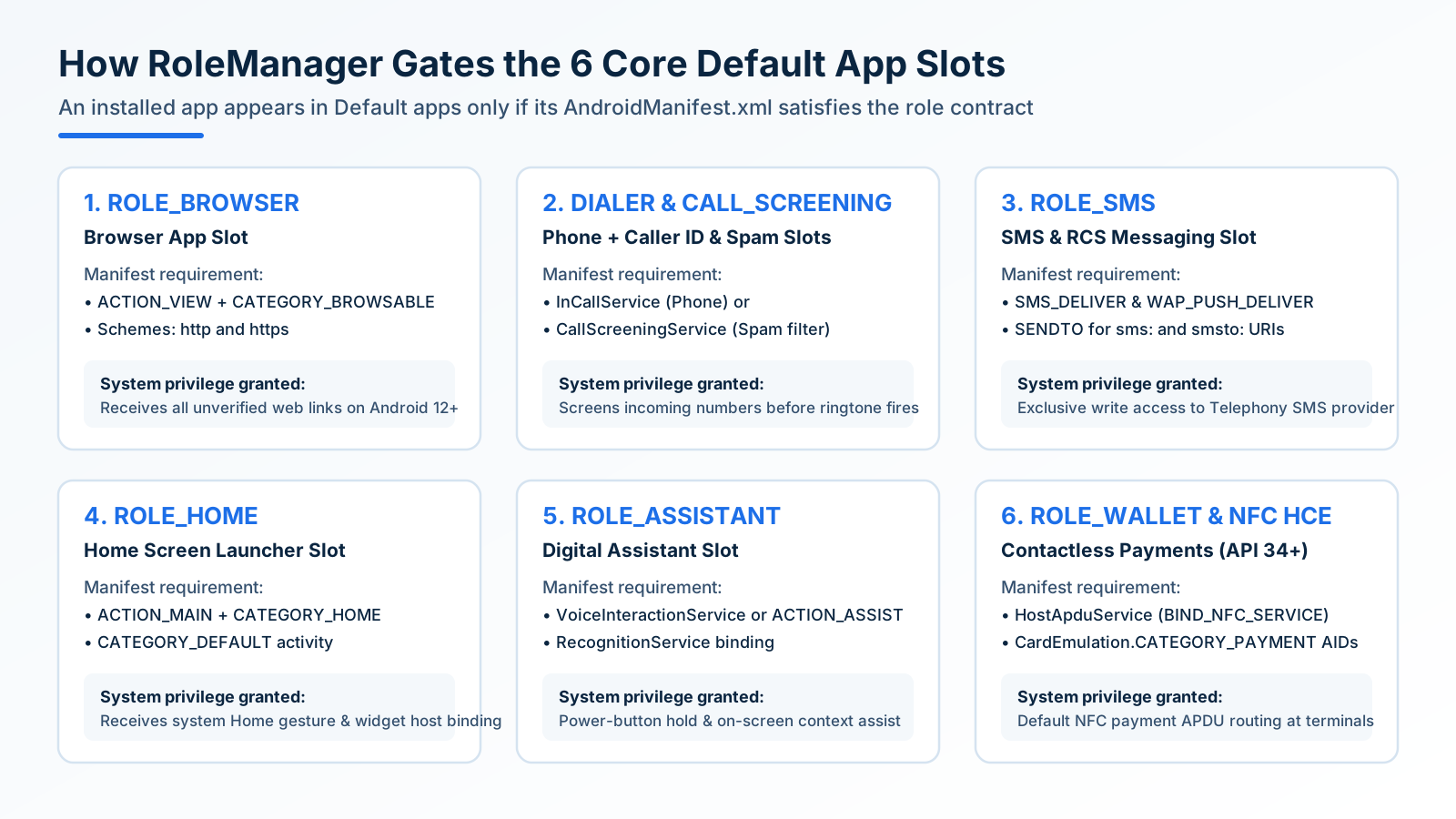
An installed application does not appear inside a RoleManager picker merely because it is on your phone. PackageManager inspects every installed APK’s AndroidManifest.xml against the role’s mandatory intent filters, permissions, and service declarations before listing it as a candidate [1]:
- Browser app (
ROLE_BROWSER): To appear here, an app must declare an activity handlingIntent.ACTION_VIEWwithIntent.CATEGORY_BROWSABLEandIntent.CATEGORY_DEFAULTfor bothhttpandhttpsURI schemes [1, 11]. Beginning in Android 12 (API level 31), the holder ofROLE_BROWSERautomatically receives every generic web link tap whose destination domain has not been verified for a native app [4]. - Phone app (
ROLE_DIALER) and Caller ID & spam app (ROLE_CALL_SCREENING): Android separates call placement from pre-ring spam filtering [1].ROLE_DIALERrequires implementingandroid.telecom.InCallServiceand handlingtel:URIs, granting the app control over the active call screen and emergency dialer handoff.ROLE_CALL_SCREENINGbinds a backgroundCallScreeningServicethat evaluates incoming numbers against spam databases before the phone rings [1, 2]. If unknown numbers still slip through after setting your dialer, configure the carrier and OS filters covered in how to block spam calls and robocalls on Android without paid apps. - SMS app (
ROLE_SMS): Only one messaging app can hold write access to Android’s systemTelephonySMS/MMS provider database at any given moment [1]. To qualify forROLE_SMS, an app must declare broadcast receivers forSMS_DELIVERandWAP_PUSH_DELIVER, an activity forSENDTOonsms:/smsto:schemes, and a service forRESPOND_VIA_MESSAGE. Switching from Samsung Messages to Google Messages transfers database write ownership through this role [2, 3]. - Home app (
ROLE_HOME): The launcher slot binds the activity that responds toIntent.ACTION_MAINwithIntent.CATEGORY_HOMEandIntent.CATEGORY_DEFAULT[1]. Whenever you swipe up to go home, Android routes that gesture to the activeROLE_HOMEholder. If you are replacing your stock pixel grid with a text-based home screen from our comparison of distraction-free minimalist Android launchers or building custom home-screen data panels using our custom KWGT widgets setup tutorial, select the new launcher insideDefault apps > Home appimmediately after installation so gesture navigation does not bounce back to the stock launcher. - Digital assistant app (
ROLE_ASSISTANT): HoldingROLE_ASSISTANTgrants the target app access to the long-press power button trigger (or corner swipe gesture),VoiceInteractionService, and on-screen context capture [1, 2]. This is where you swap between Google Gemini, Google Assistant, Bixby, Perplexity, or ChatGPT’s voice mode. - Wallet app & NFC Tap-and-Pay (
ROLE_WALLET&CardEmulation.CATEGORY_PAYMENT): Android’s NFC Host-based Card Emulation (HCE) architecture divides contactless smartcard Application IDs (AIDs) into two distinct routing pools insideandroid.nfc.cardemulation.CardEmulation:CATEGORY_PAYMENT(payment wallets such as Google Wallet, Samsung Wallet, and bank tap-to-pay apps) andCATEGORY_OTHER(transit cards, building access badges, and loyalty passes) [10]. ForCATEGORY_PAYMENT, Android routes terminal APDU commands exclusively to the single default payment service [10]. In Android 14 (API level 34) and Android 15,ROLE_WALLETsynchronizesSettings > Apps > Default apps > Wallet appwithSettings > Connected devices > Connection preferences > NFC > Contactless payments[1, 10]. Underneath the default wallet selector, enable “Use default payment app: Except when another payment app is open” if you want a secondary bank or regional transit wallet to take over NFC routing whenever that app is actively open on your screen [10].
Takeaway: If a setting belongs to one of Android’s 6 core OS privileges—Browser, Phone, Spam Screening, SMS, Home Launcher, Assistant, or NFC Wallet—switch it directly inside Settings > Apps > Default apps [1, 2].
2. Default Password Manager, Autofill & Passkeys on Android 14–15 (CredentialManager)
Password managers and passkey vaults (Bitwarden, 1Password, Proton Pass, KeePassDX, and Dashlane) never appear inside Settings > Apps > Default apps. Instead, Android routes login autofill and FIDO2/WebAuthn passkey authentication through a dedicated identity subsystem combining android.credentials.CredentialManager (introduced as a platform service in Android 14, API level 34) [7] and android.service.autofill.AutofillService (introduced in Android 8.0, API level 26) [8].
In Android 14 and Android 15, CredentialManager unifies passkeys, saved username-password pairs, and federated tokens (such as Sign in with Google) into a single bottom-sheet prompt [7]. While only one primary AutofillService can be active at a time [8], CredentialManager allows you to designate a primary Preferred service and simultaneously toggle on secondary credential providers so passkeys stored in multiple vaults remain accessible during sign-in [7].
To switch your default password and passkey manager without losing inline keyboard suggestions or Chrome autofill, complete all four steps in order:
- Assign the System Preferred Service:
- Pixel / AOSP (Android 14–15): Open
Settings > Passwords, passkeys & accounts(orSettings > Passwords & accountson Android 12–13), tap Preferred service under the top section, and select your vault (Bitwarden,1Password,Proton Pass, orKeePassDX) [7, 8]. - Samsung One UI 6 / 7: Open
Settings > General management > Passwords, passkeys, and autofill, tap Preferred service, and select your vault [7].
- Pixel / AOSP (Android 14–15): Open
- Enable Keyboard Inline Autofill (
InlineAutofill):- Starting in Android 11 (
API level 30), the Autofill Framework integrates with Input Method Editors (IMEs) such as Gboard, Microsoft SwiftKey, and Heliboard viaInlineAutofill[8]. Instead of drawing a floating popup box that frequently gets clipped by mobile browser viewports,InlineAutofillrenders unlocked login chips directly inside the top suggestion strip of your keyboard [8, 9]. - Inside Bitwarden, open
Settings > Autofilland toggle on both Autofill services and Use inline autofill [9].
- Starting in Android 11 (
- Configure Chrome on Android to Use Your Third-Party Vault:
- Even after you switch Android’s system-wide Preferred service, Google Chrome on Android maintains its own internal autofill router that defaults to Google Password Manager [9].
- As documented in Bitwarden’s Android setup guide and our Bitwarden vs KeePassDX password manager comparison, open Chrome, go to
Menu (⋮) > Settings > Autofill Services, select “Autofill using another service”, and tap Restart Chrome [9]. On Chrome 131+ (for KeePassDX native compatibility) and Chrome 135+ (for Bitwarden’s native Chrome autofill integration), this hands web form fields and passkey ceremonies directly to your chosen systemAutofillService[9].
- Prevent Background Battery Killers from Dropping Autofill Prompts:
- Avoid enabling legacy Accessibility Service screen-scraping for password autofill unless an older app completely blocks
AutofillService; Accessibility-based autofill continuously inspects window hierarchies, increasing CPU wakeups and battery drain [8, 9]. - However, if your keyboard strip occasionally stops showing login chips until you manually open the vault app, Android’s background process limiter is killing the
AutofillServicedaemon [9]. OpenSettings > Apps > [Your Vault App] > App battery usage, set it to Unrestricted, and cross-check the OEM background settings in our guide to fixing Android battery drain and background app restrictions.
- Avoid enabling legacy Accessibility Service screen-scraping for password autofill unless an older app completely blocks
Takeaway: Setting a default password manager on Android 14–15 requires both switching the OS Preferred service under Passwords, passkeys & accounts [7] and switching Chrome’s internal Autofill Services setting away from Google Password Manager [9].
3. Why Links Open in the Browser Instead of the App (Android App Links & assetlinks.json)
One of the most frequent frustrations on modern phones—searching open supported links in app android when tapping a Reddit thread, YouTube video, Spotify track, or banking link opens a mobile web tab instead of the installed app—stems from an intentional architecture change introduced in Android 12 (API level 31) [4].
How Android 12–15 Changed Web Intent Resolution
Android classifies URI links into three hierarchy levels [5]:
- Deep links: Intent filters accepting any custom URI scheme (such as
slack://orgeo:) or web scheme without host verification [5]. - Web links: Deep links explicitly using the
httporhttpsscheme withACTION_VIEW,CATEGORY_DEFAULT, andCATEGORY_BROWSABLE[5]. - Android App Links:
http/httpsweb links whose<intent-filter>includesandroid:autoVerify="true"and passes cryptographic domain ownership verification [5, 6].
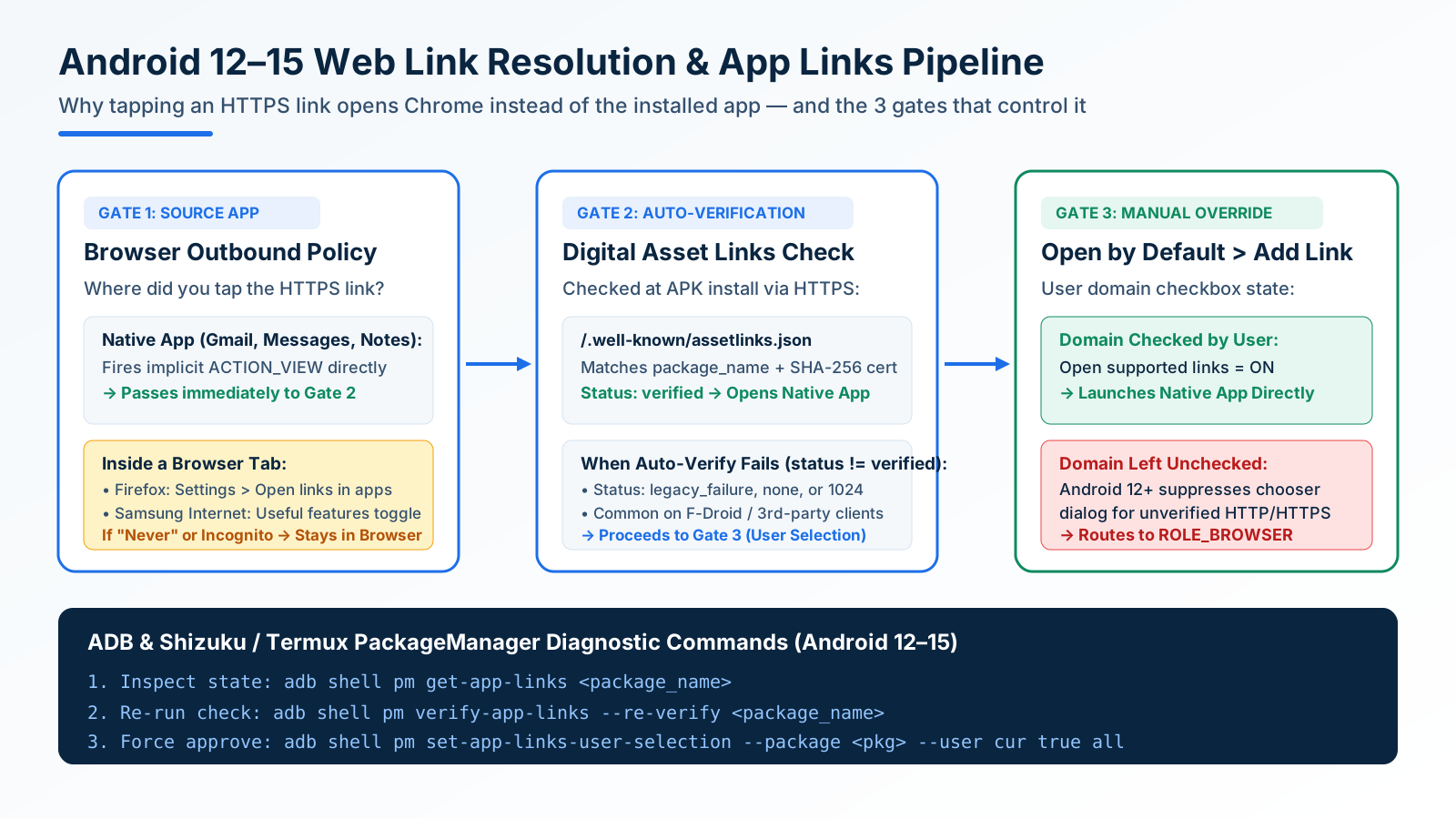
In Android 11 and earlier, tapping an unverified http/https link that matched an installed app’s manifest triggered the system “Open with [App / Browser] — Just once / Always” disambiguation dialog. Starting in Android 12 (API level 31) and continuing through Android 15, Google eliminated that disambiguation prompt for generic web intents [4]. Now, every generic http or https link routes straight to your default browser (ROLE_BROWSER) unless the app has passed Android App Links verification or you have manually approved the domain in system settings [4, 5].
Scroll horizontally to read the labels in this diagram.
How android:autoVerify="true" and /.well-known/assetlinks.json Work
When you install or update an app whose AndroidManifest.xml declares android:autoVerify="true" on an http/https intent filter, Android’s DomainVerificationManager connects over HTTPS (without HTTP redirects) to each declared host domain at /.well-known/assetlinks.json [6].
For verification to succeed, that Digital Asset Links JSON file must publish a statement granting delegate_permission/common.handle_all_urls to the app’s exact package_name and matching sha256_cert_fingerprints (the SHA-256 hash of the APK’s signing certificate) [6].
Verification fails—causing links to fall back to your browser—in four common scenarios:
- Alternative and open-source clients: A third-party Reddit client, Mastodon client, or open-source YouTube front-end installed from our best open-source F-Droid apps on Android guide declares
reddit.comoryoutube.comin its manifest, but the website owner’sassetlinks.jsonfile only lists the official first-party Play Store package name and signing key [5, 6]. - Sideloaded or re-signed builds: If an APK is signed with a different developer certificate than the fingerprint published in
assetlinks.json, cryptographic verification fails immediately [6]. - Transient install-time network failure: If your phone was on a captive Wi-Fi portal, VPN blocklist, or offline when the app was installed or updated, the HTTPS fetch to
/.well-known/assetlinks.jsontimes out [6]. - Unchecked secondary regional domains: Many global apps (such as Amazon or banking apps) declare dozens of regional domains (
.co.uk,.de,.ca,a.coshortlinks) whereautoVerifyonly succeeded on.com[4, 6].
Fix 1: Manually Approve Unverified Domains in Android Settings (No PC Required)
You can override a failed assetlinks.json check for any installed app in under 30 seconds [2, 3, 4]:
- Pixel / AOSP (Android 12–15):
- Open
Settings > Apps > See all apps > [Target App] > Open by default[2]. - Ensure Open supported links is toggled On [2].
- If any domains are unverified, tap Add link under Links to open in this app [4, 5].
- Check the boxes next to every listed domain (for example,
reddit.com,www.reddit.com,redd.it,old.reddit.com) and tap Add [4].
- Open
- Samsung One UI 6 / 7:
Note that Android enforces single-owner domain binding for unverified overrides: if the official app and a third-party client both claim the same domain, you must first open Open by default on the official app and toggle Open supported links Off before checking those domains inside the third-party app [5].
Fix 2: Check Browser-Layer Outbound Link Settings (Firefox, Samsung Internet & Chrome)
What if tapping a link inside Gmail, Google Messages, or Telegram opens the native app immediately, but tapping the exact same link inside a mobile browser search result keeps it trapped inside a browser tab?
When you tap a link inside a non-browser app, Android’s PackageManager resolves the intent directly. When you tap a link inside a webpage, the mobile browser intercepts the click first and applies its own outbound navigation policy [12]:
- Mozilla Firefox for Android: By default, Firefox can hold links inside browser tabs unless configured otherwise. Open Firefox, tap
Menu (⋮) > Settings > Advanced > Open links in apps, and change the setting from Never to Ask before opening or Always [12]. - Samsung Internet: Open Samsung Internet, tap
Menu (≡) > Settings > Useful features, and toggle Open links in other apps On [3, 12]. - Google Chrome on Android: Chrome automatically hands verified App Links to native apps when you tap a cross-origin link (such as tapping a YouTube or Reddit result on a Google Search page). However, Chrome intentionally suppresses external app launches in three situations: (1) when you type or paste a URL directly into Chrome’s top address bar, (2) when you are already browsing
www.reddit.comin a tab and tap an internal link on the same host, and (3) when browsing inside an Incognito tab (where Chrome blocks automatic native handoff to prevent leaking browsing state to installed apps).
Fix 3: Inspect and Re-Verify App Links via ADB or Termux (pm get-app-links)
Power users and developers can inspect the exact DomainVerificationManager status code for every domain an app declares using Android’s pm (PackageManager) shell utility over ADB—or locally on the handset via Wireless Debugging and Shizuku paired with our Termux terminal environment setup guide [6].
Run the following command to inspect an app’s domain state [6]:
adb shell pm get-app-links com.reddit.frontpageThe command returns the package’s verification UUID and a per-domain status code [6]:
Scroll horizontally to view all table columns.
pm get-app-links Status |
Meaning in DomainVerificationManager |
Action Required |
|---|---|---|
verified |
Passed HTTPS /.well-known/assetlinks.json SHA-256 fingerprint check [6] |
None — domain opens in the native app automatically. |
none |
Verification has not run yet or was interrupted before completion [6] | Trigger --re-verify via ADB or toggle domain under Add link. |
legacy_failure |
Verification ran and was rejected by the server’s assetlinks.json policy [6] |
Must be manually approved via Open by default > Add link or set-app-links-user-selection. |
1024 (or >= 1024) |
Custom/HTTP fetch error (e.g., DNS failure, TLS error, or HTTP 404/500 during install) [6] | Re-run verification while connected to working internet. |
If a domain is stuck in none or 1024 after an offline install, force Android to re-fetch /.well-known/assetlinks.json without reinstalling the app [6]:
adb shell pm verify-app-links --re-verify <package_name>And if you are configuring a third-party client with dozens of unverified regional subdomains, you can approve all declared domains for the current user (cur) in a single command instead of tapping 30 checkboxes by hand [6]:
adb shell pm set-app-links-user-selection --package <package_name> --user cur true allTakeaway: When links open in the browser on Android 12–15, check three gates in order: the browser’s own Open links in apps toggle [12], the app’s Open supported links switch, and the manual domain checkboxes under Open by default > Add link [4, 5].
4. How to Change or Clear the Default PDF Viewer, File Handler & mailto: App
Users searching change default browser pdf viewer android or clear defaults android frequently get stuck because there is no “Default PDF Viewer” or “Default Office App” entry inside Settings > Apps > Default apps [2, 11].
Why PDF Viewers and mailto: Handlers Are Stored on the Winning App
When you tap a downloaded .pdf statement, a .docx contract, an .apk installer, or a mailto: email link, the calling app broadcasts an implicit Intent.ACTION_VIEW carrying the file’s MIME type (such as application/pdf) or URI scheme (mailto:) [11]. Because Android does not assign a RoleManager role to document types, PackageManager queries all installed activities whose <intent-filter> declares ACTION_VIEW, CATEGORY_DEFAULT, and mimeType="application/pdf" [11].
The first time multiple apps match (for example, Google Drive PDF Viewer, Samsung Notes, Microsoft 365, and Adobe Acrobat), Android displays the bottom chooser sheet with Just once and Always [2, 11]. The moment you tap Always—or when an OEM update pre-binds a built-in reader—Android writes a preferred-activity record directly onto that winning app’s configuration, not into the central Default apps menu [2, 3, 11].
Scroll horizontally to read the labels in this diagram.
Step-by-Step: Clear a Stuck PDF or File Handler Without Affecting Other Apps
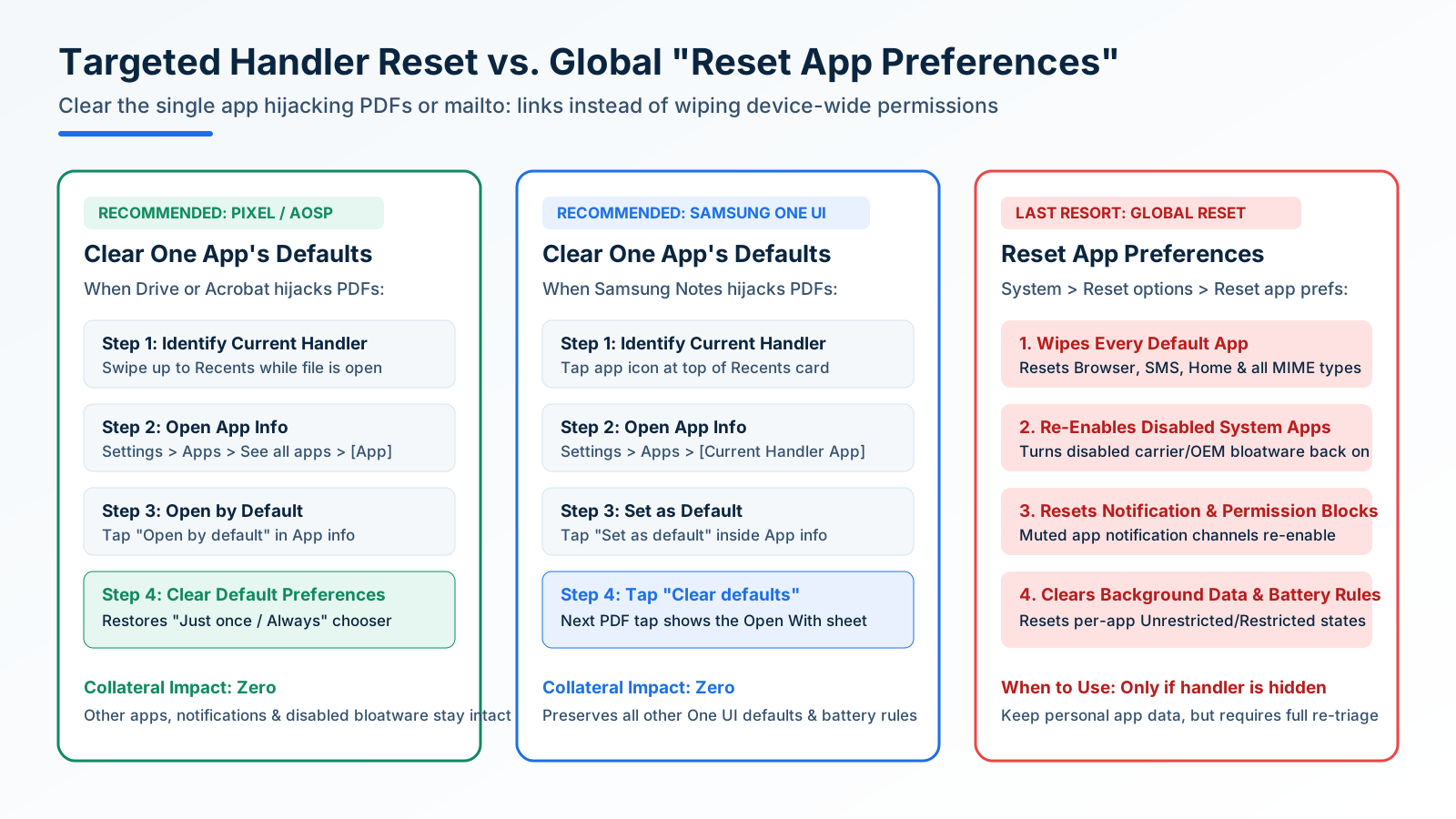
Because the default record is stored on the app currently opening the file, you do not open the settings of the new PDF reader you want to use—you open the settings of the current app that is hijacking the file [2, 3]:
- Identify the Current Hijacking App:
- Tap any PDF file so it opens in the wrong viewer.
- Swipe up from the bottom of the screen and hold to open the Recents multitasking overview.
- Look at the app icon and title at the top of the card (on Pixel phones, Google’s built-in reader is part of the Drive app; on Galaxy phones, it is typically Samsung Notes or Microsoft 365).
- Jump Directly to That App’s
App infoScreen:- Tap the circular app icon at the top of the Recents card and select App info (the
iicon). - Alternatively, navigate to
Settings > Apps > See all apps > [Current Handler App][2].
- Tap the circular app icon at the top of the Recents card and select App info (the
- Clear the Default Binding:
- Select Your New Preferred Handler:
- Return to your downloads folder or one of the Android file managers with SMB and LAN support and tap the PDF again.
- Android now restores the Open with chooser sheet [2, 11]. Select your preferred reader—such as Xodo, Flexcil, or MJ PDF from our PDF annotation and signing apps on Android guide—and tap Always (or tap Just once if you routinely switch between a lightweight reader and a full signature tool).
The exact same 4-step reset applies when an image gallery hijacks .webp/.png attachments, a browser captures mailto: email links instead of Proton Mail or Thunderbird/K-9 Mail, or a media player locks .mp4/.mkv video files [2, 11].
Why You Should Avoid Reset App Preferences Unless the Handler Cannot Be Found
Many generic troubleshooting posts advise running Settings > System > Reset options > Reset app preferences (or Settings > Apps > Menu (⋮) > Reset app preferences on Samsung One UI) to fix a single stuck PDF or link default.
Treat Reset app preferences strictly as a last resort when you cannot identify which background utility captured a custom URI scheme:
- What
Reset app preferencespreserves: It does not delete local app data, signed-in accounts, or downloaded files. - What
Reset app preferencesdestroys globally:- It wipes every default app binding (
ROLE_BROWSER,ROLE_HOME,ROLE_SMS, and all MIME-type associations) across the entire phone. - It re-enables every disabled system app, bringing back all carrier and OEM bloatware you previously disabled using our guide to removing Android bloatware, duplicate apps, and system ads.
- It resets all muted app notification blocks and runtime permission denials back to their post-install defaults, undoing the cleanup from setting up a new Android phone.
- It clears all per-app background data and battery optimization overrides (
Unrestricted/Restricted), forcing you to re-whitelist your password manager, Syncthing, and automation services.
- It wipes every default app binding (
Takeaway: Clearing defaults on the single offending app inside App info > Open by default > Clear default preferences takes 10 seconds, restores the Just once / Always prompt immediately, and incurs zero collateral resets [2, 3].
Frequently Asked Questions
Why is there no Default PDF Viewer option in Android Default apps?
Android’s Settings > Apps > Default apps screen only lists core system roles governed by android.app.role.RoleManager—specifically Browser, Phone, Caller ID & spam, SMS, Home, Digital assistant, and Wallet [1, 2]. Document formats such as application/pdf, Word spreadsheets, and mailto: email links are resolved through PackageManager implicit intent filters (Intent.ACTION_VIEW) [11]. To switch your PDF viewer, open Settings > Apps > [Current PDF App, e.g., Drive or Samsung Notes] > Open by default (Set as default on Samsung One UI) and tap Clear default preferences [2, 3].
How do I clear default app settings on Android when a link or file opens in the wrong app?
Open the file or link so the unintended app launches on screen, then swipe up into the Recents multitasking switcher. Tap the app icon at the top of the window card to open App info, tap Open by default (Pixel/AOSP) or Set as default (Samsung One UI), and press Clear default preferences (Clear defaults on Samsung) [2, 3]. Reopen the file to bring back the Just once / Always prompt [11].
Why do Reddit, YouTube, or Amazon links keep opening in Chrome instead of the installed app?
Starting in Android 12 (API level 31), Android routes all generic http and https links directly to the default browser unless the target app passes cryptographic Digital Asset Links verification (/.well-known/assetlinks.json) or has its domains manually approved [4, 5]. Open Settings > Apps > [Target App] > Open by default, turn on Open supported links, tap Add link, and check the boxes for every supported domain [4]. If the link only fails when tapped inside Firefox or Samsung Internet, also enable Open links in apps inside that browser’s internal settings [12].
How do I set Bitwarden or 1Password as my default password and passkey manager on Android 14 and 15?
Navigate to Settings > Passwords, passkeys & accounts on Pixel (Settings > General management > Passwords, passkeys, and autofill on Samsung One UI) and tap Preferred service to select your vault via CredentialManager [7]. Next, turn on Use inline autofill inside your vault app’s settings and set Chrome’s Settings > Autofill Services option to “Autofill using another service” so Chrome delegates login fields and FIDO2 passkey requests to your vault [8, 9].
How do I change the default NFC Tap and Pay wallet on a Pixel or Samsung Galaxy phone?
On Android 14 (API level 34) and Android 15, NFC Host-based Card Emulation (CardEmulation.CATEGORY_PAYMENT) and RoleManager’s ROLE_WALLET are synchronized [1, 10]. You can change your default contactless wallet either at Settings > Apps > Default apps > Wallet app or at Settings > Connected devices > Connection preferences > NFC > Contactless payments (Settings > Connections > NFC and contactless payments on Samsung Galaxy devices) [2, 3, 10].
What is the difference between clearing defaults for one app and selecting Reset app preferences?
Tapping Clear default preferences inside a single app’s Open by default page removes only that specific app’s file-type and link associations [2]. Running Settings > System > Reset options > Reset app preferences globally resets default handlers for every installed app, re-enables all disabled system bloatware, restores blocked notification channels, and wipes per-app background battery and mobile data restrictions.
Sources & References
All Android API specifications (RoleManager, CredentialManager, AutofillService, CardEmulation, and DomainVerificationManager), end-user Settings paths for Pixel UI and Samsung One UI, and browser deep-link handoff controls cited in this guide are indexed in the expandable reference list below [1, 2, 3, 6, 7, 12].
Sources & methodology12 sources
Evidence used for this article. Links open the original source in a new tab.
- RoleManager API Reference (android.app.role.RoleManager) — Android Developers
- Set or clear default apps on Android — Google Android Help
- Manage default apps on your Galaxy phone or tablet — Samsung Support
- Behavior changes: all apps — Android 12 Web Intent Resolution — Android Developers
- Handling Android App Links — Android Developers
- Verify Android App Links (Digital Asset Links & ADB pm Diagnostics) — Android Developers
- Sign in your users with Credential Manager — Android Developers
- Autofill framework overview — Android Developers
- Autofill from Android app (Autofill Services, Passkeys & Chrome Compatibility) — Bitwarden Help Center
- Host-based card emulation overview (NFC Tap & Pay Default Routing) — Android Developers
- Intents and intent filters (Implicit Intent Resolution & MIME Type Binding) — Android Developers
- Set Firefox for Android to open links in native apps — Mozilla Support
TasteOfAndroid is responsible for this page. The byline, method and commercial relationships are on the editorial policy and the author page.
Related Articles
Block Spam Calls and Robocalls on Android Without a Paid App
Use Filter spam calls, Pixel Call Screen, or Galaxy Text call. Google does not take numbers from your Contact list.
Split Screen and App Pairs: Multitasking on Android
Use two Android apps together, save supported app pairs, and check Pixel and Galaxy controls before relying on a multitasking shortcut.
Transfer Data from Android to Android: Cable vs Wireless
Choose cable or wireless Android transfer by compatibility and storage, follow the right setup path, and verify what copied before erasing the old phone.