
Contents
- What does Niagara put on the home screen?
- What does Olauncher put on the home screen?
- When does neither launcher answer the job?
- How do you try one and keep a way back?
- Frequently Asked Questions
- Is the free Niagara Launcher ad-free?
- Does Olauncher include widgets on the home screen?
- Does a list-based launcher reduce screen time?
- Which Android version does the F-Droid Olauncher build require?
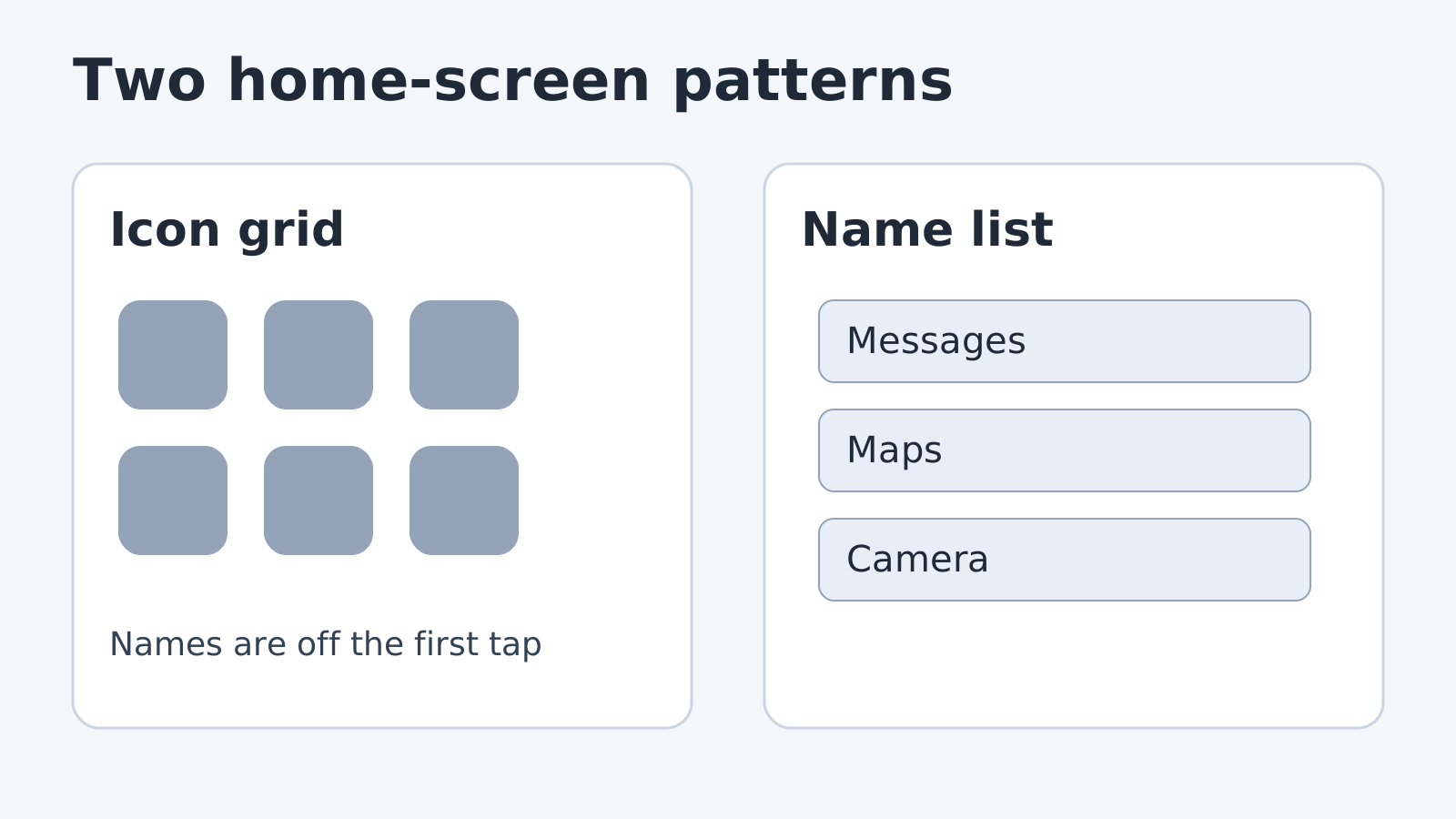
An icon grid keeps every colorful app one tap away, which is handy until the grid is what you open without choosing. For a quieter Android home screen, compare two published designs: Niagara Launcher’s list-based interface, and Olauncher’s short home row plus a swipe-up app list.
The table below is what those projects publish. It is not a screen-time, battery or speed test.
Scroll horizontally to view all table columns.
| Decision | Niagara Launcher | Olauncher |
|---|---|---|
| Home screen, in the publisher’s words | “A minimal, list-based interface” and “everything within one-handed reach” (homepage, modified 21 September 2026) | “Minimal launcher”; swipe up for all apps and search; long-press home apps to change them (F-Droid) |
| Ads | Free-feature list says ad-free (homepage) | F-Droid lists “No ads”; the README expands AF as ad-free (README) |
| Price as printed | Free $0.00 lifetime. Pro $12.98 / year or $39.98 / lifetime (homepage) | F-Droid build is GPLv3. A separate Pro Launcher app is described for widgets, weather and folders; this page has no price for it (README) |
| Android version on the page checked | Not stated on the pages retrieved 11 October 2026 | Suggested F-Droid version v6.9.17, added 19 September 2026, requires Android 7.0 or newer (F-Droid) |
| Extra focus control | Usage Breaker, app reminders, is listed under Pro (homepage, Pro page) | F-Droid lists double-tap to lock the screen (F-Droid) |
Common mistake: reading “spend less time on it” as a measured result. Niagara prints that line as a benefit. This page did not time anyone’s phone use.
What does Niagara put on the home screen?
Niagara’s homepage, modified 21 September 2026 and retrieved 11 October 2026, calls the product a minimalist launcher that declutters the home screen, cuts distractions and keeps apps within one-handed reach. The same page names the interface: a minimal, list-based layout, with a “wave alphabet for quick app access” on the free tier.
Free, listed at $0.00 for the lifetime of that offer, includes a clean home screen, the wave alphabet, reply from the home screen, limited customization, no ads and frequent updates. Pro, listed at $12.98 per year or $39.98 lifetime, adds every theme, icon font and clock customization, a calendar and weather widget, pop-up folders, widget stacks of up to four widgets, and Usage Breaker. The Pro features page, written 31 July 2026, describes Usage Breaker as reminders for apps you select after extended use. Those dollar figures are the amounts printed on Niagara’s site, not a receipt from a Play Store purchase on this date.
If you only want the list and the alphabet jump, the free list covers that. Widgets, themes and the reminder tool are the paid set.
What does Olauncher put on the home screen?
F-Droid’s listing for app.olauncher, retrieved 11 October 2026, describes a minimal launcher with a daily wallpaper, no ads, and these gestures: swipe up to see all apps and search, swipe down for the notification drawer, long-press a home app to change it, and long-press empty space for settings. The suggested build is v6.9.17 (version code 113), added 19 September 2026, and it requires Android 7.0 or newer. The license line is GNU GPL v3.0 only.
The README says niche features stay hidden so the launcher stays simple, and that the in-app About page holds the full feature list. It also points to a different app, Pro Launcher (app.prolauncher), for widgets, weather and folders. This page does not price that app.
Olauncher is the one to install from F-Droid when you want the GPLv3 build and the documented gestures. It is not the same product as Niagara, and the F-Droid page does not call the home screen a full scrolling list of every app.
The same F-Droid page lists permissions that include seeing installed packages, setting the wallpaper and starting at boot. A launcher that offers an app list has to know which apps are installed. Read the current permission list on the device before you accept it.
When does neither launcher answer the job?
Use the phone’s own launcher if you need a widget, a folder or an icon pack on the first screen and you do not want Niagara Pro or Olauncher’s separate Pro Launcher. Neither publisher page is a study of attention or battery life. A list can remove the icon grid. It does not, by itself, prove you will open the phone less often.
Switching home apps also does not remove the previous one. Niagara’s Pro page says the app “switches back just as fast if it’s not for you.” The settings label for the default Home app differs by phone brand, so use the prompt on the device rather than a path copied from another model.
Notification access and backups stay separate jobs. If a swipe-down drawer is why you are changing launchers, confirm notification delivery first. Before you experiment, keep a backup of the phone.
How do you try one and keep a way back?
- Install Niagara from the store linked on its homepage, or Olauncher from the F-Droid package named on its listing (the README also links a Play Store build). On a phone you are still setting up, finish account and restore setup before you change the Home app.
- When the phone asks which Home app to use, pick the new one. If it never asks, open the phone’s default-app settings and choose Home. Do not follow a menu path from a different brand.
- Check one documented gesture. On Niagara’s free list, that is the wave alphabet. On Olauncher’s F-Droid instructions, swipe up for the app list, then long-press a home app if you want to replace it.
- If the screen is harder to use, select the previous Home app again. Leave the new app installed until that switch works.
After the home screen is tolerable, go back to the productivity setup: one capture app, one notes store, then automation. A launcher does not replace Tasker routines or a smaller F-Droid set. If the distraction is preinstalled apps rather than the grid, use the bloatware cleanup checks instead of another home screen.
Frequently Asked Questions
Is the free Niagara Launcher ad-free?
Niagara’s free-feature list says the experience is ad-free and priced at $0.00 lifetime on the homepage modified 21 September 2026. Usage Breaker and the widget tools are on the Pro list, not the free list.
Does Olauncher include widgets on the home screen?
The F-Droid feature list retrieved 11 October 2026 does not include widgets. The README points to a separate app, Pro Launcher, for widgets, weather and folders.
Does a list-based launcher reduce screen time?
Niagara’s homepage presents mindful use as a benefit, and it sells Usage Breaker inside Pro. This page has no measurement of minutes, unlocks or battery. Treat the list as a layout change until you time your own week.
Which Android version does the F-Droid Olauncher build require?
The suggested version v6.9.17, added 19 September 2026, requires Android 7.0 or newer. Niagara’s pages retrieved the same day do not state a minimum Android version.
Sources & methodology4 sources
Evidence used for this article. Links open the original source in a new tab.
- Niagara Launcher homepage, including the free and Pro price list — Niagara Launcher
- Niagara Pro Features — Niagara Launcher
- Olauncher README — Tanuj M. (tanujnotes/Olauncher)
- Olauncher package page, suggested version v6.9.17 — F-Droid
TasteOfAndroid is responsible for this page. The byline, method and commercial relationships are on the editorial policy and the author page.
Related Articles
Android File Managers with SMB: MiXplorer vs Solid Explorer
Both apps list SMB access to PC and NAS shares. Pick by layout and cloud needs, share the folder to a named account, then verify a disposable copy before moving files.
Tasker Profiles for Beginners: Four Everyday Routines
Wrong triggers can interrupt meetings. Use four beginner Tasker routines for Wi-Fi, time, location and car audio, then check entry, exit and recovery.
Obsidian vs Google Keep: Which Fits Your Android Notes?
Compare Google Keep's quick capture with Obsidian's linked Markdown notes on Android. Check sync, sharing, backup and migration before choosing a workflow.