
Contents
- What does Filter spam calls actually silence?
- When does Pixel Call Screen replace that switch?
- What does Galaxy Text call do that a filter does not?
- Which Galaxy phones get Call screening instead?
- Which failure mode matches the phone in your hand?
- What do you write down before you add any other app?
- Method and sources
A paid blocker that asks for the contact list fails the line Google already prints: Google does not get phone numbers from your Contact list. Leaving Filter spam calls off, on a phone that still shows that switch, wastes the silence the Phone app can apply before the ringtone.
Stay inside the Phone app that is already on the device. Phone by Google’s caller ID page, read on 20 October 2026, turns Caller ID and spam on by default and offers Filter spam calls as the switch that blocks suspected spam. The same page says a phone with automatic Call Screen has no Filter spam calls option, because spam autoblocking is a Call Screen option. Pixel Call Screen, on its own help page, runs on the device and does not use Wi-Fi or mobile data. On a Galaxy, Bixby Text call answers with an automated voice while you type. Samsung’s newer Call screening page limits that feature to Android 16 with One UI 8.5 or higher. The rest of the workflow sits in the Android productivity and essential apps guide.
Scroll horizontally to view all table columns.
| Control | Phone the page names | What turns on | What you lose if you treat it as universal |
|---|---|---|---|
| Filter spam calls | Phone by Google | Optional switch under Caller ID and spam. Filtered calls stay in history. You can still check voicemail. | No missed-call notification and no voicemail notification. The switch is absent when automatic Call Screen is the feature. |
| Call Screen | Pixel, plus manual screen on selected Android phones in the US and Canada | On device. Automatic in Australia, Canada, Ireland, the UK, and the US. | Not every spam call is detected. Automatic screening stops during roaming. Headphones or Bluetooth can stop it, depending on the model. |
| Text call | Galaxy Phone app | Bixby reads a quick response or what you type. Transcripts stay in the Phone app. | You do not hear the caller. Some transcriptions are inaccurate. On One UI 5, Wi-Fi calling has to be off. |
| Call screening | Galaxy on Android 16 with One UI 8.5 or higher | Auto screen calls for unknown callers, then Text call if you want a typed reply. | The page says the feature is only on that software floor. |
What does Filter spam calls actually silence?
Caller ID and spam protection is on by default. The path is Phone app, More options, Settings, Caller ID and spam, then See caller ID and spam. Filter spam calls is the optional extra on that screen.
With the filter on, you do not get a missed-call notification or a voicemail notification. The call is still in history, and you can still open voicemail. That is the trade the page states: the ringtone stays quiet, and the notification stays quiet too.
A number outside your contacts can be sent to Google so it can supply a business name or decide the call is spam. The same page says Google does not get phone numbers from your Contact list. When a call arrives, the phone checks that it is from someone on the contact list and not an impersonator. Those are two different movements of data. The contact list stays put. An outside number can leave the phone.
Some of the steps work on Android 6.0 and up. Fake call detection is a tighter set: Android 12 or higher, Phone by Google, Contacts, and Google Messages installed, and RCS turned on in Messages. Fake call detection is the alert for a caller who hides an identity or impersonates a contact. It is not the same switch as Filter spam calls.
version_gap = 12 - 6
The result is 6. Android 12 is the floor for fake call detection. Android 6.0 is the floor the page gives for some of the caller ID steps. Six is the difference in major versions between those two printed floors. A phone on Android 8 can use the steps that only need 6.0, and it is short of the fake-call floor.
If a known number is marked spam, Recent calls, the call, Not spam, then Unblock. Future calls from that number will not be marked spam. Home, the call, then Block or Report spam marks the number and reports it.
Takeaway: Turn the filter on only after you accept a silent history. The voicemail is still there. The notification is not.
When does Pixel Call Screen replace that switch?
The caller ID page is explicit. On a device with automatic Call Screen, there is no Filter spam calls option. Spam autoblocking is one of the automatic Call Screen options. For Pixel 6 and higher, that is the Basic Protection level. For Pixel 5 and lower, it is the Silently decline option for the Spam calls category.
Call Screen’s own page adds the layout split, and it is not the same split. For Pixel 6 and below, unknown-call settings are where you pick the caller types. For Pixel 7 and above, you turn Automatically screen calls on or off and the types are Spam, Possibly faked numbers, and First-time callers. Pixel 6 sits in “6 and higher” on the caller ID page and in “6 and below” on the Call Screen page. Write down which page you followed.
pixel_step = 7 - 6
The result is 1. That 1 is the generation step between the two Call Screen layouts Google prints. It does not say a Pixel 6 lacks Call Screen. It says the settings screen changes at Pixel 7.
The setup list also names Maximum protection, Medium protection, and Basic protection as switches you turn on or off. The caller ID page equates the missing Filter spam calls switch, on Pixel 6 and higher, with Basic Protection. It does not print a separate definition of Maximum or Medium on the caller ID page.
Call Screen works on the device and does not use Wi-Fi or mobile data. Calls answered by Call Assist count as regular incoming calls. Automatic screening is on Pixel phones in Australia, Canada, Ireland, the UK, and the US. Manual screening adds France, Germany, India, Italy, Japan, and Spain, and it keeps the five automatic countries.
manual_extra = 11 - 5
The result is 6. Eleven is the manual country list as printed: the five automatic countries plus France, Germany, India, Italy, Japan, and Spain. Six is that extra set. India’s asterisk limits manual Call Screen to Pixel 10, Pixel 10 Pro and XL, Pixel 10 Pro Fold, Pixel 11, Pixel 11 Pro and XL, and Pixel 11 Pro Fold. Manual Call Screen also needs a SIM from a country where Call Screen is available. In the US and Canada it is also on selected Android devices, not only Pixels.
If the Call Assist decides the call is spam, the phone hangs up. If it decides the call is not spam, the phone rings and shows the caller’s response. You get a silent notification, Screening unknown number or Screening suspicious call, and a live transcript. The phone may stop playing music or video while it screens.
Not all spam calls and robocalls can be detected. Screened-call information is not saved to the Google Account, the Call Assist Activity page, or Web and App Activity. A transcript of the screening is saved on the phone. Recordings are a separate switch, Save Call Screen audio.
If you use call forwarding, skip automatic call screening. Screened calls will not be forwarded. During roaming, Call Screen will not screen automatically. With headphones or a Bluetooth connection, automatic screening can stop, depending on the device model. Third-party call recording and screen recording apps do not work with Call Screen. Google’s instruction is to turn those apps off first.
Call Screen uses contacts stored on the phone. Save a number as a contact when you want it left alone. If the Call Screen settings are missing and there are no on-screen instructions, Google says the device does not work with Call Screen.
Scroll horizontally to read the labels in this diagram.
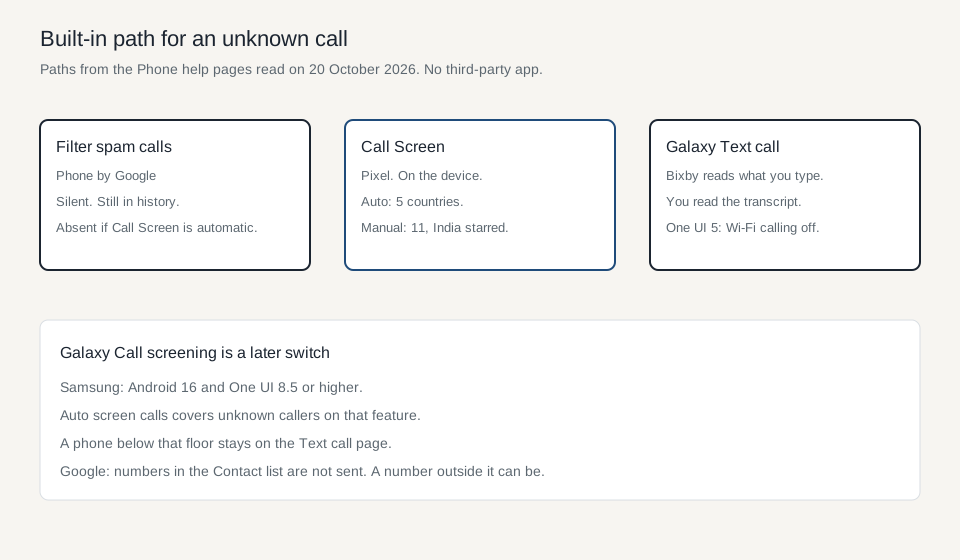
Diagram of the help-page paths. The country counts are the lists above.
Takeaway: On an automatic-Call-Screen Pixel, look for Basic Protection or the Pixel 7 protection list. The Filter spam calls row is the wrong row.
What does Galaxy Text call do that a filter does not?
Samsung’s Text call page, read on 20 October 2026, says Bixby answers with an automated voice. You type, or you pick a quick response, and Bixby reads it. You can read the caller’s words on the screen. You will not hear the conversation. The caller hears only the automated voice. The page says some voice transcriptions may not be accurate. Menu options vary by device model and OS version.
Setup is Phone app, More options, Settings, Text call, then the switch. A language starter pack can be a Galaxy Store download. Language, Voice, and Quick responses are the next screens. You can edit a suggested response, reorder them, or add one with a shortcut and a response. On One UI 5 devices, Wi-Fi calling has to be disabled before Text call will run. The page names One UI 5 for that conflict and does not print a wider Android version floor for Text call itself.
On an incoming call you answer, then Text call, and swipe up on the green Answer icon. Call assist, then Text call, is the other path. The same control exists on a call you place. Transcripts stay in the Phone app. Recents shows a speech-bubble icon on those calls. Delete is in that transcript screen.
That is a reply tool. It is not the same as a silent drop. You are still in the call, reading and typing.
Illustrative photograph. The setting names are in the help pages, not on this screen.
Takeaway: Text call keeps you in the conversation as text. It does not apply the silent history that Filter spam calls describes.
Which Galaxy phones get Call screening instead?
Samsung’s Call screening page says the feature is only on Galaxy phones running Android 16 with One UI 8.5 or higher. The path is Phone app, More options, Settings, Call screening, then the switch. Auto screen calls turns on automatic screening for unknown callers. Language and Voice are on that screen.
During a call, Call assist, then Call screening, has Galaxy AI vet the call and show a live transcription. You accept or reject while that transcript runs. After Galaxy AI connects, Text call is the control for a preset or a message you write. Standard call rates from the carrier may apply during screening. The feature can fail when storage is nearly full. Conversations and summaries show on the screen, including the lock screen.
The page also describes a missed-call oddity: if the AI answered an unregistered number and the caller hung up, the history can show a missed call even though you never heard a ring.
A Galaxy below Android 16, or below One UI 8.5, is outside that page. Text call remains the Bixby page that does not set that floor.
If the software floor is below 16, Call screening’s own note says the feature is unavailable. If Wi-Fi calling is still on and the phone is One UI 5, Text call’s own note says to disable Wi-Fi calling first.
Takeaway: Read the Android version and the One UI version before you follow the Call screening taps. Text call is the page that still applies underneath that floor.
Which failure mode matches the phone in your hand?
Scroll horizontally to view all table columns.
| Failure mode | What the help page states | What to check |
|---|---|---|
| Filter on, and a real caller leaves voicemail you never see as a notification | You do not get missed-call or voicemail notifications. The call remains in history. | History and the voicemail box, after the filter is on. |
| Looking for Filter spam calls on an automatic Call Screen phone | The option is absent. Spam autoblocking is a Call Screen option. | Pixel generation, then Basic Protection or Silently decline. |
| Automatic Call Screen while roaming, or on headphones or Bluetooth | No automatic screening during roaming. Headphones or Bluetooth can stop it, depending on the model. | Roaming state, and whether audio is on the phone speaker. |
| Call forwarding plus automatic Call Screen | Screened calls will not be forwarded. | Forwarding off before automatic screening on. |
| Text call with Wi-Fi calling on One UI 5 | Disable Wi-Fi calling to use Text call. | One UI version, then the Wi-Fi calling switch. |
| Call screening taps on an older Galaxy | Android 16 and One UI 8.5 or higher only. | Settings, About phone, then the Text call page if the floor is missed. |
| A known person keeps getting screened | Call Screen uses contacts stored on the phone. Save the number as a contact to skip screening. | The contact exists on the phone, not only in a cloud address book you have not synced. |
Illustrative photograph. Google’s headphone and Bluetooth limit is on the Call Screen page.
Takeaway: The row that fails is the one whose phone, software floor, or audio path does not match the page you followed.
What do you write down before you add any other app?
Write five cells: Phone by Google or the Galaxy Phone app, the Android version, Pixel generation or One UI version, whether Filter spam calls is actually on the screen, and whether a number you care about is saved on the phone. Then place one test call from a second handset that is not in contacts, and one from a number that is. The help pages do not promise that every robocall will be caught.
Other Android jobs on this site are indexed at the blog.
Takeaway: The built-in path is the Phone app, the version, and one test call from outside the contact list. A second app is a later decision, after those three are written down.
Method and sources
Compiled from four help pages read on 20 October 2026. Google’s caller ID page and Call Screen page are Phone app Help. Samsung’s Text call page is ANS10003690. Samsung’s Call screening page is ANS10010345. The 6 in the version gap is 12 minus 6. The 1 in the Pixel step is 7 minus 6. The 6 extra manual countries are the manual list minus the five automatic countries, with India’s Pixel 10 and Pixel 11 limit kept as printed. No third-party dialer is part of this record.
Updated October 2026.
Frequently Asked Questions
How do I block spam calls on Android without installing an app?
Open the Phone app that is already installed. In Phone by Google, Caller ID and spam is on by default, and Filter spam calls is the optional switch that silences suspected spam. On a device with automatic Call Screen, that switch is absent and spam autoblocking is a Call Screen option. On a Galaxy, Text call is the Bixby control. Call screening appears only on Android 16 with One UI 8.5 or higher.
Does Google read my contacts to label spam?
The caller ID page says Google does not get phone numbers from your Contact list. A number outside that list can be sent to Google so it can name a business or decide the call is spam. Call Screen uses the contacts stored on the phone, and the screened transcript is not saved to the Google Account.
Why is Filter spam calls missing on my Pixel?
Google's caller ID page says devices with an automatic Call Screen feature have no Filter spam calls option. Spam autoblocking is one of the automatic Call Screen options. On Pixel 6 and higher that lines up with Basic Protection. On Pixel 5 and lower it lines up with Silently decline for the Spam calls category.
Sources & methodology4 sources
Evidence used for this article. Links open the original source in a new tab.
- Use caller ID and spam protection (read 20 October 2026) — Phone app Help, Google
- Screen your calls before you answer them (read 20 October 2026) — Phone app Help, Google
- Use Bixby text call on your Galaxy phone (read 20 October 2026) — Samsung Support
- Use Call screening on your Samsung phone (read 20 October 2026) — Samsung Support
TasteOfAndroid is responsible for this page. The byline, method and commercial relationships are on the editorial policy and the author page.
Related Articles
Split Screen and App Pairs: Multitasking on Android
Use two Android apps together, save supported app pairs, and check Pixel and Galaxy controls before relying on a multitasking shortcut.
Transfer Data from Android to Android: Cable vs Wireless
Choose cable or wireless Android transfer by compatibility and storage, follow the right setup path, and verify what copied before erasing the old phone.
Termux for Beginners: Install, Manage Packages and Check Your First Script
Choose a single Termux install channel on Android, keep add-on signatures matched, learn pkg and storage boundaries, and verify a first Python script.