
Contents
Choosing the wrong restore path fails when the phone is reset or lost. Use Bitwarden if getting back in means logging into the account, and KeePassDX if you will keep the database file and its unlocking secret yourself.
Illustration: two phones with dark screens and a closed notebook. Not a password test, an account screenshot, or a security ranking.
For Bitwarden vs KeePass on Android, the decision is who can restore the vault after the phone is gone. When a Bitwarden account is on Bitwarden’s cloud, a new device logs in, and Bitwarden cannot reset a forgotten master password. KeePassDX stores credentials in a database file you keep, opened with the master password and a key file if you use one. Google’s automatic app backup does not save that file. Check autofill in the browser you actually use, with a made-up entry, before moving real logins. This comparison reads public documentation. It is not a phone test and not a security ranking.
Scroll horizontally to view all table columns.
| Input or item | Typical value or source | Why it matters |
|---|---|---|
| Vault location | Bitwarden account for the logged-in vault 6; KeePassDX uses one .kdb or .kdbx file 9 | Login and a file you copy are different restore jobs |
| New device | Cloud-hosted Bitwarden: log in, no export required 6. KeePassDX: bring the file 8 | Reinstalling the app does not recreate a missing file |
| Master secret | Bitwarden cannot reset the master password 3. KeePassDX needs the master password and the key file if you use one 8 | Neither product replaces a secret you no longer have |
| Offline | An unlocked Bitwarden app is read-only 2. KeePassDX edits the local file 9 | Airplane mode does not mean the same thing in both apps |
| Browser autofill | Bitwarden: Autofill services, plus a Chrome integration option 1. KeePassDX: system autofill, not the accessibility service 7 | Turn it on in the browser you use before moving real logins |
The wider app stack is in the Android productivity and essential apps guide. This page only compares Bitwarden with the Android client KeePassDX.
Who restores the vault after the phone is gone
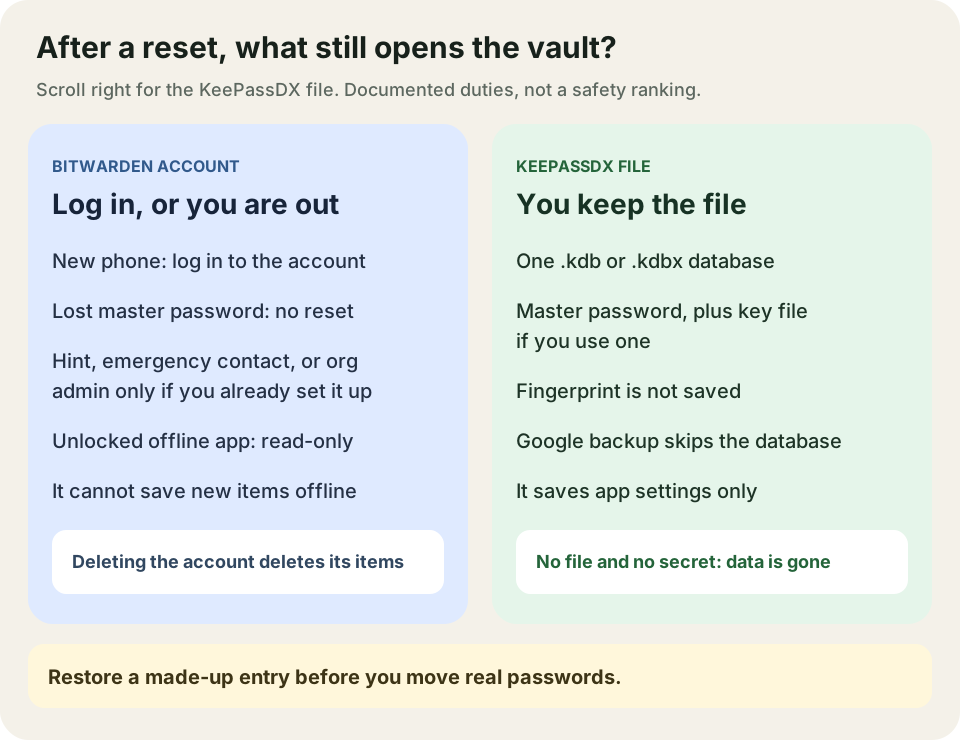
Bitwarden restores a cloud-hosted account by login, and it cannot reset a forgotten master password. KeePassDX restores only if you still have the database file and the secret that opens it. The diagram at the top of the page is that split.
If the Bitwarden account is hosted on Bitwarden’s cloud servers, the export guide says you do not need an export to add a new device: install the app and log in. 6 That path fails if you cannot log in. The forgot-master-password page says Bitwarden uses zero-knowledge encryption and has no way to access, retrieve, or reset the master password. 3
Anything else is conditional, and only if you set it up earlier:
- A master-password hint, if you created one, is emailed from the hint page. If you did not create one, the email says so. 3
- Emergency access works only after you have already added a trusted contact. Bitwarden’s page, read October 12, 2026, limits that step to premium users, including members of paid organizations. A contact can be given view access or takeover access. Takeover replaces the master password. If the organization turned on the Automatic confirmation policy, emergency access is not available. 4, 3
- Enterprise account recovery is an administrator reset for an enrolled organization member, followed by an emailed recovery link. It does not apply to a personal account that was never enrolled, it does not restore a deleted account, and it does not bypass single sign-on. 5, 3
If none of those paths work, Bitwarden says it cannot recover the account or its data. Deleting the account deletes individually owned items, including attachments. 3
KeePassDX is a local manager. Credentials sit in one encrypted KeePass file, opened with a master key, a key file, or both. 9 The backup wiki, edited January 5, 2024, and read October 11, 2026, says the database is not part of Google’s automatic Android backup. That backup covers app settings such as theme. It does not cover the database, database settings stored in the file, or fingerprints tied to the file. 8
Without the master password, and without the key file if you use one, the wiki says the database cannot be used and the information is lost. A fingerprint is only an unlock shortcut. It is not saved. After a reset or reinstall you set it up again with the master password. 8
Copies are your job. The wiki lists a backup drive, a NAS, or cloud storage you choose, and it says to copy the key file as well. It also names Syncthing or a file-manager routine as further options. This page does not set those up. 8
Common mistake: Treating an unlocked phone, a fingerprint, or Google’s app-settings backup as the vault backup. For Bitwarden, an unlocked offline session is read-only and is not a way back in after the master password is forgotten. For KeePassDX, the fingerprint and the Google settings backup are not the database. 2, 8
Takeaway: Write down the restore materials before you move real logins: account login plus any emergency contact you already enrolled, or the database file plus master password and key file.
Check autofill in the browser you use
Turn on each app’s documented autofill path and fill one made-up login in the browser you actually use. A fill in a different browser does not answer this check.
Scroll horizontally to read the labels in this diagram.
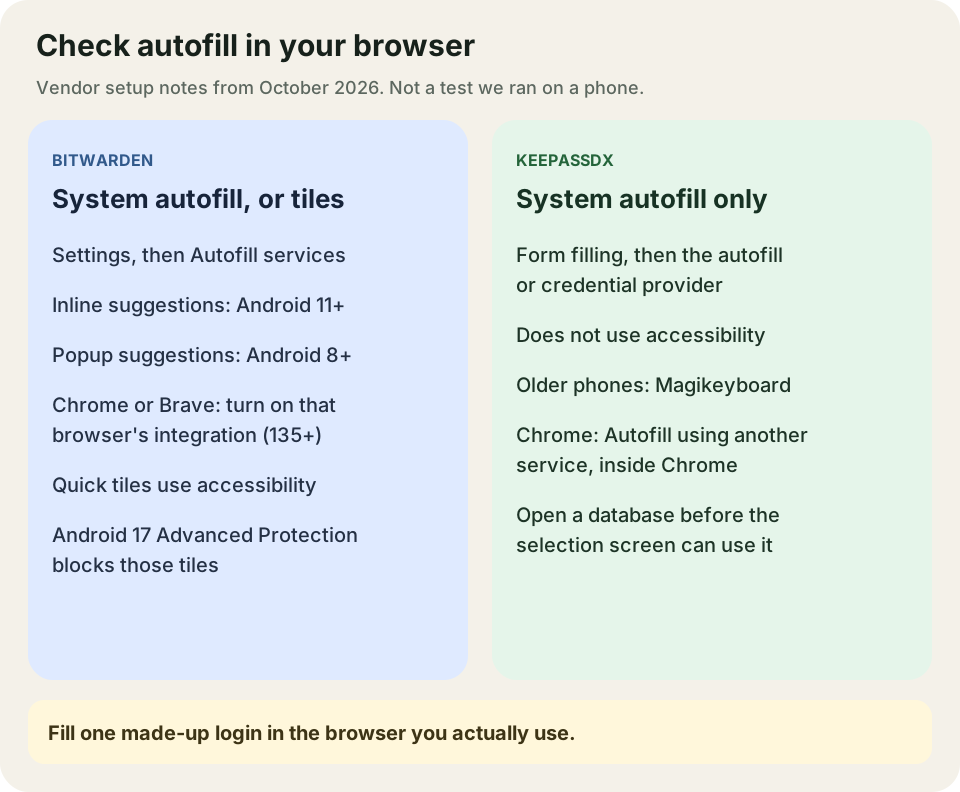
Each box is a setup named in that project’s documentation, read in October 2026. It is not a result from a phone we tested.
Bitwarden’s Android help says mobile autofill does not currently support custom fields or split login screens, where the username and password are on separate screens. It also says to autofill only into apps from trusted sources, because a malicious app can mimic a package name. 1
The documented setup is Settings → Autofill → Autofill services, then choose Bitwarden when Android asks for the preferred service for passwords, passkeys, and autofill. Inline suggestions appear in the keyboard and need Android 11 or newer, plus a keyboard that supports inline suggestions. Popup suggestions need Android 8 or newer. 1
Chrome and Brave need an extra toggle: Use Chrome autofill integration, or the Brave equivalent. Bitwarden says the Chrome app must be at least version 135, and that this replaces the browser’s built-in autofill. HTTP sites in those browsers need a flag turned on. HTTPS is the ordinary case. Edge, Opera, and Samsung Internet are detected without that toggle. On those three, Bitwarden warns that credentials could be filled into an embedded or hidden frame on a malicious site, so fill only a site you mean to open. 1
Quick-action tiles are separate. They use Android’s accessibility service and do not require the autofill service to be on. On Android 17, Bitwarden says Advanced Protection blocks that accessibility access, so the tiles will not work. Use another autofill method. 1
KeePassDX’s autofill wiki, edited August 29, 2026, uses Settings → Form filling → Set default autofill service, or Credential provider service from version 4.2.0. For Chrome and browsers based on it, the wiki says to enable Autofill using another service inside Chrome. The autofill service itself starts with Android 8.0. The project says it will not use the accessibility service to fill forms, including on older phones, and points to Magikeyboard instead. 7
If no database is open, KeePassDX asks you to open one that was opened before. The wiki says you cannot open a brand-new database from the selection screen. Open it in normal mode first. Inline suggestions exist from Android R (Android 11). The project also says it cannot secure the third-party form you fill, so the app or site has to be one you trust. 7
The two Chrome version notes are not the same gate. Bitwarden’s help, read October 11, 2026, requires Chrome 135 or newer for its browser integration. KeePassDX’s wiki table says Chrome restored native autofill from version 131, and that older Chrome used a compatibility mode. Check the Chrome version on your phone against the guide for the app you are trying. We did not run that check. 1, 7
Takeaway: Finish autofill in your browser with a fake login before you import or type real passwords.
Offline use, and who keeps the copy
An unlocked Bitwarden app can be read offline, and it cannot save changes until it connects again. KeePassDX changes the file on the phone. Another device sees those changes only if you copy the file there.
Scroll horizontally to read the labels in this diagram.
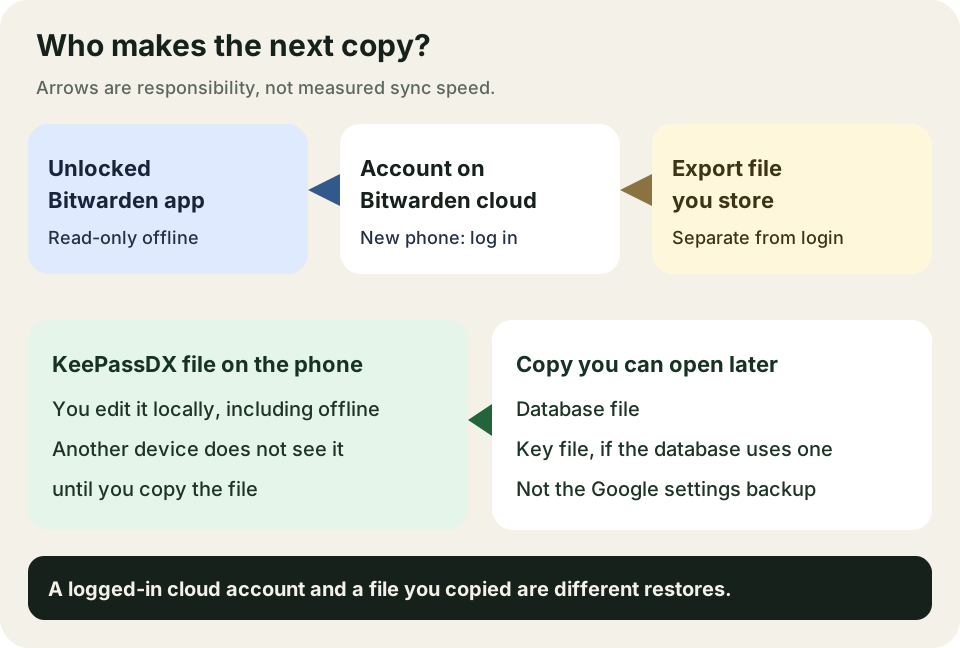
Arrows show who is responsible for the next copy. They are not measured sync times.
Bitwarden’s offline page says any unlocked app can be used offline in read-only mode, including airplane mode, or when a self-hosted server is unreachable. You cannot edit or add vault items, attachments, or sends, and you cannot import. The same page’s steps for installing without a network are for the Windows desktop app. They are not Android install instructions. 2
A file export is a separate copy, not the same thing as logging in. On mobile, Bitwarden documents Settings → Vault → Export vault, then .json, .csv, or password-protected .json. You confirm with the master password. Unless the export is encrypted, do not send it by ordinary email, and delete it when the transfer is done. 6
Encrypted exports come in two kinds. A password-protected file can be imported into any Bitwarden account if you still have that export password. An account-restricted file can be imported only into the same account that created it. That includes a refusal for a new account with the same email after the old account was deleted, and for a different region or self-hosted server. Rotating the account encryption key makes an older account-restricted export impossible to decrypt. Individual exports leave out organization-owned items, trash, and Sends. 6
Direct transfer to another app through the FIDO Credential Exchange Protocol is documented for Android 10 and newer. Bitwarden says you start that from the destination app, and the steps depend on that app. 6
KeePassDX’s README describes editing one KeePass file and says that file type works with KeePass, KeePassXC, and KeeWeb. Shared file support does not move the file for you. 9 The backup wiki says you decide the redundancy: copy the database, and the key file if you use one, to a place you can open after the phone is gone. 8
The README also says the main features stay free, encryption is the same for every user, and the optional support build adds visual styles rather than a different database. This page does not quote a price. Check the project if you need the current contribution terms. 9
Takeaway: Decide whether the next device gets the vault by logging in or by a file you copied, and try that path with fake data.
Disposable-entry checklist
Do this with an invented login, such as a hostname you do not use and a password you make up for the test. Stop if the restore fails. Keep the old password manager until the fake entry comes back.
Scroll horizontally to read the labels in this diagram.
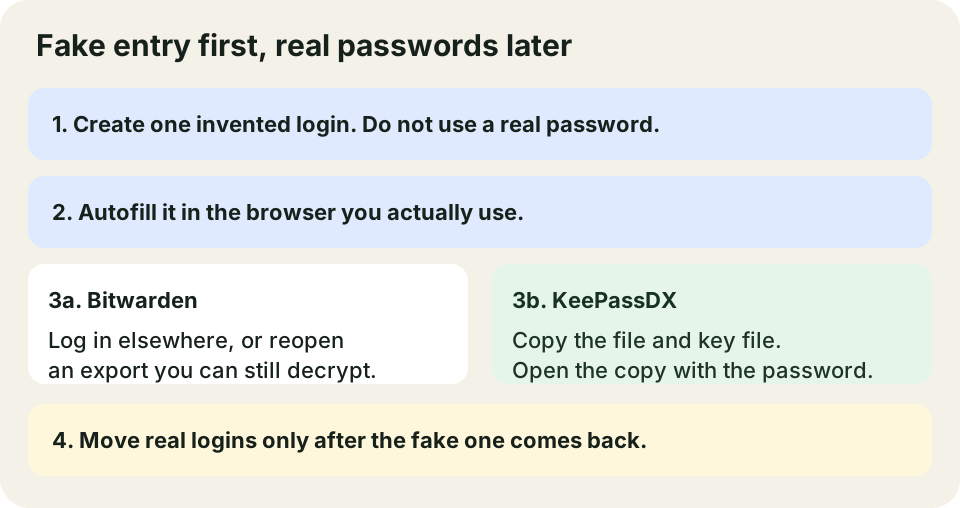
A suggested order for your own check. The boxes are not a record of a test we performed.
- Create the fake login in a test Bitwarden vault or a new KeePassDX database. Do not type a real password into the test.
- Turn on the autofill path for your browser from the section above, and fill the fake login once.
- For Bitwarden on a cloud account, log in on a second device, or export the vault and confirm the fake login is in a file you can open again. Keep an account-restricted export only if you still have that same account. 6
- For KeePassDX, copy the database off the phone, copy the key file if the database uses one, and open the copy with the master password. Do not count a fingerprint unlock as the restore. 8
- Confirm the original test vault or file still opens after the copy.
- Move real logins only after step 2 and step 3 or 4 succeed.
The shorter file-copy version of step 4 is the KeePassDX restore check in the F-Droid app guide. This page adds the Bitwarden account path and the browser autofill check.
Takeaway: A fake entry that you can autofill and restore is the gate. Real passwords wait behind it.
When this does not apply
This page does not rank password managers, compare encryption strength, or report a security audit. It does not carry Windows KeePass plugins over to KeePassDX. It does not install a NAS, Syncthing, or a self-hosted Bitwarden server. Organization single sign-on, device-management rules, or an enterprise recovery policy can override the personal paths above. Read those rules before you choose. 5
We did not install either app for this article. Browser behavior, Android version labels, and whether emergency access is on your plan should be rechecked on the phone and in the current help pages before you depend on them.
Method and sources
Compiled from Bitwarden Help and the KeePassDX README and wiki, with AI assistance. Bitwarden autofill and offline pages were read on October 11, 2026. The forgot-password, emergency-access, account-recovery, and export pages were read on October 12, 2026. The KeePassDX autofill wiki shows an edit date of August 29, 2026. The backup wiki shows an edit date of January 5, 2024. Both wikis and the README were read on October 11, 2026. The fake-login checklist is an editorial procedure, not an observed test. No price, certification, or breach count is claimed.
Sources & methodology9 sources
Evidence used for this article. Links open the original source in a new tab.
- Autofill from Android app — Bitwarden Help
- Using Bitwarden offline — Bitwarden Help
- Forgot my master password — Bitwarden Help
- Emergency access — Bitwarden Help
- Account recovery — Bitwarden Help
- Export vault data — Bitwarden Help
- AutoFill — KeePassDX wiki
- Backup — KeePassDX wiki
- KeePassDX README — KeePassDX project
TasteOfAndroid is responsible for this page. The byline, method and commercial relationships are on the editorial policy and the author page.
Related Articles
Android File Managers with SMB: MiXplorer vs Solid Explorer
Both apps list SMB access to PC and NAS shares. Pick by layout and cloud needs, share the folder to a named account, then verify a disposable copy before moving files.
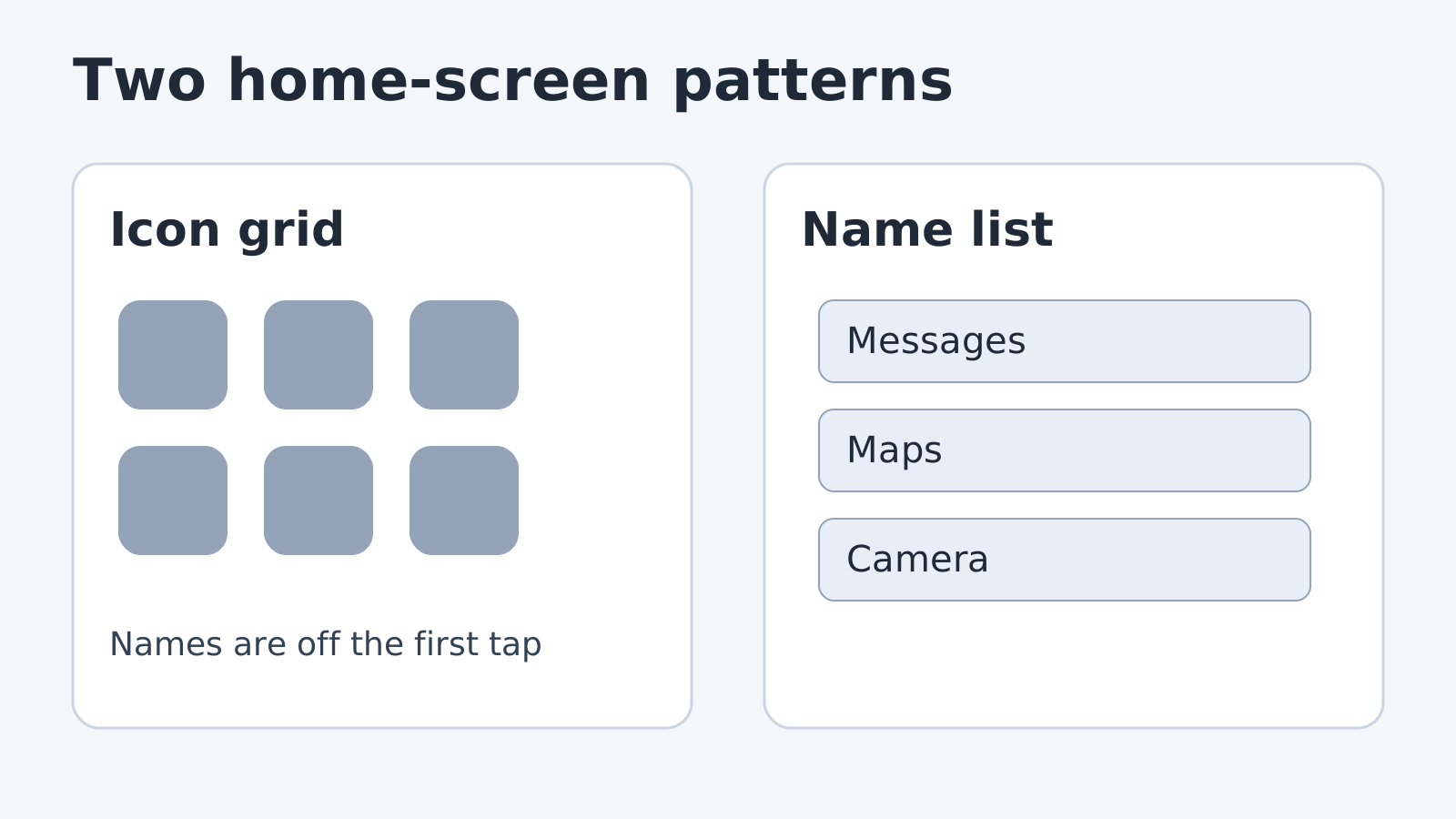
Minimalist Android Launchers: Niagara and Olauncher
Niagara Launcher publishes a list-based home screen, a free tier and Pro prices. Olauncher documents swipe and long-press gestures. No screen-time test.
Tasker Profiles for Beginners: Four Everyday Routines
Wrong triggers can interrupt meetings. Use four beginner Tasker routines for Wi-Fi, time, location and car audio, then check entry, exit and recovery.