Contents
- What counts as bloatware, a duplicate, or a system ad
- Rules of thumb before Hide, Disable, or Uninstall
- Worked example: storage you can and cannot free
- Trace a system ad to one sender
- Put the last change back before you try another
- Frequently asked questions
- Do archive steps exist before Android 15?
- Will Samsung customisation off delete every ad?
- How do I get a disabled Galaxy app back?
Disabling the wrong preload costs a working camera, dialer, or message path until you enable that app again. Android bloatware is the name for preloaded apps, duplicate apps, and system ads you do not want, and Play Protect is a separate check for harmful behavior. Sort the package, then use the smallest control that phone actually shows.
Android bloatware is a preloaded app, a second app for the same job, or an ad surface you did not ask to keep. Google says some system apps that shipped on the phone cannot be deleted, and that some phones can turn those apps off so they leave the app list. On Galaxy phones, Samsung’s Canada page dated 13 October 2026 separates three controls: Hide drops the icon and leaves the app installed, Disable stops a preload and leaves it installed, and Uninstall removes an app you downloaded and frees storage. System ads split the same way. Samsung’s UK page, updated 24 April 2026, says third-party pop-ups come from downloaded apps, while the Samsung account customisation service is an opt-in that stops personalised promotions without fully removing ads. Match the control to the thing on the screen.
- Name the app and check whether it is the current default for links, messages, or photos.
- Treat Hide, Disable, Uninstall, Archive, and Pause app activity if unused as different operations.
- Change one control, use the phone, then reverse that change if a feature stops.
- Read the sender on an ad before you remove a different package.
Scroll horizontally to view all table columns.
| Control | Documented effect | Dominant failure mode | Prevention |
|---|---|---|---|
| Keep | No files change. The icon and the process stay. | Clutter stays, including a second app you never open. | Keep it when you use it or when it is the current default. |
| Hide (Galaxy) | The icon leaves the Apps screen. The app stays installed and can still be found by name. | Ads and background work continue, because Hide is not removal. | Use Hide only when the problem is the icon. |
| Disable (Galaxy) | The preload stops and leaves the Apps screen. The package stays on the phone. | A feature tied to that preload stops until you tap Enable. | Disable one app, test the feature, then Enable it if the feature fails. |
| Uninstall | A downloaded app leaves the phone and frees storage. | Sign-in and in-app setup are gone when you install it again. | Back up account-bound data first. Reinstall from the same store account. |
| Archive (Android 15 and up, supporting hardware) | The Archive page says the phone removes the software, permissions, and temporary files, stops notifications, and keeps the icon and the data. | Restore fails when the store is missing, the listing is gone, or free space is too small. | Confirm the store is still installed before you archive. |
| Pause app activity if unused | After a long period of non-use, Android deletes temporary files, revokes permissions, and stops background work and notifications. The app stays installed. | An app you still want alerts from goes quiet. | Turn Pause app activity if unused off for that app. |
What counts as bloatware, a duplicate, or a system ad
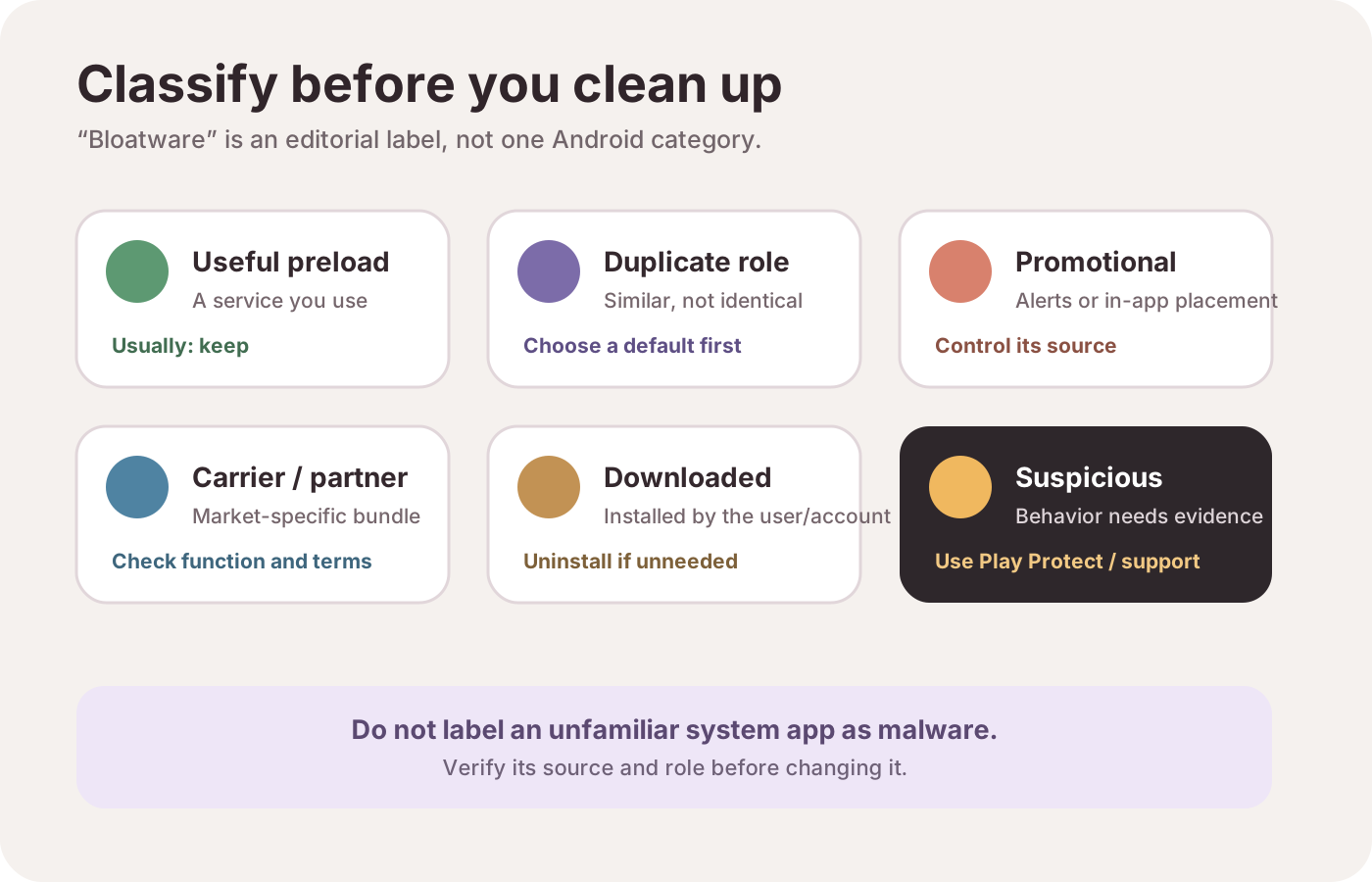
Classify the app before you change it: useful preload, duplicate role, promotion, carrier or partner bundle, download you accepted, or behavior that needs a security check.
Six labels, in this order: useful preload, duplicate role, promotion, carrier or partner bundle, downloaded app, suspicious behavior. The label picks the first control. It does not prove malware.
Scroll horizontally to read the labels in this diagram.
A useful preload is one you open, or the app Android currently uses for a job. On a Galaxy phone, Settings, Apps, Choose default apps sets the handler for a category such as the browser. A web link then opens in that default. The categories on that screen follow the apps installed on that phone. [8]
A duplicate is two installed apps with overlapping jobs and different accounts. Samsung documents both stores on the same page: Play Store installs with a Google account, and Galaxy Store installs with a Samsung account. Galaxy Store is another source for some Samsung apps, watch apps, themes, and exclusive content. Depending on model and software, the icon reads Galaxy Store or Store, usually inside the Samsung folder on the Home screen. Leaving both stores in place is normal. Removing one does not move purchases or sign-in to the other. [8] How much of that split you live with is part of the difference covered in Pixel Android and Samsung One UI.
A system ad is a surface, not a single Android switch. Samsung’s UK page says pop-ups on the Home screen, lock screen, or over other apps come from third-party apps that were downloaded, and that those pop-ups are unrelated to the phone itself. The same page treats Samsung’s own promotions as a separate opt-in during Samsung account setup. [9] That opt-in is one of the choices on setting up a new Android phone.
Carrier and partner apps are preinstalled packages whose job is a network or a regional service. Google’s disable page does not list those packages phone by phone. It says some preinstalled system apps cannot be deleted, and that the disable steps come from the device manufacturer. [2]
Suspicious behavior is a Play Protect warning, an app from outside Play that Play Protect flags, or a permission access you did not expect. An unfamiliar name is not that evidence. The Privacy Dashboard shows which apps used a permission and when: the last 7 days on Android 13, or 24 hours on Android 12. The path is Settings, then Security and privacy or Privacy, then Privacy dashboard. It records access. Play Protect is the check that warns, and that can deactivate or remove a harmful app. [5] [6]
Once you know which app you will keep for a job, Android productivity and essential apps is the page for choosing that one app instead of stacking duplicates.
Rules of thumb before Hide, Disable, or Uninstall
Rule of thumb: If the app screen shows neither Uninstall nor Disable, stop. That missing control is the threshold. Google says some preinstalled system apps cannot be deleted. Samsung says some apps cannot be uninstalled or disabled because the phone needs them to operate. [2] [8]
Rule of thumb: If a Galaxy preload shows Disable and not Uninstall, Disable is the documented control. It stops the app and removes it from the Apps screen, and the package stays installed so related features can keep the files they need. Samsung’s note on integrated preloads is the reason to test one app, then tap Enable if the camera, messages, or another feature fails. Enable is Settings, Apps, the app, Enable. [8]
Rule of thumb: If Archive is absent, check the OS version before looking for an archive toggle. Google limits those archive steps to Android 15 and up, and to hardware that supports them. [4]
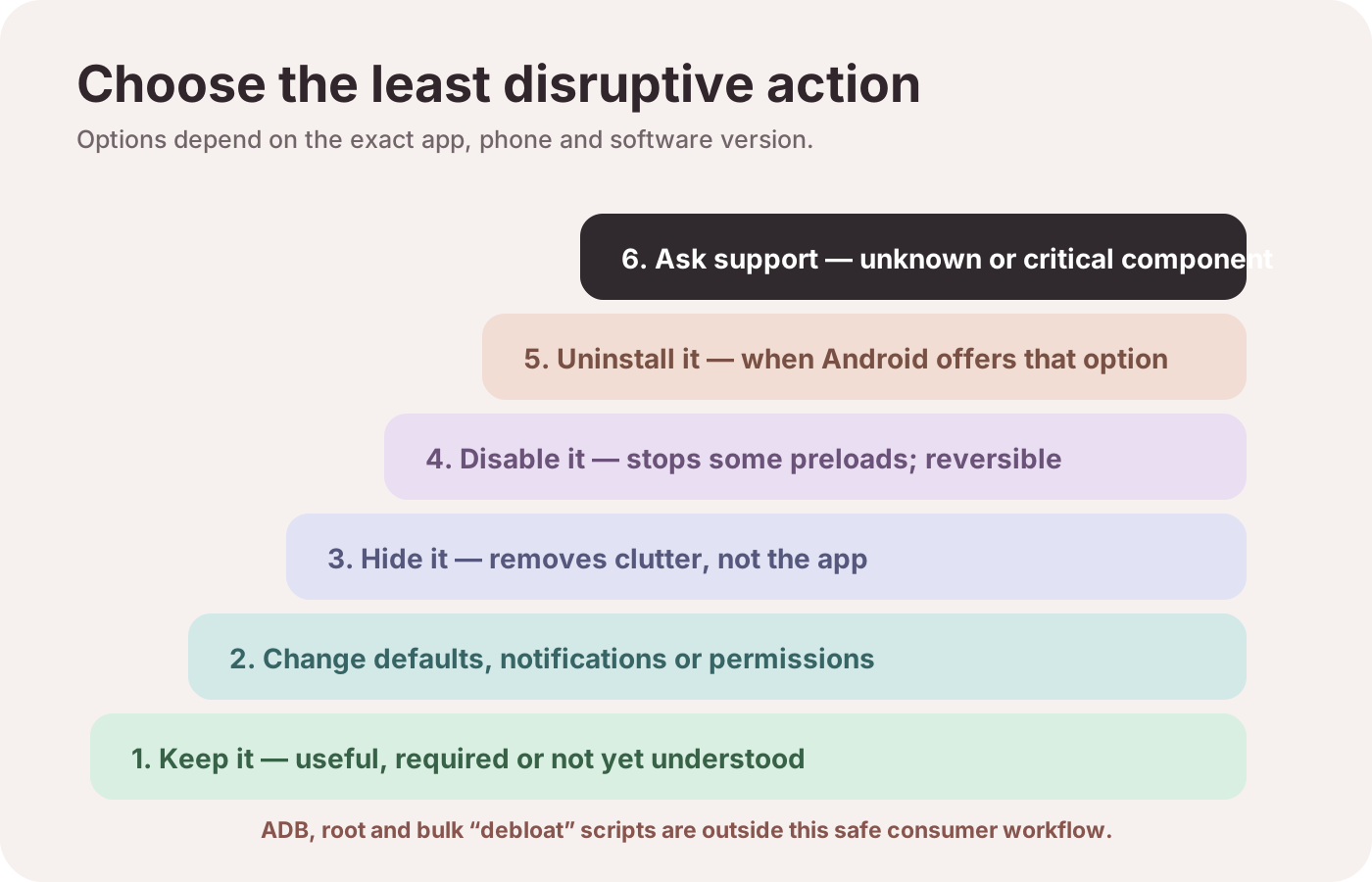
ADB, root, and bulk package-removal lists sit outside this ladder. The ladder diagram says the same thing, and neither Google nor Samsung documents those scripts as the cleanup path.
The safe order is keep, change defaults or notifications, hide, disable, uninstall, then the manufacturer when the package is unknown. Skip any rung the phone does not show.
Scroll horizontally to read the labels in this diagram.
Worked example: storage you can and cannot free
Samsung’s Storage screen lists the space used by the app, its data, and its cache. Clear cache removes leftover cache files. After it finishes, the Cache line shows 0 B. Clear data resets the app and permanently removes personal settings and data stored in that app. Some system apps do not allow Clear data. Uninstall removes a downloaded app and frees storage. Disable leaves the package installed. [8]
Recovered_cache = Cache_before
Uninstall_recovery = App + Data + Cache
Disable_recovery = 0
Worked example: The Storage screen shows App = 210 MB, Data = 40 MB, and Cache = 18 MB. Those three numbers are example inputs. Replace them with the lines on your phone. Clear cache: Recovered_cache = 18 MB, and the Cache line becomes 0 B. Uninstall of that downloaded app: Uninstall_recovery = 210 + 40 + 18 = 268 MB. Disable of a preload with the same three lines: Disable_recovery = 0 MB of package space, because the app remains installed. Hide frees 0 MB for the same reason.
Google’s unused-app page adds a different saving. After you have not used an app for a long time, Android deletes temporary files, revokes permissions, and stops background work and notifications. It does not publish an hour or megabyte figure for that pause, and the app remains installed. Turn the pause off under App info, Unused apps, Pause app activity if unused, when you still want alerts from that app. [3] A phone that still runs hot after that pause is a battery question, covered in fix Android battery drain. Cleanup is also a weak substitute for capacity. 128GB vs 256GB for Android is the storage decision when the Storage total, not one cache line, is the limit.
The hidden cost sits beside the megabytes. Samsung says a later install from Play Store or Galaxy Store can require you to sign in and configure the app again. Clear data permanently removes the personal settings and data saved in the app. Back up photos, messages, and authenticator apps before either step. That backup prevents an uninstall from turning a sign-in into a lost code or a lost thread.
Archive frees a different slice, and only on the phones Google names. On Android 15 and up, with supporting hardware, archiving removes the software, permissions, and temporary files, stops notifications, and keeps the icon and the data. The icon goes dim. You restore it by tapping that icon, and the store must still be installed with the app still available to download. If free space is too small to put the software back, the phone asks you to manage storage. Automatic archive is a Play Store opt-in. Turn off Manage app if unused when you want that app left alone. You can still archive it by hand from Settings, Apps. [4]
The Delete apps page uses different words for the same action. Its tip says archiving removes the app data and keeps the icon and your personal data. The Archive page says the phone keeps the data and removes the software, permissions, and temporary files. Follow the Archive page for the steps, and read the Storage screen before you archive anything you cannot replace. [1] [4]
Trace a system ad to one sender
Find the surface first. A notification, a promotion inside one app, a browser pop-up, and a full-screen placement do not share one off switch.
Four surfaces: notification shade, inside one app, browser or site, unknown full-screen. Identify the sender. Customisation off stops personalised Samsung promotions and does not remove every ad.
Scroll horizontally to read the labels in this diagram.
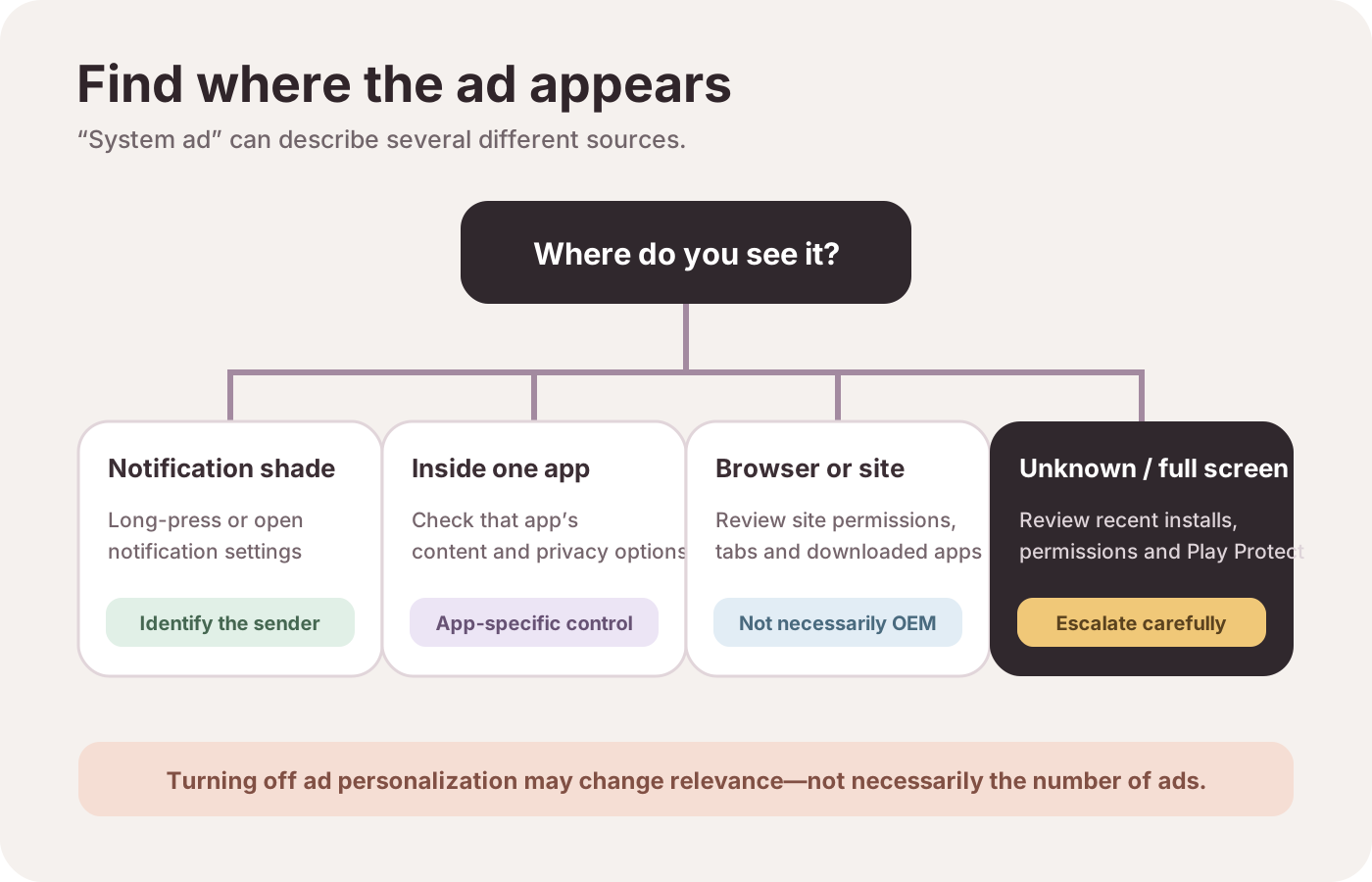
Notification shade. Swipe down. The notification names a sender, and some notifications also appear on the lock screen and the Home screen. Long-press that notification and turn notifications off for that app, which is the step Samsung’s UK page gives for an ad sitting beside your messages. Android’s own notification page says the steps differ by device. Notification history, where the phone has it, holds snoozed alerts, dismissed alerts, and the day’s alerts. Some phones have no notification history. [7] [9] If the alert you still want then disappears, use Android notifications not working before you disable more packages.
Inside Samsung apps. The UK page says Samsung ads are opt-in. The customisation service toggle enables personalised promotions on Samsung apps. Turning it off stops that personalisation and does not fully disable ads. The same page says removing personalised ads reduces the number of ads on the device. The path after setup is Settings, Samsung account, Privacy, customisation service, then the privacy settings link, then off. [9]
Browser or site. Samsung’s UK steps for Chrome are Settings, Site settings, then Pop-ups and redirects off, and Ads off. For Samsung Internet the page says Sites and downloads, Block pop-ups on, then the Ad blockers menu in that browser. A site permission is not fixed by disabling an unrelated phone package. [9]
Unknown full-screen pop-up. The UK page says the app has to be active to show the ad, and it points at Play Store, My apps and games, Installed, Last used. Uninstall one recent app, then watch whether the pop-up stops, before you remove the next one. The page also says you probably cannot stop every pop-up. If the pop-up continues after those steps, Samsung treats that as a reason to check the phone for a virus and to use Samsung Members. [9]
Play Protect is on by default. It checks apps from Play before download, checks the device for harmful apps from other sources, warns you, and can deactivate or remove a harmful app. It also warns about apps that hide or misrepresent important information under Google’s unwanted-software policy. Keep the scan on. [6]
Put the last change back before you try another
Reverse the latest control before you add a second one.
- Disabled Galaxy app: Settings, Apps, select it, Enable. [8]
- Hidden Galaxy app: Apps screen, More options, Settings, Hide apps on Home and Apps screens, then clear the red minus on that app and tap Done. A hidden app still appears by name in search, with Open on its page. The Search bar sits at the top or the bottom depending on model, software, and settings. [8]
- Uninstalled app: install it again from Play Store or Galaxy Store with the same account. A purchased app can be installed again from that account. Expect a fresh sign-in. [1] [8]
- Archived app: tap the dimmed icon. Restore needs the store, a listing that is still available, and enough free space. [4]
- Paused unused app: turn Pause app activity if unused off. [3]
- Bad update on a preinstalled Samsung app that offers it: Settings, Apps, the app, More options, Uninstall updates. Samsung limits that action to certain preinstalled apps and describes it as a fix for a bad update, not as a way to strip the phone. [8]
Maker software still differs after you finish this ladder. OnePlus and Xiaomi software is the comparison for how much preload and promotion those two skins ship with. This page does not restyle their menus as Galaxy steps.
Checked 17 October 2026 against the Android Help pages and the two Samsung pages in the source list. Recheck the model and the software version before you follow a path, because Samsung states that labels and menus differ by model and version.
Frequently asked questions
Do archive steps exist before Android 15?
Google’s archive page limits those steps to Android 15 and up, and to devices with supporting hardware. On an older version, use uninstall, Disable where the phone shows it, and Pause app activity if unused.
Will Samsung customisation off delete every ad?
It stops personalised promotions and does not fully disable ads. The same UK page, updated 24 April 2026, says the number of ads on the device falls. A pop-up from a downloaded app is a different sender. That page says those pop-ups come from the app, not from the phone.
How do I get a disabled Galaxy app back?
Open Settings, tap Apps, select the app, and tap Enable. Samsung documents that path on the Canada page dated 13 October 2026. Installing a downloaded app again from Play Store or Galaxy Store can require a new sign-in and a new setup.
Sources & methodology9 sources
Evidence used for this article. Links open the original source in a new tab.
- Delete apps on your Android device — Android Help
- Disable apps that came with your Android device — Android Help
- Manage unused apps on your Android device — Android Help
- Archive unused apps on Android — Android Help
- Manage permissions from the Privacy Dashboard — Android Help
- Use Google Play Protect to help keep your apps safe — Google Play Help
- Control notifications on Android — Android Help
- Manage apps on your Samsung Galaxy — Samsung Canada Support
- How to remove ads from a Galaxy smartphone — Samsung UK Support
TasteOfAndroid is responsible for this page. The byline, method and commercial relationships are on the editorial policy and the author page.