
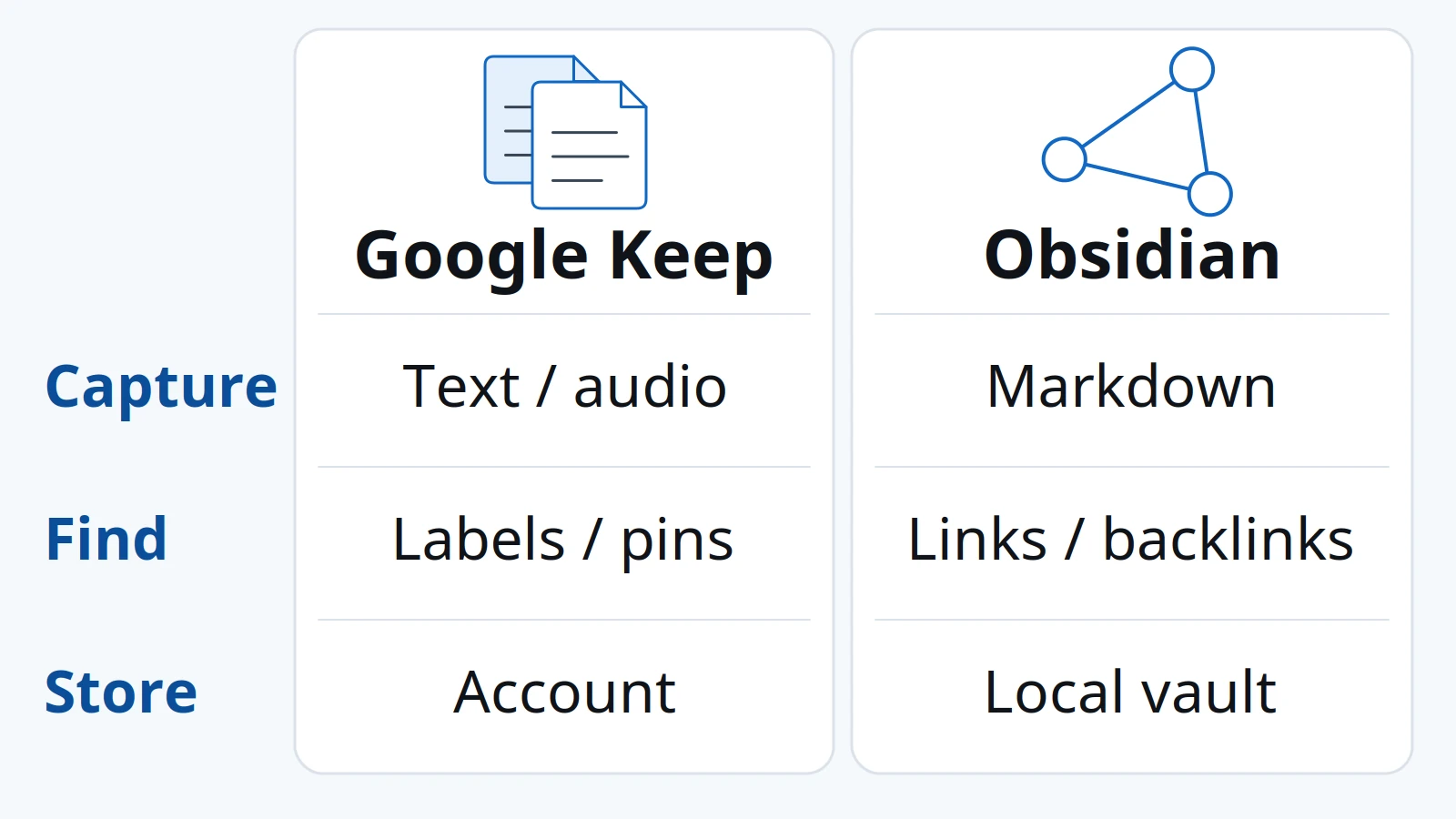
Contents
- Capture on Android: match the input to the moment
- Linked Markdown: decide what you want to find later
- Sync: separate the working copy from the route to another device
- Sharing: a shared list and a shared vault are different commitments
- Choose by the life of the note
- Use both only when the handoff has a purpose
- Before switching: test migration and recovery with a copy
- When this does not apply
- FAQ
- Does Obsidian require an account to store notes on the phone?
- Where are Obsidian Sync servers located?
- What if you lose the Obsidian Sync encryption password?
- Method and sources
- Related reading
Saving a note in the wrong place costs you the list someone else needed, or the link you needed a month later. Use Google Keep when the note is a short Android capture or a shared list, and use Obsidian when it should become a Markdown file inside a vault you can link and copy. Settle that path, the file model, and a recovery check before you move an existing archive.
For Obsidian vs Google Keep on Android, choose by what the note must do after the first save. Google’s Android help, accessed 18 October 2026, documents five create types (text, list, image, drawing, and audio), home-screen widgets that exist only on Android, and sharing of a single note. The organize page caps labels at 50. Obsidian’s help documents a vault as a local folder of Markdown files, links between those files, and a sync method you choose before a second device can see them. A shared Sync vault allows up to 20 collaborators, and attachments are limited to 5 MB on the Standard Plan or 200 MB on the Plus Plan. Use Keep for a checklist another person will edit. Use Obsidian for notes you will reopen as files and connect with links. Confirm a separate backup before you retire the old copy.
Scroll horizontally to view all table columns.
| Input or item | Typical value or source | Why it matters |
|---|---|---|
| Android create types | Text, list, image, drawing, and audio 1 | The Create button has to match the input in your hand |
| Keep labels | Up to 50 2 | A label list past that cap has left the documented organize model |
| Home-screen widgets | Quick capture, Single note, and Note collection, Android only 3 | A visible list and a new-note shortcut do different jobs |
| Vault | Local folder of Markdown files, including subfolders 4 | Another editor can open the same files |
| Second device | A sync method you add; Obsidian Sync lists Android 7 | The phone copy and the route to another device are separate jobs |
| Shared Sync vault | 20 collaborators; attachments 5 MB on Standard or 200 MB on Plus 9 | Headcount and file size both have a documented ceiling |
| Moving Keep notes | Takeout ZIP, then Importer format Google Keep (.zip) 11, 12 | Checklists arrive as top-level items; reminders and assignments stay behind |
Place this choice inside the Android productivity and essential apps guide when notes are one part of a larger phone setup.
Capture on Android: match the input to the moment
Keep is the capture app when the note starts as a list item, a photo, a drawing, a short text, or something you say. On Android, Google’s create guide puts those five types behind the Create button. A setting can make a single tap create a text note, and a long press still reaches the other types. 1
The same page documents bold, italic, underline, and paragraph heading styles inside a text note, plus a recording control on a text note with Speak, Play, and Delete. Formatting and a voice memo are both part of the Android create path. 1
Home-screen widgets are a separate decision, and Google limits that feature to Android. Quick capture starts a new note. Single note pins one note, and you can check list items on the home screen, while text edits go through Open in Keep. Note collection shows all notes, pinned notes, or one label. If the phone has used more than one Keep account, you pick the account for the widget. 3
Scroll horizontally to read the labels in this diagram.
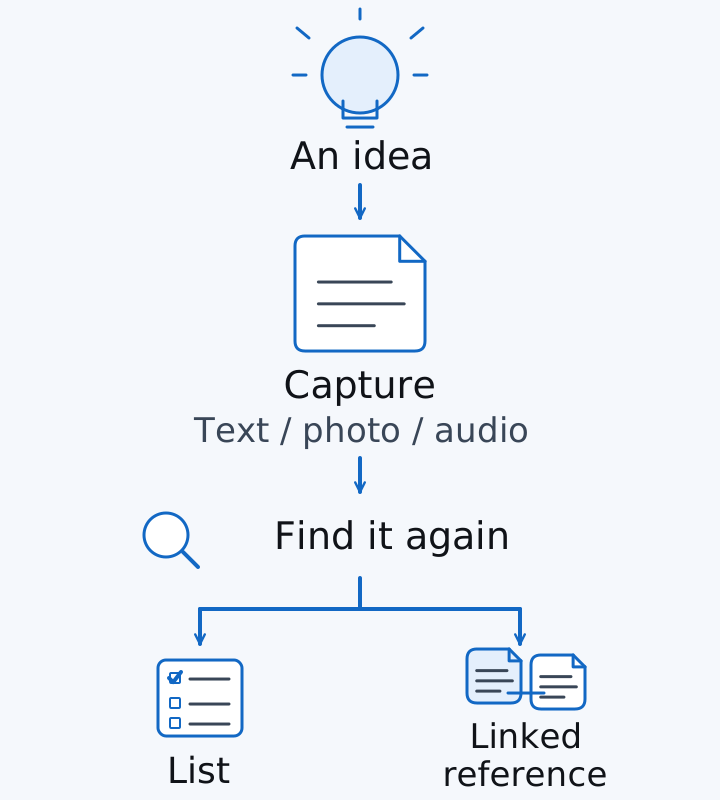
Diagram of the capture path: an idea becomes a note, then a list or a linked reference. Illustration only.
On a replacement phone, put that widget in place while you follow the new Android phone setup guide. The setup page covers the phone. This page covers which note the widget should open.
For Obsidian, the first capture is an ordinary note in the vault you intend to keep. The storage guide describes notes as Markdown files in a local folder. Add a plugin after that plain note is easy to create and find. 4
Takeaway: Put today’s input on the Create button or a widget, and leave the long-term archive for the next decision.
Linked Markdown: decide what you want to find later
Choose Obsidian when the thing you need later is the connection between notes. A vault is a folder on the device, including subfolders, and each note is a Markdown file. Other text editors and file managers can open those files. Obsidian refreshes the vault when something outside the app changes a file. 4
An internal link points at another note. Obsidian accepts a Wikilink such as [[Three laws of motion]] and a Markdown link to the same file. Wikilinks are the default. If you want links that other Markdown editors understand, turn Wikilinks off under Files and links. Characters # | ^ : %% and doubled brackets are poor filename material. 5
A backlink is the return direction. In Obsidian’s own example, “Three laws of motion” links to “Isaac Newton,” and the backlink runs from Newton back to the laws note. The Backlinks plugin splits those into linked mentions (a real internal link) and unlinked mentions (the note title appears as plain text). 6
Scroll horizontally to read the labels in this diagram.
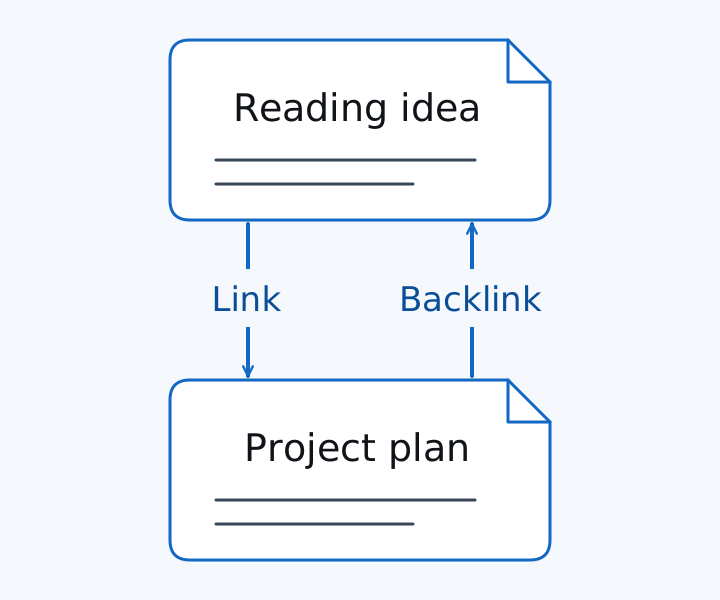
The sample titles “Reading idea” and “Project plan” show the same link and backlink relationship as Obsidian’s laws-and-Newton example.
Keep retrieves notes with labels, colors, pins, and a sort by custom order, date created, or date modified. You can have up to 50 labels. On a shared note, only you see your labels, colors, and pins. 2 Use a label when you already know the words you will search. Add a link when you will need the reason two notes belong together.
Block references are a portability limit. Obsidian’s link guide says a block reference is specific to Obsidian and is outside standard Markdown, so that link fails in another editor. Skip block references if leaving the vault is part of the plan. 5
Links are also local to one vault. Obsidian recommends against a vault stored inside another vault, because those links can update incorrectly. 4
Takeaway: Add the link while you still remember why the two notes belong together. A label covers a search you already know how to phrase.
Sync: separate the working copy from the route to another device
Keep’s create guide says you can find notes from any device. That route is the Google account inside Keep. Obsidian stores the working copy in the local vault, including while the phone is offline, and a second device sees those files only after you add a sync method. 1, 4, 7
Scroll horizontally to read the labels in this diagram.
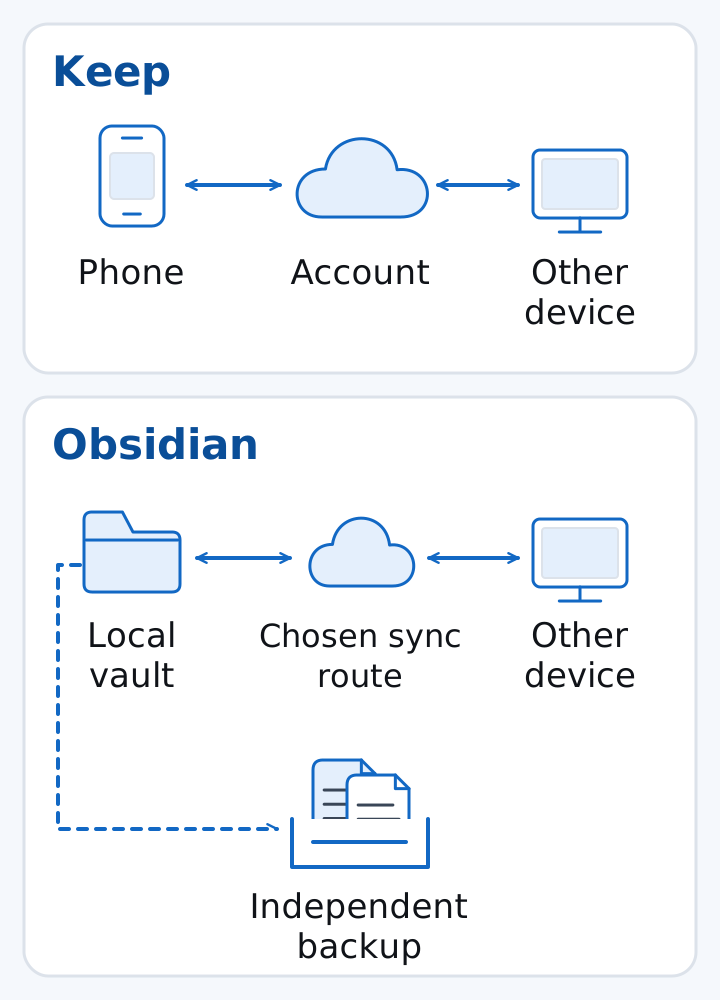
Diagram of two routes. Keep goes phone, account, other device. Obsidian goes local vault, one sync route, other device, plus a separate backup.
Obsidian Sync is the method the sync guide calls officially supported, and its recommended systems include Android. Sync keeps a local copy on the device and an off-site remote vault. 7
The same guide lists other routes with narrower Android support:
- Google Drive’s recommended systems include Android. Vault syncing through Drive is unofficial, so the guide points to third-party apps or plugins, with vault files kept available offline. 7
- OneDrive has limited functionality on Android. The guide names Dropsync and FolderSync as Android options and says to keep the folder available offline. 7
- iCloud’s recommended systems on that page are macOS, iOS, and iPadOS. Use those steps on an Apple device. 7
- Syncthing’s recommended systems are Windows, macOS, and Linux. The official Syncthing Android app is no longer maintained. The guide names the community fork Syncthing-Fork, from GitHub releases or F-Droid, and says sync works best when at least one device stays on. You can exclude
.obsidianif each device should keep its own settings. 7
The iPhone and iPad section of that guide says to avoid syncing the same vault through two services at once, because the files can conflict or corrupt. Use one route for the Android vault as well. Before a Syncthing folder holds real notes, run the Syncthing setup and conflict checks on an empty folder.
Obsidian’s backup guide separates the jobs. Sync keeps files current across devices. A backup is a one-way copy in another location, taken from the device you edit on most. The in-app File recovery plugin stores a limited recovery copy on each device separately. Keep the vault folder outside the backup service’s own sync folder. 13
Phone photos, messages, and authenticator codes are a different recovery list. Use the Android backup guide for photos, messages, and authenticator codes for those, and use the SMB file-manager comparison when the one-way vault copy goes to a PC or NAS share. Copy one disposable file and open it before you copy the vault.
Takeaway: Prove one route with a disposable note edited on both devices, then open a one-way backup that sync does not rewrite.
Sharing: a shared list and a shared vault are different commitments
Share a Keep note when another person should edit that list. Google’s Android sharing steps add a collaborator by name, email, or Google Group. Collaborators can edit text, lists, images, drawings, and audio. They can also label, color, archive, or add reminders, and those choices stay their own. If you want someone to see the note without editing it, the same page says to send a copy through another app. If you own the note and delete it, Keep deletes it for everyone. 8
Share an Obsidian vault when the other person should receive a folder of files through Obsidian Sync. Every collaborator needs an active Sync subscription. Joining a shared vault stays outside that person’s remote-vault limit. If the remote vault uses end-to-end encryption, each person enters the encryption password during setup. Collaborators receive the owner’s permissions. Fine-grained permissions are still unsupported, and only the owner can invite. The documented ceiling is 20 collaborators. Attachment size follows the remote vault host’s plan: 5 MB on Standard and 200 MB on Plus. Edits appear after sync, without a live cursor. Simultaneous edits are merged, and version history can restore an earlier copy. 9
Scroll horizontally to view all table columns.
| Decision | Google Keep | Obsidian | Dominant failure mode and prevention |
|---|---|---|---|
| Share unit | One note. Collaborators edit the contents. Their labels, colors, archive state, and reminders stay theirs. 8 | One remote vault. Each person needs an active Sync subscription. Cap of 20. Only the owner invites. 9 | Owner deletion removes a shared Keep note for everyone. Send a separate copy when people need their own record. A shared vault shows edits after sync, so use version history when a merge is wrong. 8, 9 |
| Retrieval | Up to 50 labels, colors, pins, and sort by custom order, date created, or date modified. 2 | Wikilinks or Markdown links, and backlinks from the Backlinks plugin. 5, 6 | A label fails when the useful fact is why two notes belong together. Add the link while that reason is still obvious. |
| Working copy | Notes found in Keep on other devices signed into the account. 1 | Markdown files in a local vault folder. 4 | Two sync services on one vault can conflict or corrupt files. Keep one route, and keep Drive or OneDrive files available offline. 7 |
| Recovery copy | Download of notes that are still present: content, attachments, color, pin and archive state, collaborators, and your label list. 11 | One-way backup from the device you edit on most. In-app file recovery is limited and stored per device. 13 | A sync replica carries a bad edit to the other devices. A one-way backup prevents that edit from becoming the only history. 13 |
Rule of thumb: If labels exceed 50, Keep’s organize guide has already hit its cap, so the next retrieval method is search, a pin, or a link in a vault. If one attachment exceeds 5 MB on a Standard Plan remote vault, that file sits outside the documented Sync attachment limit for the host’s plan. The Plus Plan limit on the same page is 200 MB. 2, 9
Worked example. Compare an assumed file with those plan limits:
plan_limit_MB = 5 on Standard, and plan_limit_MB = 200 on Plus.
Assume the attachment is 8 MB. Because 8 is greater than 5, the Standard limit excludes it. Because 8 is under 200, the Plus limit includes it. The 8 MB figure is only the arithmetic input. Neither help page reports 8 MB as the size of a real note.
Takeaway: Invite a collaborator to one Keep note for a living list. Invite someone to a vault only after they can accept a Sync subscription, the file-size ceiling, and edits that arrive after sync.
Choose by the life of the note
Match the app to the note’s next week.
- A household list that other people check off belongs in Keep’s note sharing. A shared vault is a larger commitment than that list needs. 8
- Reading notes that should show up again from a project note belong in Obsidian links and backlinks. Try the link on sample titles before you rename a whole archive. 5, 6
- A photo or a voice memo you want inside the original note fits Keep’s documented Android create types. Decide afterward whether the file also needs a life as a Markdown attachment. 1
- Direct access to the files themselves fits Obsidian’s vault. Settle the Android sync route before a second device is part of the routine. 4, 7
- A note you will not maintain as a file stays in Keep. The vault’s
.obsidianfolder, sync route, and backup are ongoing work. 4, 13
Local files and their attachments occupy phone storage. Judge that space with the 128GB and 256GB storage comparison. An app choice does not change how much free space the phone has.
Obsidian Sync encrypts the remote vault, and the copy on the phone stays unencrypted by Sync. End-to-end encryption is the default for a new remote vault. Standard encryption uses a key Obsidian manages. A lost end-to-end password leaves the remote vault unusable, while the local copies on your devices usually remain. 14
Community plugins inherit Obsidian’s access to files, the network, and installing other programs. Restricted mode is the default and blocks third-party code. Leave it on unless you trust the plugin author. 15
A shared vault requires an active Sync subscription for each collaborator. 9
Takeaway: Let next week’s use of the note pick the app, including the subscription and the backup work that come with a vault.
Use both only when the handoff has a purpose
Keep can hold the note you just captured, and Obsidian can hold the reference you will link later, once you name which copy you will edit afterward. The help pages used here describe that handoff as a manual copy.
Scroll horizontally to read the labels in this diagram.
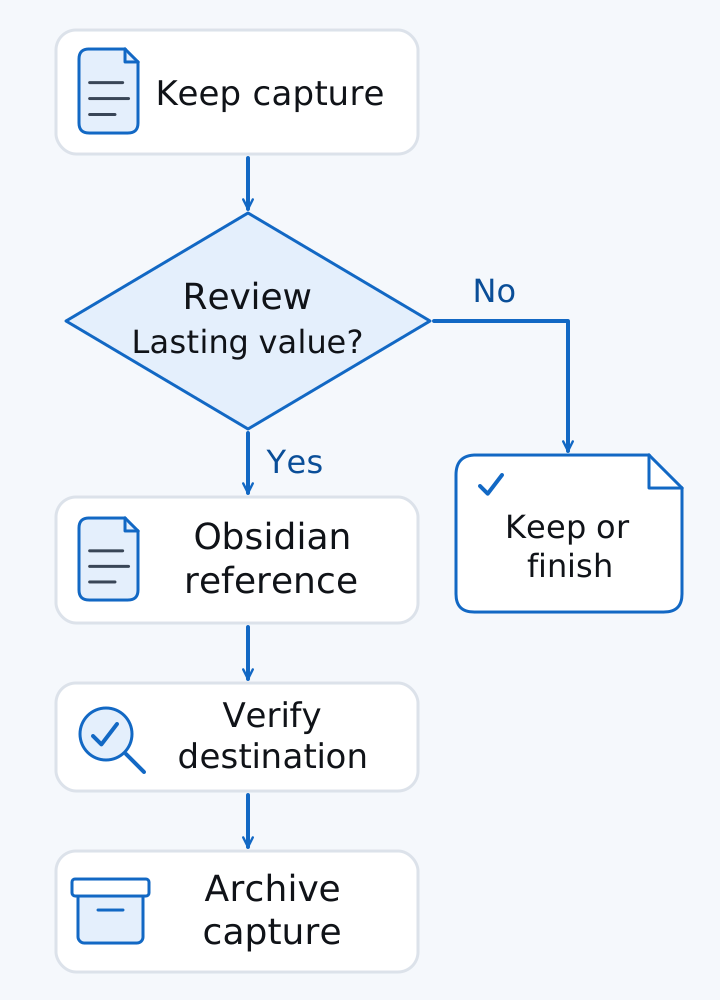
Diagram of a manual handoff. Lasting notes move to an Obsidian reference, then you verify the destination and archive the capture. Notes without lasting value stay in Keep.
Google’s send guide names Gmail and Drive as examples. Copy to Google Docs creates a Doc. Send via other apps copies the note contents into an installed app, and you can edit that copy there. If the share sheet has no Obsidian entry, copy the text yourself. 10
After the text is in the vault, link it to the project note and archive the Keep capture if the vault copy is now the one you will edit. A household checklist can stay in Keep even when research notes live in the vault.
Common mistake: Leaving both copies editable. Name the copy you will change before you add any plugin that moves notes on a schedule.
Takeaway: Use both apps when you can point to the handoff and to the copy that remains editable.
Before switching: test migration and recovery with a copy
Obsidian’s importer guide is the documented path from Keep to Markdown. In Google Takeout, deselect all, select Keep, create the export, and download the ZIP. Import with the Importer plugin, file format Google Keep (.zip), and read the preview before the second Import click. 12
Google’s export page says you can download data that has not been deleted. The download includes note content, attachments (voice recordings, drawings, and images), color, pin and archive state, collaborators, and your label list. On a work or school account, some data might not be available. 11
The importer’s stated limits are specific. Every checklist arrives as top-level items, because Keep does not export indentation. Reminders and user assignments are not imported, because Obsidian does not support those features. Template variables can carry archive state, pin state, trash state, color, labels, sharees, and related fields. Those variables do not restore the two features the limitations section excludes. 12
Importer is a community plugin. Installing it means leaving Restricted mode, and the plugin then inherits Obsidian’s file and network access. 12, 15
Run the import into a new test vault. Keep that folder outside any existing vault. Obsidian warns that a vault inside another vault can update links incorrectly, and that a vault in the system folder may lead to corrupted data or data loss. The published system-folder paths on that page are for macOS, Windows, and Linux. 4
Acceptance checks on the copy:
- Keep the Takeout ZIP, and open several imported notes in the test vault.
- Compare text, attachments, and checklist structure with the Keep originals. Expect flat checklists.
- Confirm whether you depended on a reminder or an assignment. Those do not come across.
- Open one imported file in another editor if file access is why you are moving.
- Send one disposable edit to the second device and back, on a single sync route.
- Open a one-way backup before you retire the Keep account or the old phone.
If you are also leaving an iPhone, use the iPhone-to-Android transfer guide for the phone copy, then run the Keep import as its own check. Before a factory reset, use the checklist for selling an Android phone while the source account still signs in. To confirm you can see the test vault as files, start with Fossify File Manager on the F-Droid shortlist and copy one disposable file first.
Takeaway: Retire the old notes only after the test vault, the second device, and a one-way backup all open the imported material.
When this does not apply
Work or school rules can block the account, the export, or the folder where files are allowed to live. Google’s export page already warns that some of that data is unavailable for download, and a super admin’s Workspace export is a different procedure. 11
A team that needs live cursors in one shared document will not get that from a shared Obsidian vault. The collaboration page says you will not see the other person’s cursor, and edits appear after sync. 9
The iCloud setup steps in Obsidian’s sync guide apply to Apple systems. An Android vault uses one of the Android routes above. 7
Takeaway: Clear the account rule and the collaboration model first. Then try the capture and the import on a copy.
FAQ
Does Obsidian require an account to store notes on the phone?
No. Obsidian’s license overview says you can download and use the app without an account, and that notes stay on the device unless you turn on Sync or Publish. You need an account for payments or add-on services. A shared vault adds a further requirement: each collaborator needs an active Sync subscription. 16, 9
Where are Obsidian Sync servers located?
Obsidian Sync’s security page says the servers are hosted by DigitalOcean. The listed regions, as published on that page, are Automatic (chosen from your IP when you first set the vault up), Asia (Singapore), Europe (Frankfurt), North America (San Francisco), and Oceania (Sydney). The page’s debug steps show the host as sync-xx.obsidian.md. 14
What if you lose the Obsidian Sync encryption password?
The remote vault stays encrypted, and Obsidian cannot reset that password. Local copies on devices that already have the vault usually remain. The security page’s recovery sequence is a full local backup, a disconnect on each device, a new remote vault, a full sync from the main device, then a reconnect of the others. 14
Method and sources
The comparisons above come from Google Keep’s Android help pages and from the Markdown files Obsidian’s help pages preload, retrieved on 18 October 2026. The license overview’s own date line says 20 February 2025. Sample titles in the link diagram illustrate the documented backlink relationship. The 8 MB attachment figure is an assumed input for the plan-limit arithmetic. Speed, sync delay, and battery use stay outside this comparison.
Related reading
- Android productivity and essential apps guide: put note capture in the rest of the phone’s app setup.
- Syncthing setup and conflict checks: pair devices on an empty folder before a vault uses that route.
- Android backup guide for photos, messages, and authenticator codes: recover the phone’s other stores alongside the vault backup.
- Checklist for selling an Android phone: confirm the note export while the old phone still signs in.
Sources & methodology16 sources
Evidence used for this article. Links open the original source in a new tab.
- Create or edit a note — Android — Google Keep Help
- Organize your notes — Android — Google Keep Help
- Get notes on your Android home screen — Google Keep Help
- How Obsidian stores data — Obsidian Help
- Internal links — Obsidian Help
- Backlinks — Obsidian Help
- Sync your notes across devices — Obsidian Help
- Share notes, lists & drawings — Android — Google Keep Help
- Collaborate on a shared vault — Obsidian Help
- Send a Keep note to another app — Android — Google Keep Help
- Export your data from Google Keep — Google Keep Help
- Import from Google Keep — Obsidian Help
- Back up your Obsidian files — Obsidian Help
- Security and privacy — Obsidian Sync — Obsidian Help
- Plugin security — Obsidian Help
- License overview — Obsidian
TasteOfAndroid is responsible for this page. The byline, method and commercial relationships are on the editorial policy and the author page.
Related Articles
Android Private Space Versus a Work Profile and Cloned Apps
Compare Android 15+ Private Space, Work Profiles, and cloned apps across user IDs, locked notification states, Photo Picker visibility, VPN bypass, and backups.
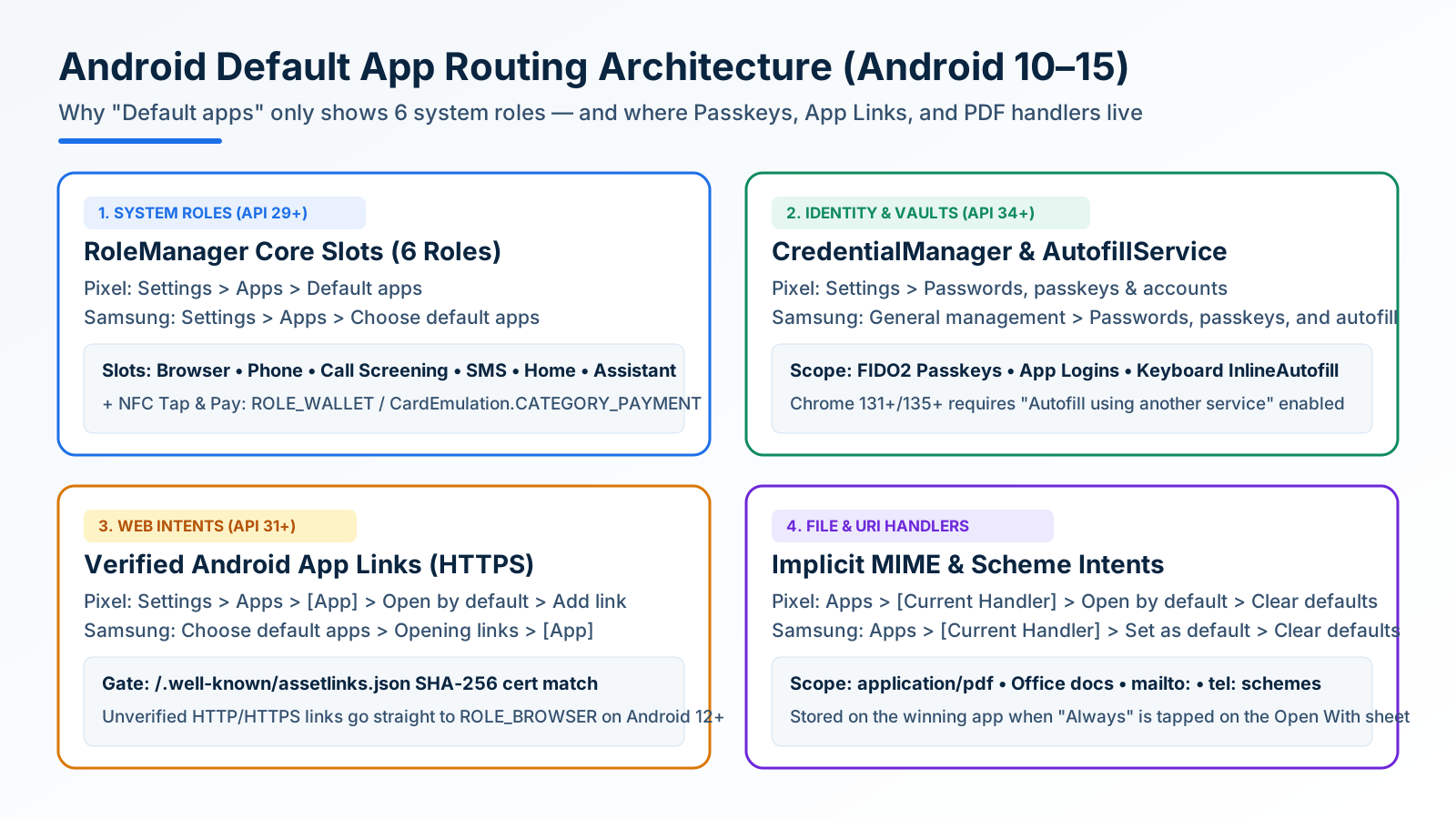
How to Change and Reset Default Apps on Android: Browsers, Passkeys, PDFs, and App Links
Looking only in Default apps fails when a wrong PDF viewer or browser hijacks links. Use Android's 4 routing menus to set browsers, passkeys, App Links, and MIME handlers.
Block Spam Calls and Robocalls on Android Without a Paid App
Use Filter spam calls, Pixel Call Screen, or Galaxy Text call. Google does not take numbers from your Contact list.