
Contents
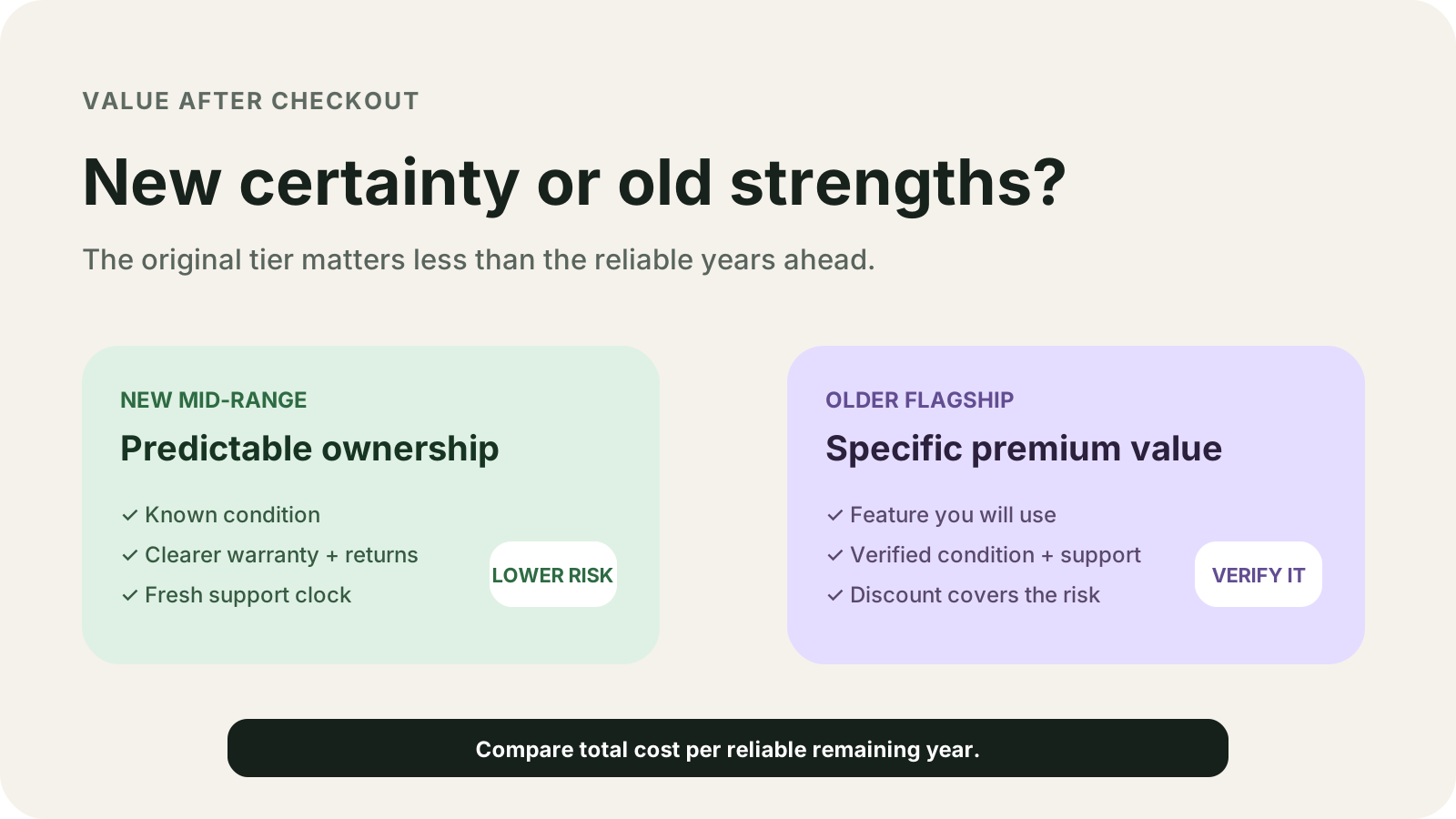
An older flagship fails as a multi-year buy when its published update anniversary is already this month. Choose the new mid-range phone when its own stated window still covers the years you will keep it, and choose the older phone only when that window, a readable battery check, and a feature you will use all line up.
The pair is two exact models. A later policy does not lengthen an earlier list. More of this column sits in the Android buying guides.
A new mid-range phone is the better buy when the older phone’s published support window no longer covers the years you will keep it. On Google’s update page, Pixel 8 and later phones, including the Pixel 10a, get 7 years of OS and security updates from first availability on the US Google Store. Pixel 6 and Pixel 6 Pro are in the 5-year group. The availability table prints October 2023 for Pixel 8 and Pixel 8 Pro, March 2026 for the Pixel 10a, and October 2021 for Pixel 6 and Pixel 6 Pro. Compare price, RAM, battery capacity, refresh rate, and camera hardware directly on each model’s specification sheet.
Those months and year counts are the update page and the US Google Store availability table. [1] [2] The update page and the availability table use model names, months, and year counts.
Scroll horizontally to view all table columns.
| Input or item | Typical value or source | Why it matters |
|---|---|---|
| Pixel 8 and Pixel 8 Pro | October 2023 on the US Google Store; 7 years of OS and security updates from that availability | The anniversary month is October 2030. Arithmetic is below. |
| Pixel 10a | March 2026; same 7-year group | The anniversary month is March 2033. Google prints no price tier for it. |
| Pixel 6 and Pixel 6 Pro | October 2021; 5-year group | The anniversary month is October 2026, the check month for this page. |
| Pixel 6a | July 2022; 5-year group | A different month from Pixel 6. Do not copy the Pixel 6 result onto it. |
| Pixel 5a and earlier | No longer receive Android version updates or security updates | The old model name does not keep patches coming. |
| Pixel 3 through Pixel 8 Pro, and Pixel Fold | Designed to keep at least 80% capacity up to a stated cycle count; rated line says up to 80% for about 800 cycles | Replacement is recommended under 80% remaining capacity or at 800 cycles. Health status is absent on Pixel 8 and Pixel 8 Pro. |
| Pixel 8a and later, including Pixel 10a | Rated line says up to 80% for about 1000 cycles; health screen shows Normal or Reduced | Reduced means capacity below 80%. |
| Galaxy S21, S21+, S21 Ultra, S21 FE | Up to four One UI generations and five years of security updates on the 9 February 2022 list | The start date is not printed, so years left stay blank. |
| Galaxy S24 series | Seven generations of OS upgrades and seven years of security updates, in the 18 January 2024 release | Timing depends on model and market. That page does not print the start date. |
| Galaxy S26 series | Seven generations of OS upgrades and seven years of security updates from the global launch date | General availability in that release starts 11 March 2026. The footnote does not define that day as the global launch date. |
| EU smartphone, Annex II.B, from 20 June 2025 | At least 800 cycles at 80% capacity; listed spare parts for at least 7 years after the end of placement; OS updates, if provided, at no cost for at least 5 years after the end of placement | This is a placing-on-the-market rule. It does not rewrite a 2021 or 2023 US Google Store date. |
Scroll horizontally to read the labels in this diagram.
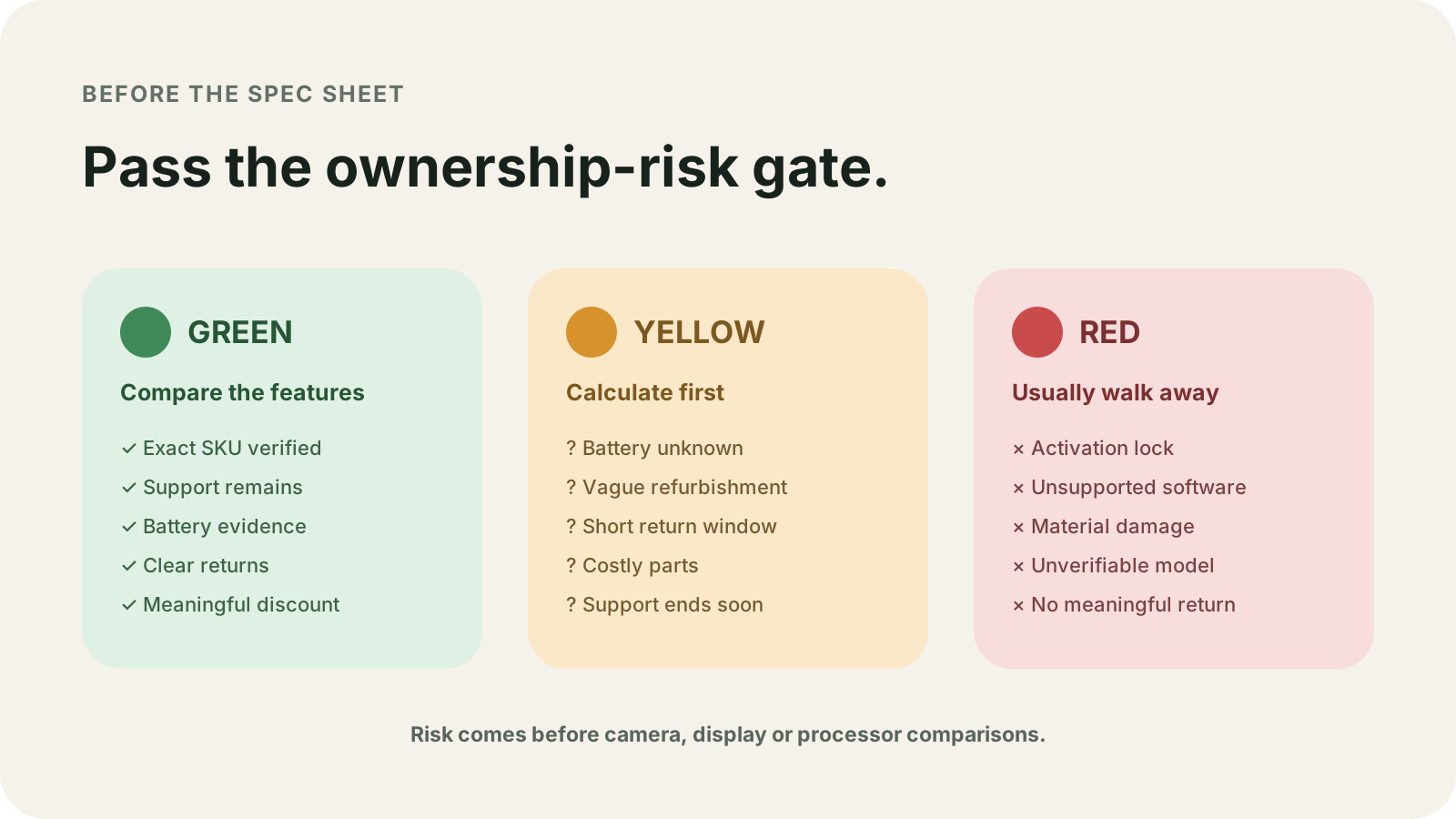
Green means the model is on a current list, whole years are still left, the battery screen is visible, the cycle count is under the printed limit, and you will use a feature on that phone. Yellow means a blank: no health screen, no start day, no parts list, or no cycle count. Red means updates have already ended, the battery is swollen, whole years left are zero, the model is missing from the list, or the cell has lifted the screen.
How many whole years are left
Google starts the Pixel clock when the device first became available on the US Google Store, and the availability table prints a month and a year. [1] [2] The 7-year sentence for Pixel 8 and later, and the 5-year sentence for Pixel 6, Pixel 6 Pro, Pixel 6a, Pixel 7, Pixel 7 Pro, Pixel 7a, and Pixel Fold, both cover OS and security updates. Pixel Drops are a separate extra in that paragraph. This arithmetic uses only the stated years. Rollout still depends on the carrier and the device, and Google says it can take weeks for a given unit to see the update. The US store month is the support start. A carrier can ship the patch on a later day. For another brand, use the same subtraction on that model’s own row. The steps are in how Android update support is counted.
Anniversary month = availability month + stated years.
Worked example, month-level arithmetic. The check month is October 2026, the month this page was updated. The availability table prints no day, so every day count below is blank.
Pixel 8 and Pixel 8 Pro: October 2023 + 7 years = October 2030. Whole years left = 2030 - 2026 = 4. Day remainder: blank.
Pixel 6 and Pixel 6 Pro: October 2021 + 5 years = October 2026. Whole years left = 2026 - 2026 = 0. Days still inside October 2026: blank. A multi-year plan does not fit a row whose anniversary month is the check month.
Pixel 10a: March 2026 + 7 years = March 2033. Counting from the first of the check month to the first of the anniversary month: (2033 - 2026) × 12 + (3 - 10) = 84 - 7 = 77 months = 6 years and 5 months. That is month-start arithmetic. The true gap can shift by less than a month because the day is not printed.
Pixel 6a is July 2022 in the 5-year group, so its anniversary month is July 2027. Leave it on its own row.
Rule of thumb. If remaining whole years < 1 under this October 2026 check, do not plan a multi-year hold on that Pixel 6 or Pixel 6 Pro row. The published anniversary month is already here, and the day remainder is blank.
Conservative reliable years = the smaller of the years you plan to keep the phone and the whole years left. If whole years left are 0, stop. Do not divide a price by zero years.
A 4-year hold in the next line is a planning assumption. These pages do not print that 4 as a spec. For Pixel 6 and Pixel 6 Pro, the smaller of 4 and 0 is 0. For Pixel 8 and Pixel 8 Pro, the smaller of 4 and 4 is 4. For the Pixel 10a, 6 years and 5 months of month-start gap is longer than 4 years, so the limit is the 4-year plan.
Where each choice fails
Scroll horizontally to view all table columns.
| Phone or rule | Dominant failure mode | Prevention |
|---|---|---|
| Pixel 6 and Pixel 6 Pro in October 2026 | The 5-year anniversary month is the check month, so a multi-year plan has zero whole years left | Do not spread ownership across years the row does not show |
| Pixel 5a and earlier | Android version updates and security updates have stopped | Skip it for banking or a long hold |
| Pixel 8 and Pixel 8 Pro | Update years can still remain while the health-status screen is absent | Rely on physical cycle and runtime observations when the health percentage screen is unavailable |
| Pixel 8a and later | Reduced means capacity below 80%, and the rated line is about 1000 cycles | Read the screen before the return window closes |
| Swollen battery | The screen can lift and let liquid or dust in | Do not take the phone apart or fix that battery yourself |
| Galaxy S21 series | A later seven-year sentence does not move this phone onto that sentence | Use the 9 February 2022 list and leave years left blank |
| EU smartphone placed on the market from 20 June 2025 | A serialised spare part needs the owner’s authorisation before pairing software is provided | Read the free-access procedure before you count on a repair |
| Phone first sold before that date | The 7-year parts duty is tied to placing on the market under the regulation | Leave the parts cell blank unless that model’s own page prints one |
Battery cycles and the screen you can open
Google’s battery page says a Pixel battery, charged as recommended, is designed to keep at least 80% of its initial capacity up to a certain number of charge cycles. Capacity is the fuel-gauge estimate. A cycle counts partial discharges: 100% down to 50% and back to 100% is 0.5 cycles. [3]
The rated lines on that page:
- Pixel 3 through Pixel 8 Pro, and Pixel Fold: should retain up to 80% capacity for about 800 charge cycles, after which replacement is recommended.
- Pixel 8a and later: should retain up to 80% capacity for about 1000 charge cycles, after which replacement is recommended.
The replacement lines use a harder edge: less than 80% remaining capacity, or 800 cycles on the first group, or 1000 cycles on Pixel 8a and later.
Battery health status, Normal or Reduced, is only on Pixel 8a and later. Reduced means capacity below 80%. Google also lists Pixel 6a, Pixel 7, Pixel 7 Pro, Pixel 7a, Pixel 8, and Pixel 8 Pro as phones that do not indicate battery health status. Cycle count in Settings, under About phone, then Battery information, is the Pixel 8a and later path. On that screen, the battery manufacture date and the date of first use are shown. Google attributes an earlier first-use date to factory checks, so a seller’s purchase story and the first-use date can differ.
Battery health assistance is a different control. It is on Pixel 6a and later. It starts adjusting maximum voltage at 200 charge cycles and continues until 1000. On Pixel 9a and later it is on by default and cannot be turned off. On Pixel 6a through Pixel 9 Pro Fold it can be switched. That toggle is the assistance control. Reduced and Normal are the separate health-status labels.
A fast drop in runtime on a used phone can be an app, a setting, or a cell past the rated count. Separate those before you pay for a battery. Use a single change at a time, as in how to diagnose Android battery drain.
A swollen battery is its own failure mode. Google says the swelling itself is not the safety event, and that it can lift the screen so liquid or dust enters. An exposed cell is then easier to damage. The same section says not to take the device apart and not to fix a swollen battery yourself.
Divide by the years, and leave the money blank
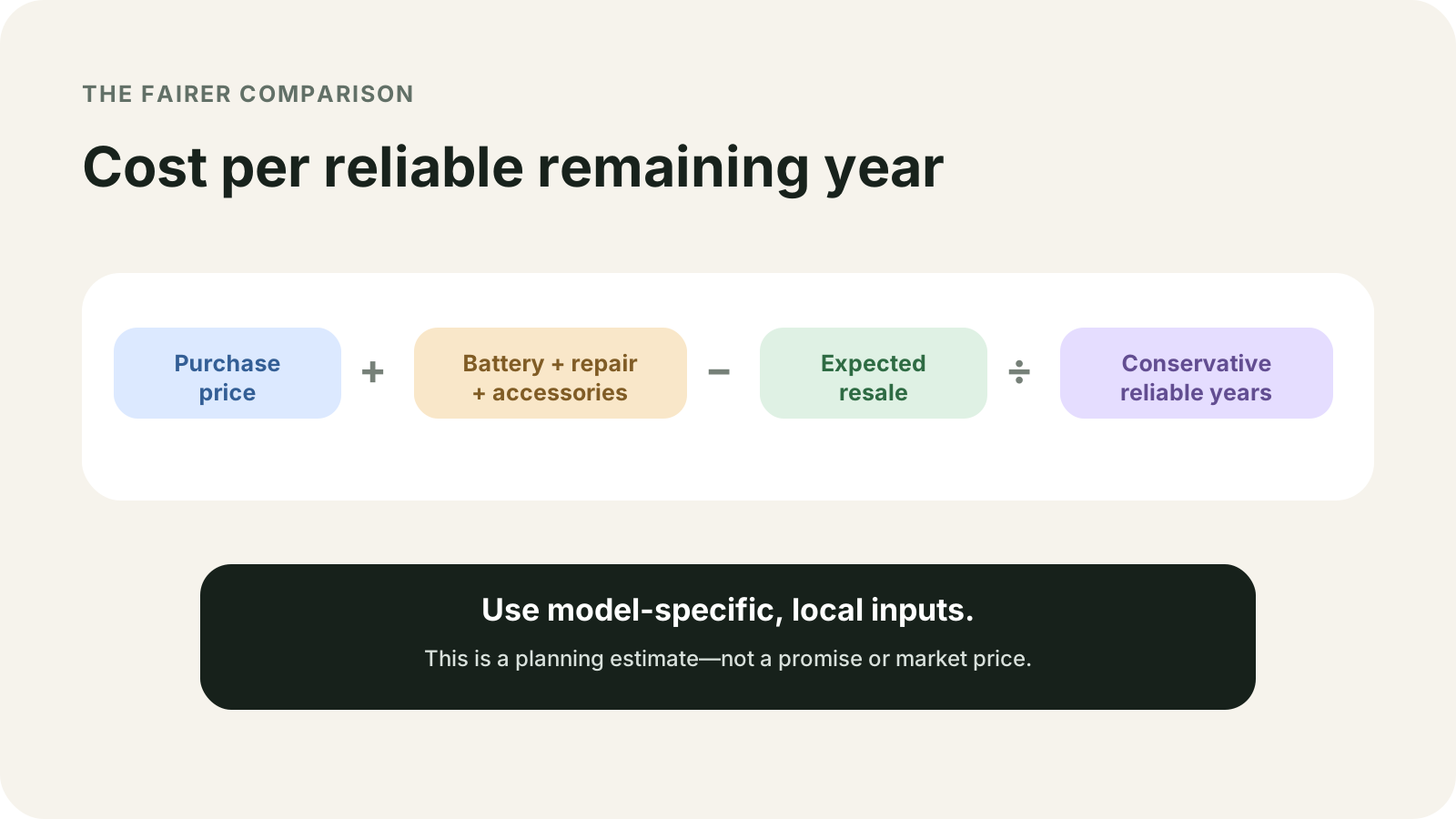
Cost per reliable year = (purchase price + battery or repair cost you have in writing + accessories - resale you can complete) / conservative reliable years.
Scroll horizontally to read the labels in this diagram.
Open the full-size cost diagram
This page does not print a purchase price, a battery price, or a resale figure, so those cells stay blank. The denominator is the conservative reliable years from the section above. When that number is 0, as it is for a multi-year plan on Pixel 6 or Pixel 6 Pro in October 2026, stop. A lower checkout price does not create a year the update row does not show.
Resale in the formula is money you can actually receive after the handoff. The steps for accounts, device-bound services, and the reset are in what to do before you sell an Android phone. If you do not complete that handoff, leave resale blank too.
A later Samsung sentence does not move an earlier phone
On 9 February 2022 Samsung’s US newsroom said select devices would get up to four generations of One UI and Android OS upgrades, and up to five years of security updates. The eligible Galaxy S list names Galaxy S22, S22+, S22 Ultra, Galaxy S21, S21+, S21 Ultra, S21 FE, and upcoming S series devices as of that release. The footnote makes timing depend on the model and on when the Android OS upgrade arrives. [4] Phones that are not eligible for four One UI generations stay at up to three, which Samsung described as a step up from two. The opening sentence mentions select A series phones. The eligible list under the footnote does not name an A series model. Years left for a Galaxy A phone you are holding: blank, until that model’s own page prints them. The S21 start date is also blank on this release, so S21 years left stay blank. Do not subtract from 9 February 2022. The page does not say the five security years start that day.
The Galaxy S24 release of 18 January 2024 says that flagship offers seven generations of OS upgrades and seven years of security updates. Its footnote makes timing depend on the device model and the market. It does not print a start date, and it does not place the S21 on the seven-year line. [5]
The Galaxy S26 release of 25 February 2026 says the series gets seven generations of OS upgrades and seven years of security updates from the global launch date. The same release says general availability starts 11 March 2026. The footnote does not say 11 March 2026 is the global launch date, so this page does not subtract from 11 March. [6]
A US Google Store month is a US date. A unit sold under another regional name can sit on a different support row. Check that split in Global Version vs China Version labels before you treat a store month as universal.
What an EU smartphone must do from 20 June 2025
Regulation (EU) 2023/1670 sets ecodesign requirements for placing smartphones on the market. Annex II.B dates the smartphone rules below from 20 June 2025. [7] A Pixel whose US Google Store month is October 2021 or October 2023 is outside that start. Resale of that phone does not move it onto the annex.
For a smartphone in that annex:
- Battery endurance in cycles is at least 800 cycles at 80% remaining capacity. The test charges at a rate the battery management system limits. The power supply’s maximum sits outside that limit.
- Listed spare parts, including the battery, cameras, ports, buttons, microphones, speakers, and, where present, the hinge and folding mechanism, go to professional repairers until at least 7 years after the date of end of placement on the market. The clock starts when placement of that model ends. The day you pay is a separate date.
- The battery, display assembly, back cover when it must come off for the battery, and a few other parts also go to end users for that same 7-year period, unless the maker uses the alternative path: at least 83% capacity after 500 full cycles, at least 80% after 1000 full cycles, and dust-tight immersion protection of at least 1 meter for 30 minutes. That alternative is how a maker can keep the battery with professional repairers. The 800-cycle line stays the minimum for every smartphone in the annex.
- If the maker provides security, corrective, or functionality updates, those updates are free from the end of placement until at least 5 years after that date, for units of the model on the same operating system. Security and corrective updates are due within 4 months of the underlying operating-system release. Functionality updates are due within 6 months. The annex does not say every phone receives a new Android version each year.
- The phone records, where the user can open it, the battery manufacture date, the date of first use after the first user sets the phone up, the number of full charge and discharge cycles, and measured state of health.
Google’s “about 800” and “about 1000” lines are a Pixel design statement, with partial discharges counted as fractions of a cycle. The annex uses full cycles and a stated charge-rate limit. Both documents print 800. Keep each 800 on the test condition printed next to it.
The minimum dust and water line in the annex is protection against solid objects bigger than 1 millimeter and against splashing water. That sentence is the floor for phones placed on the market under the annex. Seals on an older phone after wear or repair sit outside it; audit a used flagship’s perimeter adhesive before purchase using our guide to best waterproof phone cases and Android barometer IP68 seal testing.
Which phone to take home
Scroll horizontally to read the labels in this diagram.
Open the full-size decision diagram
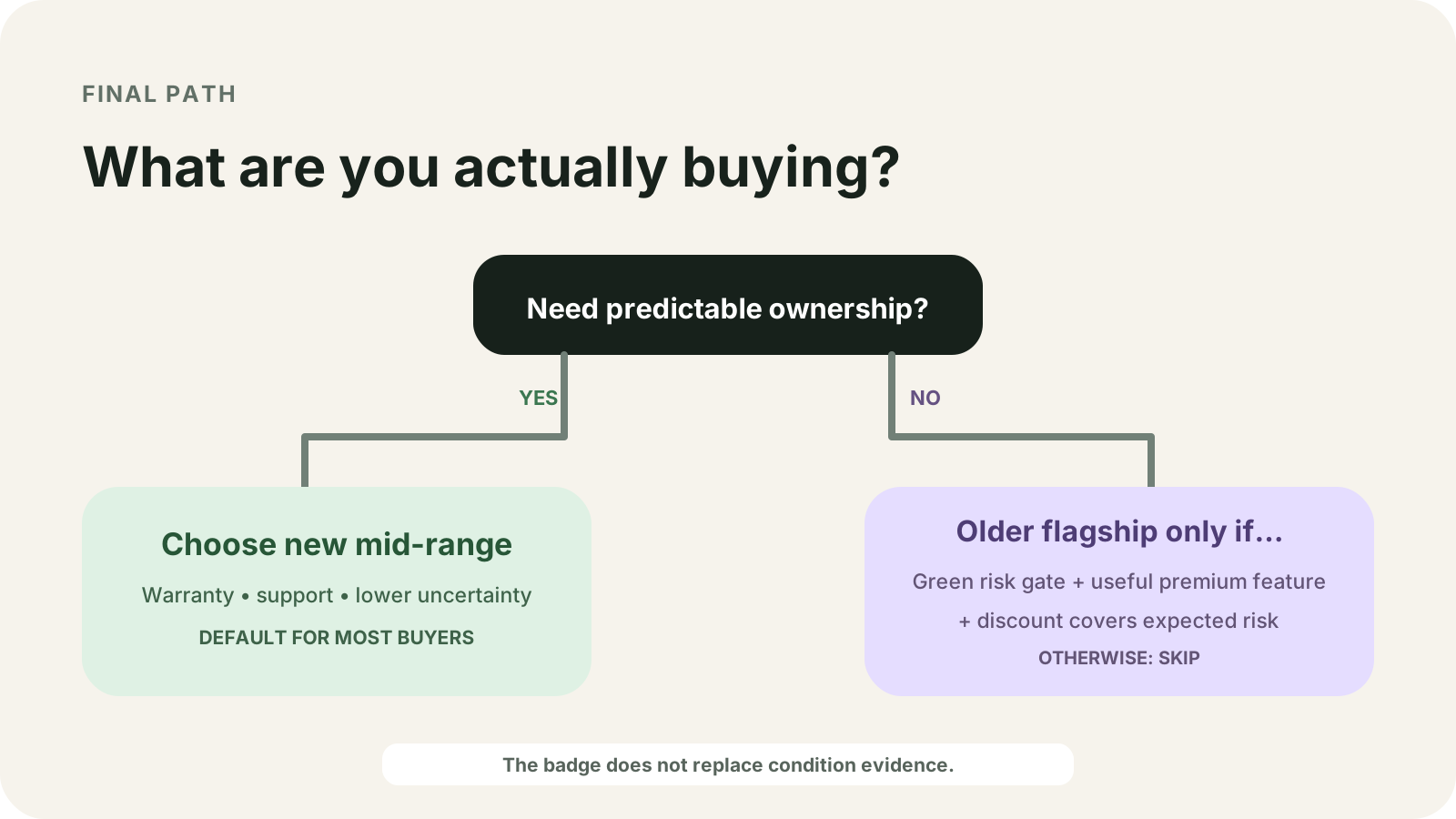
When the plan needs whole years still left, take the phone whose anniversary month is still ahead and whose battery screen you can read. On the pages saved here, the Pixel 10a is in the 7-year group with a March 2026 US Google Store month, about 1000 cycles, and the health screen that starts with Pixel 8a. Pixel 6 and Pixel 6 Pro have a 5-year anniversary month of October 2026. Pixel 8 and Pixel 8 Pro still show 4 whole years in the October arithmetic, and the health-status screen is absent on those two models, so they stay yellow until you have battery evidence the page actually provides.
Take the older phone when your plan fits the years that model’s own row still shows, you can read the battery check that model actually has, and you will use a feature on that model. If memory or storage is the reason you want the older phone, read the figure on the model page. RAM and storage for this pair are blank here. The method for the memory figure is how much RAM an Android phone needs. The method for 128GB against 256GB is which storage size fits your files.
If you buy the newer phone, move accounts and files while the old phone still turns on. The order is in how to set up a new Android phone.
The pages read for this rewrite were saved on 18 October 2026. Anniversary months are arithmetic on the printed month plus the stated years. Days inside those months are blank. Prices, RAM, milliamp-hour capacity, refresh rate, and camera specifications are blank for the same reason.
Frequently Asked Questions
Does Google label the Pixel 10a a mid-range phone?
No. Google's update page lists the Pixel 10a with Pixel 8 and later for 7 years of OS and security updates. The availability table prints March 2026. Neither page prints a mid-range label or a price.
How many days of Pixel 6 support are left in October 2026?
The day count is blank. Google prints October 2021 and a 5-year window, so the anniversary month is October 2026. The availability table does not print the day inside October 2021.
Does the Galaxy S24 seven-year line move a Galaxy S21 onto seven years?
No. Samsung's 9 February 2022 list names the Galaxy S21, S21+, S21 Ultra, and S21 FE for up to four One UI generations and five years of security updates. The S24 release states seven generations and seven years for that flagship, and it does not reprint the S21 onto that line.
Sources & methodology7 sources
Evidence used for this article. Links open the original source in a new tab.
- Learn when you'll get software updates on Google Pixel phones — Google Pixel Help
- Find when your Pixel device became available — Google Pixel Help
- Understand your Pixel battery — Google Pixel Help
- Samsung Sets the New Standard of Four Years of OS Upgrades — Samsung Newsroom US
- Enter the New Era of Mobile AI With Samsung Galaxy S24 Series — Samsung Global Newsroom
- Samsung Unveils Galaxy S26 Series — Samsung Newsroom US
- Commission Regulation (EU) 2023/1670 — Official Journal of the European Union
TasteOfAndroid is responsible for this page. The byline, method and commercial relationships are on the editorial policy and the author page.
Related Articles
Choosing Waterproof Phone Cases: IP Ratings, Seal Condition and Fit
Compare rigid waterproof phone cases and pouches by model fit, manufacturer-rated use, closure condition and controls. Understand the limits of phone barometer checks.
Pocket Casts vs AntennaPod: Choose and Move Your Podcasts
Choose Pocket Casts or AntennaPod by playback controls and sync needs, then move subscriptions with OPML while protecting listening progress and settings.

Xodo vs Flexcil: PDF Annotation and Signing on Android
Study marks, a visual signature, and a signing request are different jobs. Follow the public steps, then reopen a copied PDF. These pages do not name a winner or a price.