
Contents
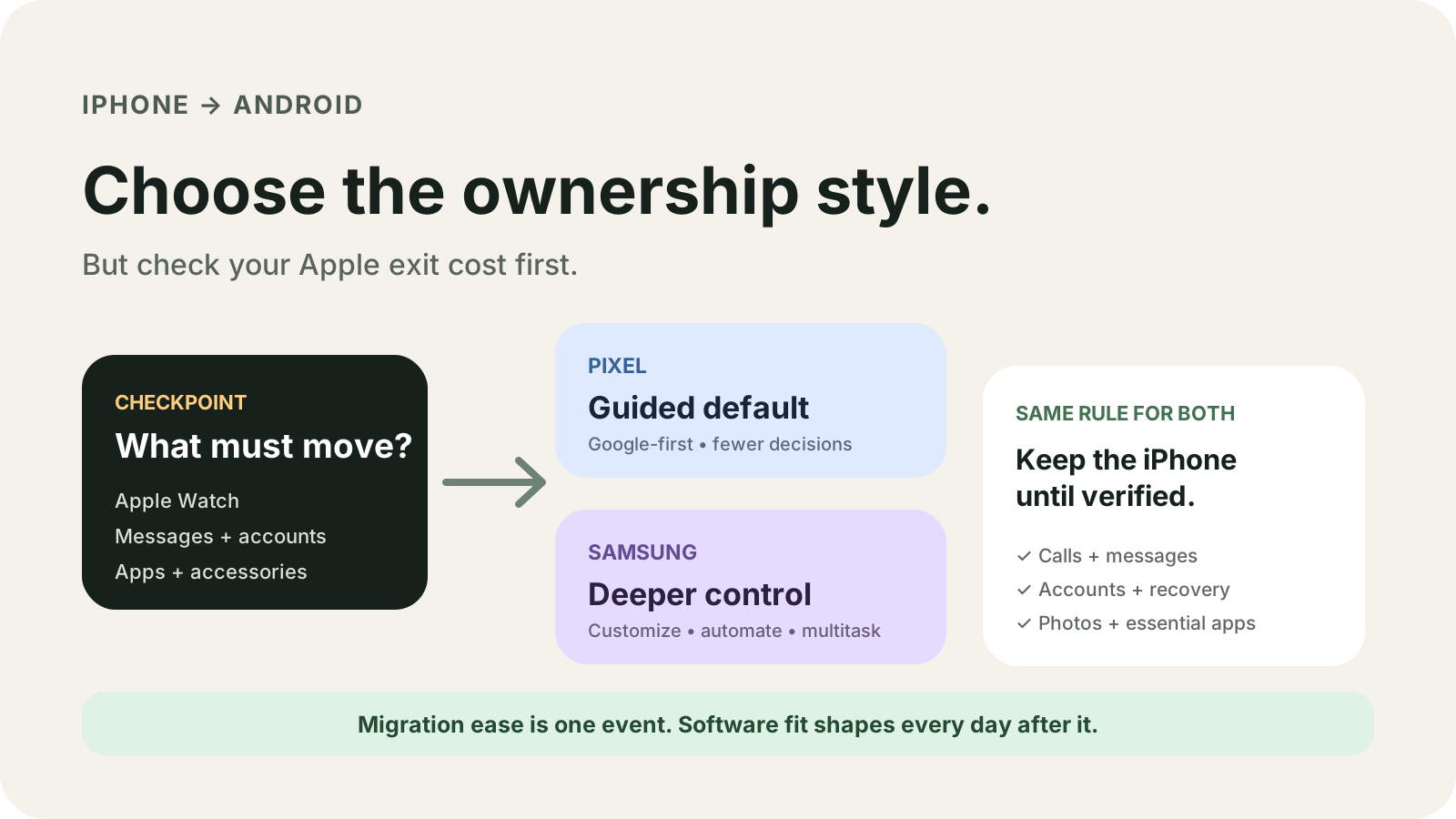
Moving the number while iMessage is still on fails RCS or SMS/MMS delivery, and an Apple Watch that still has to pair with an iPhone makes the new phone the wrong daily device. For an iPhone switcher, choose Pixel when that exact Pixel is in the Pixel Help group that marks texts Yes, and choose Samsung when Smart Switch’s USB list is the copy you will run or the Quick Share page names that Galaxy.
This comparison sits with the other Android buying guides.
Choose Pixel when the phone is Pixel 10 or later, or a Pixel 8 or newer phone that already runs Android 17 and can use the upgraded column, where text messages and iMessages are marked Yes. Choose Samsung when you will copy with Smart Switch over USB, because that personal-content line includes Messages, or when the Quick Share page names that exact Galaxy. Series 12 and Ultra 4 still need an iPhone 11 or later on iOS 27 or later. SE 3 needs an iPhone 11 or later on iOS 26 or later. Classic wireless marks texts No. The iCloud Smart Switch line does not list Messages. Pages saved 18 October 2026.
The watch requirement, the iMessage switch, and the text column decide the move. The full conditions are in the table.
Scroll horizontally to view all table columns.
| Input or item | Printed value, saved 18 October 2026 | Why it matters | Dominant failure mode |
|---|---|---|---|
| Apple Watch Series 12 and Ultra 4 | iPhone 11 or later with iOS 27 or later. Apple Support, published 14 September 2026. | Setup on that page pairs the watch with the iPhone. | Treating a Pixel or Galaxy as the setup phone. The page does not describe that path. |
| Apple Watch SE 3 | iPhone 11 or later with iOS 26 or later. | A lower iOS floor than Series 12 and Ultra 4. | Copying the iOS 27 line onto an SE 3. |
| Earlier Apple Watch | Different iPhone models and earlier systems. The iPhone says if it needs an update. | The Series 12 line does not fill this row. | |
| iMessage and FaceTime | Pixel Help and Samsung say turn both off before the transfer. Apple’s deregister page is for a non-Apple phone that is not receiving RCS or SMS/MMS. | The number can keep routing through Apple. | Moving the number while iMessage stays on. |
| Pixel 10 and later | Pixel Help lists passwords and passkeys, Wi-Fi networks, texts, photos, contacts, apps, and calendars. Latest iOS, Wi-Fi, and Bluetooth. | This sentence is for that group. | Reading it as every Pixel. |
| Pixel 8 and newer on Android 17 | Upgraded column: texts and iMessages Yes on wireless or cable. Passwords and passkeys Yes on that column. | Classic wireless still marks texts No. | Using the wireless classic column for texts. |
| Apple Passwords | The same Pixel page says they do not transfer automatically. Export, then import into Google Password Manager. | The upgraded Yes cell does not erase this section. | Skipping the export. |
| More than 60 GB into a Pixel | Fully charge both phones and use a USB cable, to prevent connection drops or battery depletion. | A size threshold, not a speed. | A wireless copy of a library over 60 GB. |
| Smart Switch USB from iOS | Personal content includes Messages. iTunes music after 2009 can transfer. Music prior to 2009 cannot. | The cable list is the one with Messages. | Assuming the iCloud list matches it. |
| Smart Switch iCloud from iOS | Personal content: Contacts, Schedule, Calendar, Notes, Call history, Bookmarks. Messages is not on that line. Some data may not transfer. | Wireless iCloud is a shorter list. | Expecting iPhone texts from that line. |
| Quick Share with iPhone | Named phones only. AirDrop set to Everyone for 10 minutes. Latest update on a compatible device. | Pixel 8a is named. Pixel 8, Pixel 8 Pro, and Pixel 8 Pro XL are not. | Treating every Pixel 8 phone as listed. |
| AirPods Pro 2 (USB-C) specs | AirPods can be used as Bluetooth headphones with non-Apple devices, but functionality may be limited. | Basic audio is the printed limit. | Expecting the iPhone control set. |
| Pixel 10 and later in the US | eSIM only. The fix page limits that sentence to the US. | A physical SIM does not go into that US phone. | Treating the US line as every country. |
Clear the Apple Watch and iMessage gates first
Apple’s setup page does not offer a Pixel or Galaxy path. Series 12 and Ultra 4 need an iPhone 11 or later with iOS 27 or later. SE 3 needs an iPhone 11 or later with iOS 26 or later. Earlier watches use different iPhones and earlier systems, and the iPhone itself reports when it needs an update. [6]
The dominant failure mode is a watch that still has to be paired, after the only qualifying iPhone has been erased. Keep that iPhone until you have another setup path you have already checked against the model line above. The page’s published date is 14 September 2026, so the iOS numbers belong to that page, not to a different watch.
Pixel Help and Samsung both tell you to turn off iMessage and FaceTime before the transfer. Apple’s deregister page is the follow-up when a non-Apple phone is not receiving RCS or SMS/MMS. Put the SIM back in the iPhone if you already moved it, use cellular data, then turn off iMessage and FaceTime under Settings, Apps. If you no longer have the iPhone, Apple offers online deregistration. Texts can arrive right away, and some Apple devices can take a few hours to stop sending iMessage to that number. Messages sent to the Apple Account still arrive on other Apple devices. [1] [4] [7]
On the AirPods Pro 2 USB-C specs page, AirPods can be used as Bluetooth headphones with non-Apple devices, but functionality may be limited. That sentence does not list which controls remain. Check the controls you use before you treat the buds as carried over. [9]
When this does not apply: if you do not use Apple Watch, the iPhone 11 and iOS lines do not choose the phone. They still block erasing the only iPhone that can set that watch up later.
Use the copy column that marks messages yes
Pixel Help splits the iPhone copy into Pixel 10 and later, and Pixel 9a or earlier. On Pixel 10 and later, the page says you can transfer passwords and passkeys, Wi-Fi networks, texts, photos, contacts, apps, and calendars, wirelessly, with a cable, or both, after the latest iOS plus Wi-Fi and Bluetooth. The same page then says passwords stored in Apple Passwords do not transfer automatically. Export them on the iPhone and import them into Google Password Manager or another manager on the Pixel. [1]
Inside the Pixel 9a or earlier section, Pixel 8 or later on Android 17 may use an upgraded process that copies more data. The table under that page says the upgraded process, beginning with Android 17 on all Pixel 8 devices and newer, marks text messages and iMessages Yes. Classic wireless marks them No. Classic cable marks them Yes. The chat-history row on that table is No on classic wireless, Yes on cable, and Yes on the upgraded column after initial setup. The same page says some apps on that row need a cable after setup. [1]
The fix page adds three Pixel-only conditions. Google Messages can take up to 24 hours to index history. Copies of more than 60 GB need both phones fully charged and a USB cable. An iPhone X or earlier can use a USB-C to Lightning cable or a Quick Switch Adapter. Paid apps from the Apple App Store do not transfer. Only apps from the Google Play Store transfer, and a missing iOS app has to be found again on Play. Pixel 10 and later phones in the US can only use eSIM. If the iPhone copy does not offer an eSIM move, Pixel Help tells you to contact the carrier. [2]
Do not follow the Android-phone variant of the same Pixel answer. That variant’s cable steps are for a previous Android device, including five taps on the copy screen. The iPhone steps are the iPhone and iPad variant. [11]
Samsung’s own path is Smart Switch. The support page tells you to turn off iMessage and FaceTime, update the iPhone, and back up iMessage media to iCloud or iTunes. The cable it names is an iPhone Lightning to USB-C cable, or a Lightning to USB cable with a USB-OTG adapter. Wireless copy uses iCloud, and the page says some data may not transfer that way. [4]
The Smart Switch content page splits the iOS lists. USB personal content includes Messages. iCloud personal content does not. Both lists include Bookmarks. Both allow iTunes music purchased after 2009, and both block music purchased prior to 2009 because those files are not DRM-free. The year 2009 itself is in neither sentence, so a 2009 purchase stays unchecked. [5]
Android Help, a separate page, says the upgraded iPhone copy includes Pixel 8 devices and newer, Galaxy Z Flip 8, and Galaxy Z Fold 8. Wireless Android Switch on that page needs iOS 15 or later. Samsung phones are pointed to their own copy method. That page also says the copy usually takes less than 30 minutes, and can take up to a few hours with a lot of data. It says iCloud photos and videos, paid apps and in-app purchases, Safari bookmarks, and health data do not come across. Pixel Help’s iPhone table has no bookmarks row, so this page leaves the Pixel bookmarks cell blank. Smart Switch does list Bookmarks. [3]
Message coverage changes with the column. Pixel 10 and later has its own section above this classic and upgraded table.
Rule of thumb. If the on-device copy is over 60 GB, charge both phones and use a USB cable. If the iTunes purchase year is under 2009, Smart Switch cannot move that music. If the installed iOS version is under 15, Android Help does not open the wireless Android Switch app. A Pixel 10 still follows that model's own line, which says the latest iOS, not iOS 15.
Photos on the Pixel iPhone page transfer when they are saved on the phone. iCloud photos need Google Photos on the iPhone, or Apple’s iCloud migration tool, which that page says will transfer photos, videos, and music playlists. If the iPhone cannot take the latest iOS during Pixel’s prep flow, the prep page says you get extra on-screen steps for password data. [1] [10]
The step order after you pick a column is in the iPhone-to-Android transfer checklist. The printed update window for a named Pixel or Galaxy is in the Pixel Android versus Samsung One UI comparison. This page does not copy a year from one phone onto another.
Share files later only if that phone is named
Quick Share with iPhone is a second question, after the one-time copy. The Android page saved on 18 October 2026 says compatible Android phones can use Quick Share with AirDrop, on the latest update, within Bluetooth distance. The iPhone user sets AirDrop to Everyone for 10 minutes. The iPhone side of that page says all iPhone devices. The Android side is a name list.
Pixel names on that list: Pixel 10, 10 Pro, 10 Pro XL, 10 Pro Fold, 10a. Pixel 9, 9 Pro, 9 Pro XL, 9 Pro Fold, 9a. Pixel 8a.
Galaxy names on that list: Galaxy S26, S26+, S26 Ultra. Galaxy S25, S25+, S25 Ultra, S25 Edge. Galaxy S24, S24+, S24 Ultra. Galaxy Z Flip7, Z Fold7, Z Flip6, Z Fold6, Z Fold6 Special Edition, and Z TriFold.
The list does not name Pixel 8, Pixel 8 Pro, or Pixel 8 Pro XL. It does not name Galaxy Z Flip 8 or Galaxy Z Fold 8, which are the Galaxy models on Android Help’s upgraded copy list. Absence from the saved list is not a guess about a future update. The same page also names Xiaomi 17T Pro, OnePlus 15, OPPO Find X9, X9 Pro, X9 Ultra, X9s, OPPO Find N6, HONOR Magic V6, and vivo X300 Ultra. It labels Motorola razr fold 2026, OPPO Find X8 series, HONOR Magic8 Pro, and vivo X300 and X300 Pro as Coming Soon. [8] [3]
The figure shows the Pixel gap and the Galaxy split. The paragraph above has every Pixel and Galaxy name from the saved page.
Worked example. The Quick Share page sets one AirDrop Everyone window at 10 minutes. Assumption for this arithmetic: you need two separate sends, and the first window closes before the second send. Everyone window = 10 minutes. Total Everyone time = 10 + 10 = 20 minutes. This adds the printed window. It is not a file-size or transfer-speed result. The page does not print how many files fit in one window.
A Pixel 8 can sit in the upgraded copy group and still be missing from the Quick Share list. A Galaxy S26 can sit on the Quick Share list and still be outside Android Help’s upgraded names, which are Flip 8 and Fold 8 plus Pixel 8 devices and newer. Pick the column you will run, then check the name list for the sharing you still do with iPhones.
Keep the iPhone until the checks pass
The costs that do not show up as a phone price are a second copy when the first column skipped texts, up to 24 hours of Google Messages indexing on a Pixel, a few hours before some Apple devices stop using iMessage, a separate move for iCloud photos, and an iPhone that still has to set up the watch. Android Help’s usual copy time, less than 30 minutes or up to a few hours with a lot of data, is a different clock from the 24 hour indexing line. Do not add those figures together. [2] [3] [7]
Search for a known message by keyword before you erase the iPhone. Pixel Help gives that search as the way to see whether a large message history has finished indexing. Then run setup steps for a new Android phone and the backup checks for photos, messages, and authenticator codes.
Which phone fits
Choose Pixel 10 or later when you want that Pixel Help iPhone path, and still export Apple Passwords because the same page says they do not move on their own. Choose a Pixel 8 or newer phone that already runs Android 17 when you need the upgraded text column. A Pixel 8 or newer phone that is not on Android 17 stays on the classic cable column for texts. Choose Samsung when the USB Smart Switch list is the list you need, especially Messages and Bookmarks, or when that Galaxy is named for Quick Share and the Pixel you were considering is not. Delay both when Series 12, Ultra 4, or SE 3 is still in the day and you do not have the iPhone that setup page names.
Saved 18 October 2026 from the Pixel Help iPhone variant, the Pixel transfer fix page, Android Help, Samsung Support US, Apple Support, and the Android Quick Share page. The Android-device variant of the Pixel transfer answer is cited only so its cable steps are not used on an iPhone.
Frequently Asked Questions
Does every Pixel 8 phone appear on the Quick Share with iPhone list?
No. The Android Quick Share page saved on 18 October 2026 names Pixel 8a. It does not name Pixel 8, Pixel 8 Pro, or Pixel 8 Pro XL.
Will classic wireless copying bring iPhone texts to a Pixel?
No. On the Pixel Help iPhone table, text messages and iMessages are No for classic wireless Android Switch, and Yes for classic cable and for the upgraded column. The upgraded column is for Pixel 8 devices and newer, beginning with Android 17.
Can Apple Watch Series 12 be set up on a Pixel or a Galaxy?
Apple's setup page, published 14 September 2026, says Series 12 and Ultra 4 need an iPhone 11 or later with iOS 27 or later. The steps pair the watch with an iPhone. That page does not describe Pixel or Galaxy setup.
Does Smart Switch over iCloud include iPhone messages?
The iCloud personal-content line lists Contacts, Schedule, Calendar, Notes, Call history, and Bookmarks. It does not list Messages. The USB adapter line does list Messages. Samsung also says some data may not transfer on a wireless iCloud copy.
Sources & methodology11 sources
Evidence used for this article. Links open the original source in a new tab.
- Transfer data from your previous device to a Pixel phone, iPhone and iPad — Pixel Phone Help
- Fix issues with data transfer on a new Pixel phone — Pixel Phone Help
- Copy apps and data from an iPhone or iPad to a new Android device — Android Help
- Switch from iPhone to Samsung — Samsung Support US
- Content that can be transferred with Smart Switch — Samsung Support US
- Set up your Apple Watch, published 14 September 2026 — Apple Support
- Deregister iMessage on your iPhone or online, published 12 May 2026 — Apple Support
- Quick Share with iPhone — Android
- AirPods Pro 2 with MagSafe Charging Case (USB-C), Tech Specs — Apple Support
- Get your data ready for your new Pixel device, iPhone and iPad — Pixel Phone Help
- Transfer data from your previous device to a Pixel phone, Android phone and tablet variant — Pixel Phone Help
TasteOfAndroid is responsible for this page. The byline, method and commercial relationships are on the editorial policy and the author page.
Related Articles
Choosing Waterproof Phone Cases: IP Ratings, Seal Condition and Fit
Compare rigid waterproof phone cases and pouches by model fit, manufacturer-rated use, closure condition and controls. Understand the limits of phone barometer checks.
Pocket Casts vs AntennaPod: Choose and Move Your Podcasts
Choose Pocket Casts or AntennaPod by playback controls and sync needs, then move subscriptions with OPML while protecting listening progress and settings.
Xodo vs Flexcil: PDF Annotation and Signing on Android
Study marks, a visual signature, and a signing request are different jobs. Follow the public steps, then reopen a copied PDF. These pages do not name a winner or a price.