
Contents
- What standard and custom mean in Android procurement
- Use four requirement axes, not a supplier label
- 1. Hardware
- 2. Platform and application
- 3. Management and configuration
- 4. Validation and rollout
- What the four procurement paths change
- What does not justify customization by itself?
- Branding and packaging
- App installation or kiosk use
- Business criticality or fleet size
- AOSP or GMS preference
- Match common scenarios to the least complex viable path
- Business app on company-owned devices
- Single-purpose check-in or kiosk
- Media or peripheral-heavy SaaS workflow
- System-level or physical requirement
- Request evidence, not broad capability claims
- Follow a sequence that limits unnecessary customization
- The practical rule
- Method and source review
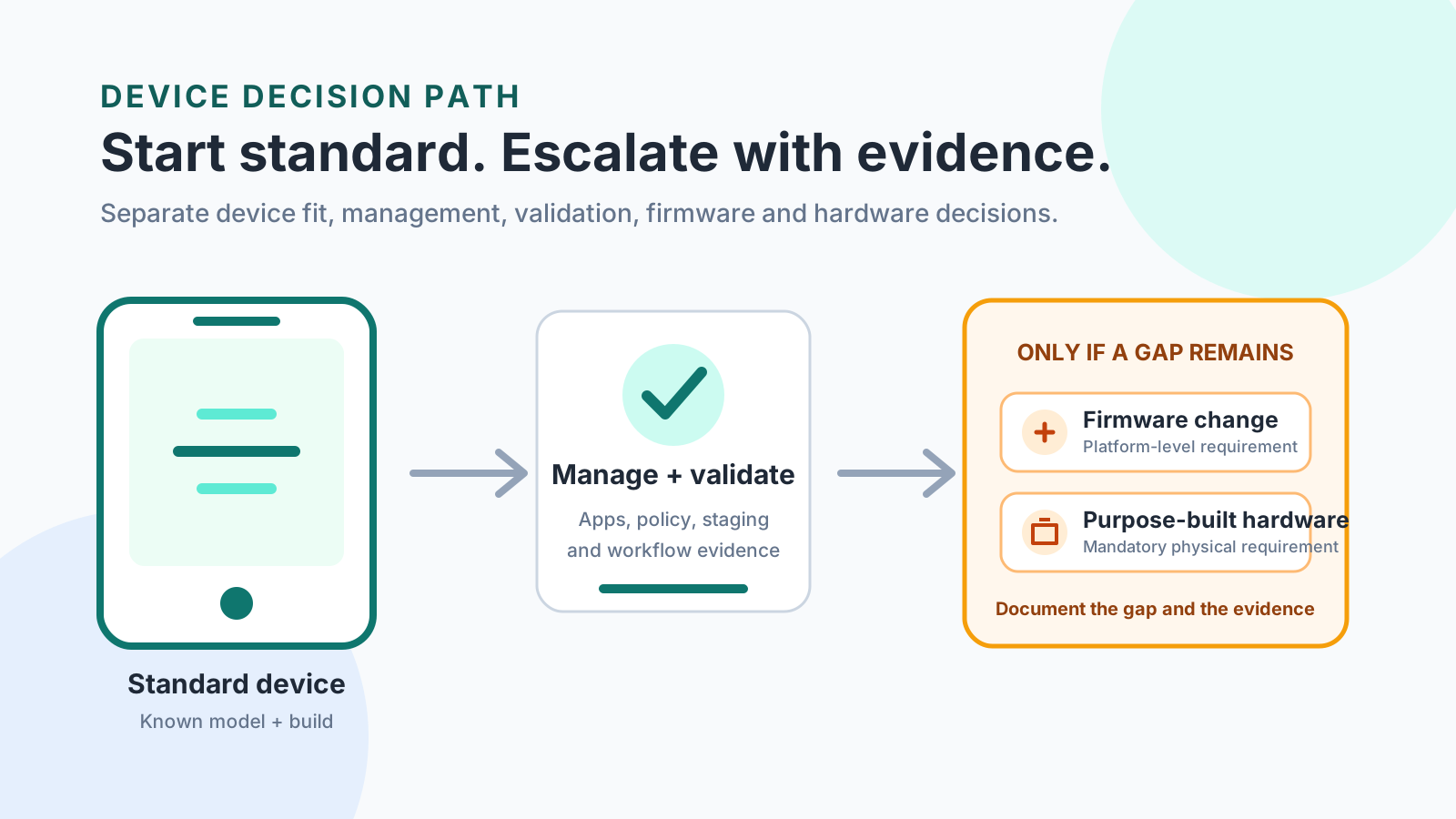
You waste the next security update on rework when the workflow already passes on a commercial build. Use that commercial Android device, and keep a firmware or hardware change for a gap the model, build, app, and policy checks still show.
Use a standard commercial Android device when that exact model, build, app, and policy already pass the written workflow. Custom here means a change you can name: staging and policy on that same device, a firmware delta under the app layer, or a physical unit built because the required port or sensor is missing from acceptable commercial models. The Android Management API introduction, fetched 18 October 2026, lists four solution sets: a work profile on a personally-owned device, a work profile on a company-owned device, a fully managed device, and a dedicated device. Those sets are for enterprise mobility management providers. Android Device Policy enforces the policy, and the page calls it the only device policy controller compatible with this API. Price, lead time, and a hardware redesign are absent from that page. Pick the least complex path that still has evidence for the exact device.
Scroll horizontally to view all table columns.
| Item | Printed on the Android Management API introduction | Why it matters |
|---|---|---|
| Audience | Enterprise mobility management providers (EMMs), as part of Android Enterprise[1] | The page describes an API for EMM builders, plus the console those builders give their customers. |
| Solution sets | Work profile on a personally-owned device; work profile on a company-owned device; fully managed device; dedicated device[1] | Dedicated device is a named management set on this page. |
| Policy enforcer | Android Device Policy, the only device policy controller compatible with this API[1] | A pass result names that controller and the policy it applied. |
| Named user cap | An existing user specified in the enrollment token can be associated with up to 10 devices. If the token omits the user, a new user is created automatically.[1] | The cap is a binding limit on that token, with the condition attached. |
| Device record | Read-only details include the associated user, the policy, and the management mode[1] | Approval records the mode that came back after enrollment. |
| Custom system image | The introduction’s procedure is token, policy, and Android Device Policy. | |
| Price, lead time, minimum order | None of these figures are printed. | |
| CDD result, CTS result, GMS status | None of these results are printed. |
What standard and custom mean in Android procurement
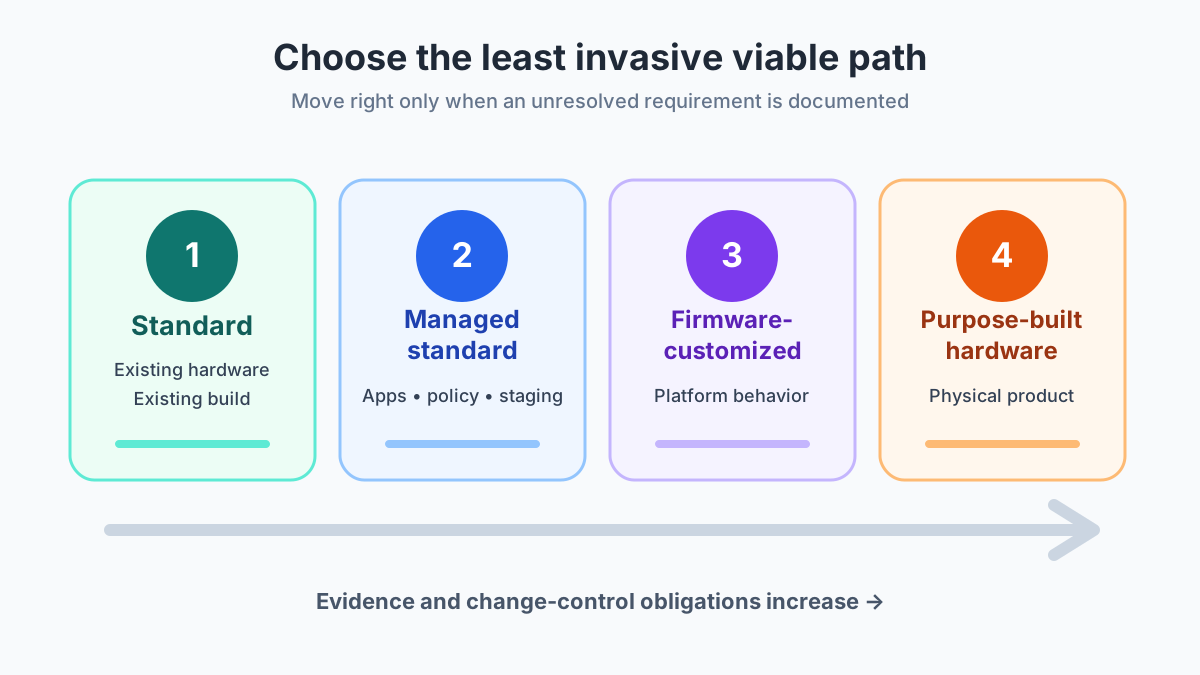
A standard device is a commercial phone, tablet, or handheld used with the maker’s build. A managed standard device is that same unit after enrollment, apps, and policy. A firmware-customized device changes something under the app and policy layer: the system image, a privileged component, the boot path, or a system app. Purpose-built hardware is a different physical product, because the required port, sensor, enclosure, or integrated reader is missing from acceptable commercial models.
Google’s labels sit beside those four records. The introduction says you can use the Android Management API to support the work profile on a personally-owned device, the work profile on a company-owned device, the fully managed device, and the dedicated device solution sets.[1] The program is intended for EMMs. In the console an EMM supplies, customers generate enrollment tokens and create policies. As part of provisioning, the device installs Android Device Policy, and that app enforces policy settings linked to the device.[1]
The device resource stores the associated user, the policy, and the management mode.[1] Dedicated device and fully managed device are solution-set names on that page. The introduction does not print the mode string for each set, so the approval record keeps the set name and the mode value that came back as two fields. A system-image change, or a new enclosure, is a further line on that record.
Use four requirement axes, not a supplier label
Score the project on four axes before a supplier sentence such as “fully customizable” picks the path. Each axis has its own evidence.
Scroll horizontally to read the labels in this diagram.
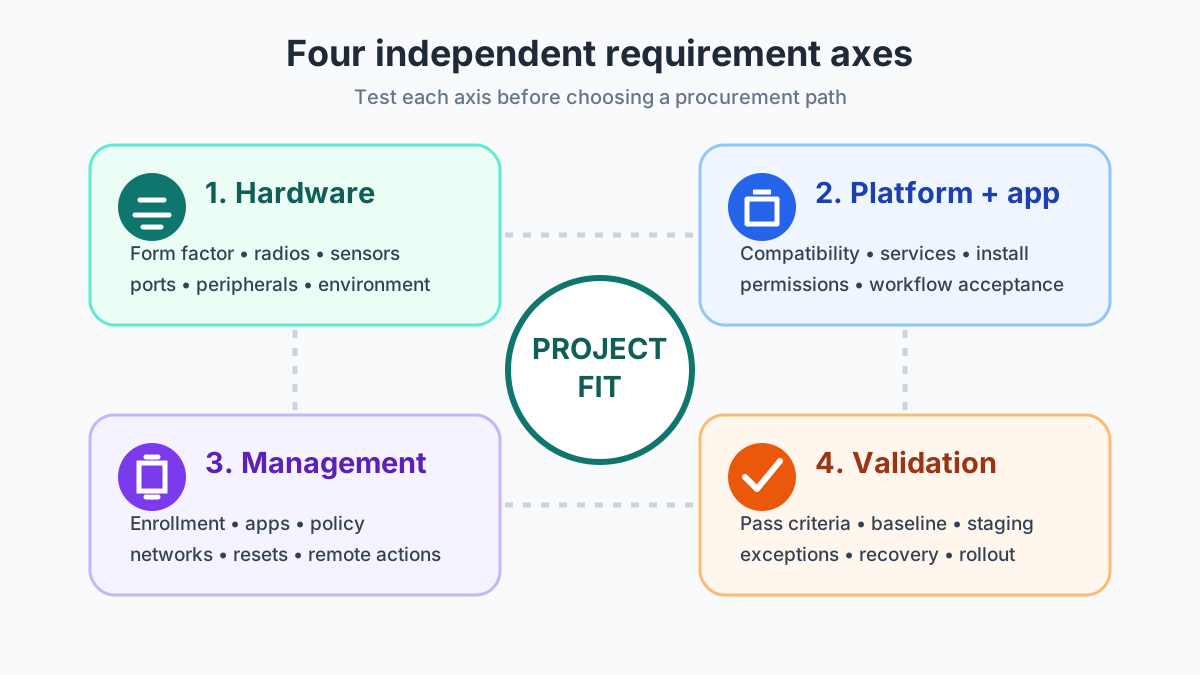
- Hardware is the physical unit, the radios, the sensors, the ports, and the place it has to keep working.
- Platform and app is the build, the services the app calls, and the workflow result.
- Management is the solution set, the enrollment token, and each policy setting.
- Validation is the reproducible baseline: model, build, app version, policy, and the person who owns the next update.
1. Hardware
Write the form factor, display, storage, battery, charging, cameras, audio, radios, ports, docks, and the environment. A line on a family brochure is a clue. The pass is the exact model with the peripheral attached, in the place the device will sit.
Memory is part of that model line. Read the physical RAM figure the maker prints for that storage variant, using the same habit as how to read physical RAM on an Android phone. Leave a “virtual RAM” total out of the requirement.
2. Platform and application
Keep the build identifier, the services the app calls, the install path, and the workflow result in separate rows. A regional name on the carton is its own row. Why a Global Version or China Version label is a separate check covers carrier acceptance, Play Protect certification, and warranty, which this management page does not.
Compatibility-suite results and a services-license status are blank in the table above because the fetched introduction does not print them. If the project needs either result, attach the page that prints it. Until that page is in the file, the platform row stays limited to the build you actually installed and the workflow you actually ran.
3. Management and configuration
The introduction follows a policy-driven model. A policy is a group of device and app settings. An enrollment token binds the device to an enterprise, and it can carry a policy name so that policy applies when provisioning finishes.[1] The device resource then stores the user, the policy, and the management mode.
Android Device Policy is the only device policy controller the page marks as compatible with this API.[1] An EMM product that uses a different controller is outside this source. The controller name, the solution set, and a reset test then have to come from that product’s own document. The Android Device Policy sentence stays attached to this API.
When the token specifies an existing user, that user can be associated with up to 10 devices. When the token leaves the user out, the page says a new user is created automatically.[1]
4. Validation and rollout
Approve one reproducible state: hardware identifier, build, app version, policy version, test conditions, exceptions, and the owner of the next update. A device family name is a catalog label. The baseline is the unit that passed.
What the four procurement paths change
The four paths change who owns the next update and how many times the critical workflows must be run again. They are options with different evidence, ordered from the smallest change that can still pass.
Scroll horizontally to read the labels in this diagram.
Open the procurement-path diagram
Scroll horizontally to view all table columns.
| Path | What changes | Dominant failure mode | Prevention |
|---|---|---|---|
| Standard | Commercial model, maker’s build | The workflow was signed off on a different model or build | Lock the sample to one model identifier and one build, with the pass condition written down |
| Managed standard | Same hardware, plus enrollment and policy | The policy looks assigned, then a factory reset comes up with a different management mode | Provision from a reset with the enrollment token and read the management mode back |
| Firmware-customized | System image or privileged component | The maker’s next security update ships without the delta, or the delta blocks that update | Name the image, the owner, and a rollback build before approval |
| Purpose-built hardware | Enclosure, port, sensor, or integrated reader | The bench unit passes and the workflow fails once the peripheral is part of the assembly | Run the acceptance matrix on the integrated unit |
Extra acceptance runs = critical workflows × changed layers × later update events.
Worked example, with inputs stated as assumptions: 4 critical workflows, 1 changed layer (one firmware delta), and 2 later update events that must be repeated. Extra acceptance runs = 4 × 1 × 2 = 8. The same 4 workflows with 0 changed layers give Extra acceptance runs = 4 × 0 × 2 = 0. Substitute the project’s own counts. The result is a count of extra acceptance runs under those assumptions.
Scroll horizontally to view all table columns.
| Hidden cost | What to count | Project-specific variable |
|---|---|---|
| Retest load | Extra acceptance runs from the formula above | Dollar cost |
| Update owner | Who produces the image after the maker ships a security update | A year count for a named phone |
| Enrollment identity | Token, policy name, and the management mode read back after a reset | A promise that every EMM uses this API |
| Spare unit | Same model identifier and same build as the approved sample | An order quantity |
| Sourcing file | Supplier legal name and the exact phone, kept apart from this baseline | A price |
Count the published window for a commercial model in how Android update support is counted before you accept an image with no named owner. That count belongs to the model the maker still patches. It does not transfer to a private image.
What does not justify customization by itself?
Several requests sound like a new device and still belong on a preparation line or a policy line. Split the request until one line names an unresolved gap.
Branding and packaging
A logo, a printed insert, a label, or a project carton is a preparation line. A boot graphic that replaces part of the system image is a firmware line. Put them in separate rows so each one can be tested on its own.
App installation or kiosk use
Preloading an app is an install-path row: version, distribution method, and the result after enrollment. A single-task lock is a policy result you read back after provisioning, including the management mode on the device record. The introduction names a dedicated device solution set and does not describe a check-in app, so the pass condition stays the workflow you wrote.
Business criticality or fleet size
A critical workflow gets a tighter acceptance matrix, a named owner, and a rollback build. A larger fleet gets more units that must match that same baseline. The path still follows the gap that remained after the commercial build and the policy were tested.
AOSP or GMS preference
AOSP and GMS do not appear on the introduction fetched for this page, so their definitions stay blank here. A preference for either label needs a separate document that prints the build and the services the app calls. That preference still has to pass the four axes. It does not select firmware or a new enclosure on its own.
Copy this gap record before a firmware or hardware change is approved.
Scroll horizontally to view all table columns.
| Gap field | Your record |
|---|---|
| Required behavior and pass condition | |
| Model, build, app version, and policy version tested | |
| Observed failure and the file that shows it | |
| Layer that failed, and the lighter option already tried | |
| Proposed change, owner, and risks still open |
Match common scenarios to the least complex viable path
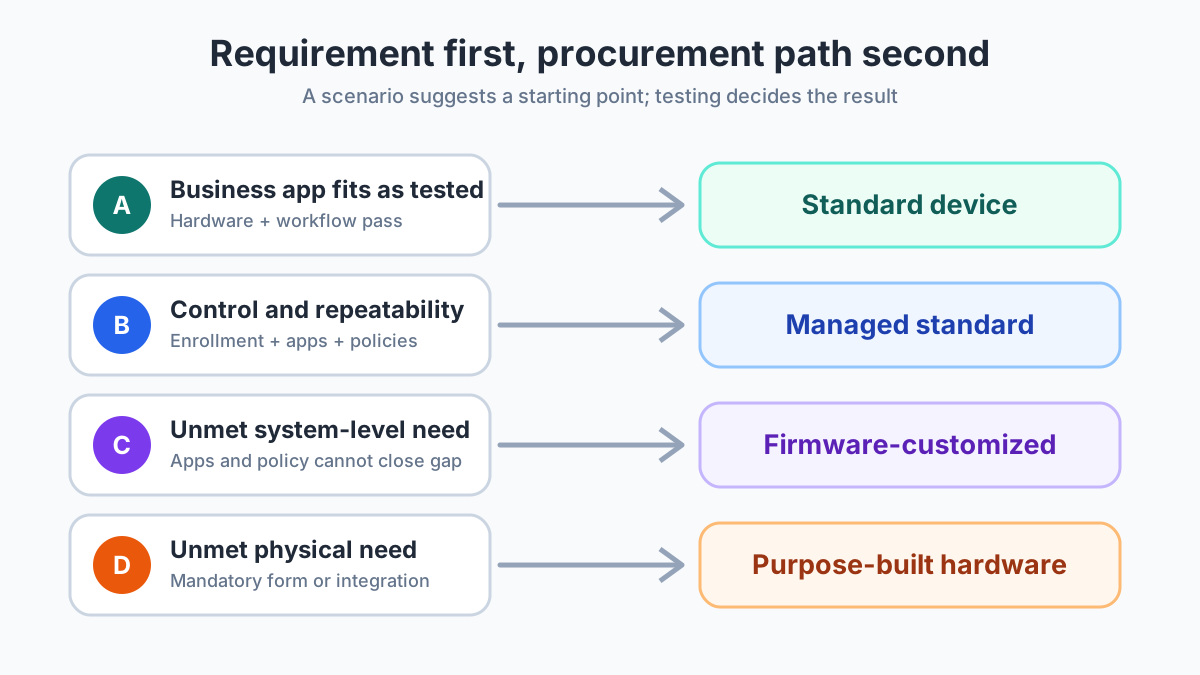
Start from the requirement. The path is the smallest change that still has a pass result on the exact device.
Scroll horizontally to read the labels in this diagram.
Business app on company-owned devices
A field app that needs the camera, location, and a restricted network starts on commercial hardware. If that hardware passes and the organization also needs enrollment, managed apps, and certificates, the next record is managed standard: solution set, token, and policy. Firmware stays closed while those checks pass.
Single-purpose check-in or kiosk
Treat the check-in as a workflow with a written pass condition. Enroll a commercial unit, apply the policy, reset it, and read the management mode back. The introduction lists dedicated device as a solution set an EMM can support through this API.[1] It does not print the check-in screens. If the mode comes back as expected and the check-in still fails, write the failing layer. The image change waits on that line.
Media or peripheral-heavy SaaS workflow
Camera, audio, Bluetooth, USB, and scanner behavior are acceptance tests on the exact model, build, and peripheral. A pass on that combination removes the technical reason to edit firmware because the operation runs on that camera, that call, or that scan. A fail names the layer: app permission, policy, cable, or a missing physical interface.
System-level or physical requirement
A privileged component or a persistent system behavior that policy and the app cannot provide is a firmware candidate, with the change list, the image name, and a rollback build. An integrated reader, connector, enclosure, or sensor layout that is missing from acceptable commercial models is a purpose-built candidate. Test a supported app, a policy, an external peripheral, a dock, or an enclosure first. The extra acceptance runs in the worked example are the retests you add by skipping that step.
Request evidence, not broad capability claims
Tie every approval to the proposed model, build, policy, and workflow. “Supports Android Enterprise,” “works with our app,” and “fully customizable” do not name those four.
Scroll horizontally to read the labels in this diagram.
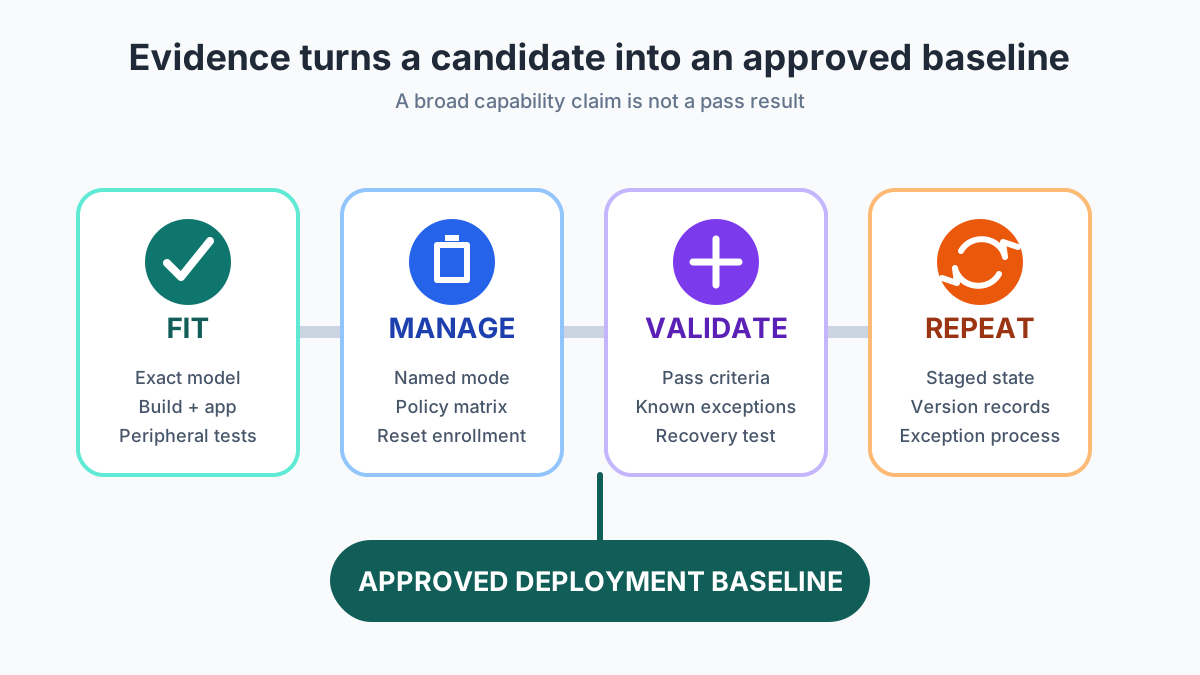
Open the evidence-gate diagram
Scroll horizontally to view all table columns.
| Requirement | Evidence to request |
|---|---|
| Hardware | Exact product identifier and revision, interfaces, peripherals, and the sample that was tested |
| Platform | Android version, build identifier, and update state on that sample. Compatibility-suite and services-license cells stay blank unless a fetched page prints them |
| Application | App version, install and update method, permissions, and the result for each critical workflow |
| Management | Solution set, EMM name, enrollment method, policy-by-policy result, and a test that starts from factory reset. On this API, read back user, policy, and management mode[1] |
| Firmware change | Written change list, affected components, image name, impact on the next maker update, and the owner of rollback |
| Validation | Acceptance matrix, environment, exceptions, approved sample, and the staged-state record |
Scroll horizontally to view all table columns.
| Acceptance field | Your record |
|---|---|
| Device identifier and hardware revision | |
| Android version, build, app version, policy version | |
| Environment, peripherals, management mode | |
| Required behavior and the observable pass condition | |
| Result, evidence file, and test date | |
| Owner, exception, and approval |
When the purchase is still ordinary inventory, keep the phone-identity checks in how to check a wholesale phone shipment from China in a separate file from this technical baseline.
Follow a sequence that limits unnecessary customization
- Write the operational outcome, the users, and the place the device works.
- Split mandatory hardware from preferences, including the physical RAM figure for that model.
- Record the build identifier and every service the app calls. Leave CDD, CTS, and GMS blank until a page that prints them is attached.
- Write an acceptance line for each critical workflow, peripheral, network, permission, and recovery step.
- Name the solution set, the EMM, and each required policy. For a deployment on this API, the enforcer in the introduction is Android Device Policy.[1]
- Test the commercial hardware on that build.
- Enroll, apply the policy, reset, and read the management mode back. If one named user would go past 10 devices, split the user records first.[1]
- Label every remaining failure as hardware, platform, app, management, or rollout.
- Open a firmware or purpose-built path only where that label shows the lighter path cannot pass, and attach an owner plus a rollback build.
- Approve one baseline that lists the hardware, the build, the apps, the policies, and the test results.
The practical rule
The strongest path is the simplest one that passes on the exact device. Keep hardware, the build and the app, management, and rollout as separate records. Fully managed and dedicated are solution sets the Android Management API introduction names for EMM providers, enforced by Android Device Policy.[1] Add a firmware delta or a purpose-built enclosure when the gap record and the test file say the commercial build plus policy still fail. The same habit runs through the other Android for Business guides.
Method and source review
This is a procurement comparison. No device test record is attached to this page.
Library search on 18 October 2026 did not return the Android Management API introduction. Host-limited queries on developer.android.com, support.google.com, and source.android.com returned no documents. A general query for custom Android firmware returned trade and developer news, which this page does not use as evidence. The cached SERP lookup for “custom android” returned no rows, and no new SERP was bought.
One live fetch, a single attempt, saved the Android Management API introduction. The response was HTTP 200 with no redirect. The body used above is that HTML. The response Last-Modified header is 31 October 2024, and the fetch time is 18 October 2026. Claims about solution sets, Android Device Policy, enrollment tokens, the 10-device user association, and the device record’s management mode come from that text.
Cells for price, lead time, minimum order, CDD, CTS, and GMS are empty because that page does not print them. The worked example uses assumed counts so the retest formula is visible. Those counts are inputs for the arithmetic. No model list was added.
Frequently Asked Questions
Is a dedicated Android device a custom Android device?
Dedicated device is one of four solution sets named on the Android Management API introduction, beside fully managed devices and two work-profile sets. The printed mechanism is an enrollment token, a policy, and Android Device Policy. A firmware delta or a new enclosure is a separate record.
Does fully managed or dedicated enrollment require a custom system image?
The Android Management API introduction, fetched 18 October 2026, describes enrollment and policy enforcement through Android Device Policy. It does not list a project-specific system image in that procedure.
How many devices can one named user have on this API?
When the enrollment token specifies an existing user, the introduction says that user can be associated with up to 10 devices. If the token omits the user, the page says a new user is created automatically.
Does a large order require firmware customization?
Quantity changes how many units must match the approved baseline. The path still follows the unresolved gap on hardware, the build, the policy, or the physical interface.
Sources & methodology1 source
Evidence used for this article. Links open the original source in a new tab.
- Android Management API introduction — Google for Developers
TasteOfAndroid is responsible for this page. The byline, method and commercial relationships are on the editorial policy and the author page.